AI Sales Assistant Guide: What It Is and How to Pick One
AI adoption in sales is already mainstream, but that doesn't mean teams trust what their assistants do. Salesforce found that 81% of sales teams were experimenting with AI or had fully implemented it, while a 2025 academic review reported that only 35% of respondents trusted AI data accuracy (Salesforce's State of Sales findings, Gartner's review of sales AI). That gap matters: an assistant that sends more messages but can't show its evidence, permissions, and approval history isn't saving a team from work. It's giving the team more work to verify.
The right way to evaluate an AI sales assistant is as a governed operating system for sales work, not a tool that promises hours back. Teams should ask what it can prepare, what it can execute, what it must pause for, and how every campaign gets graded against business outcomes.
Table of Contents
- What an AI Sales Assistant Actually Does
- How an AI Sales Assistant Works Under the Hood
- Productivity, Personalization, Qualification, and Forecast
- Integration Patterns with CRM and the Rest of the Stack
- Running a 30 Day Pilot Without Buying the Wrong Layer
- Governance, Approvals, and the Audit Trail Buyers Underweight
- Your Next Three Moves to Put This Into Practice
What an AI Sales Assistant Actually Does
Vendors often lead with the promise of automated emails. That's a small part of the job. A useful AI sales assistant connects the repeatable work between identifying a prospect and recording what happened in the CRM, while leaving relationship decisions under human control.
Sales representatives spend about 60% of their time on non selling work, including manual data entry, prospect research, and switching between tools, leaving roughly 40% for direct selling activity, according to Salesforce's State of Sales takeaways for small businesses. The operational opportunity isn't to automate every interaction. It's to remove repetitive preparation and administration so sellers can spend more attention on qualified conversations.
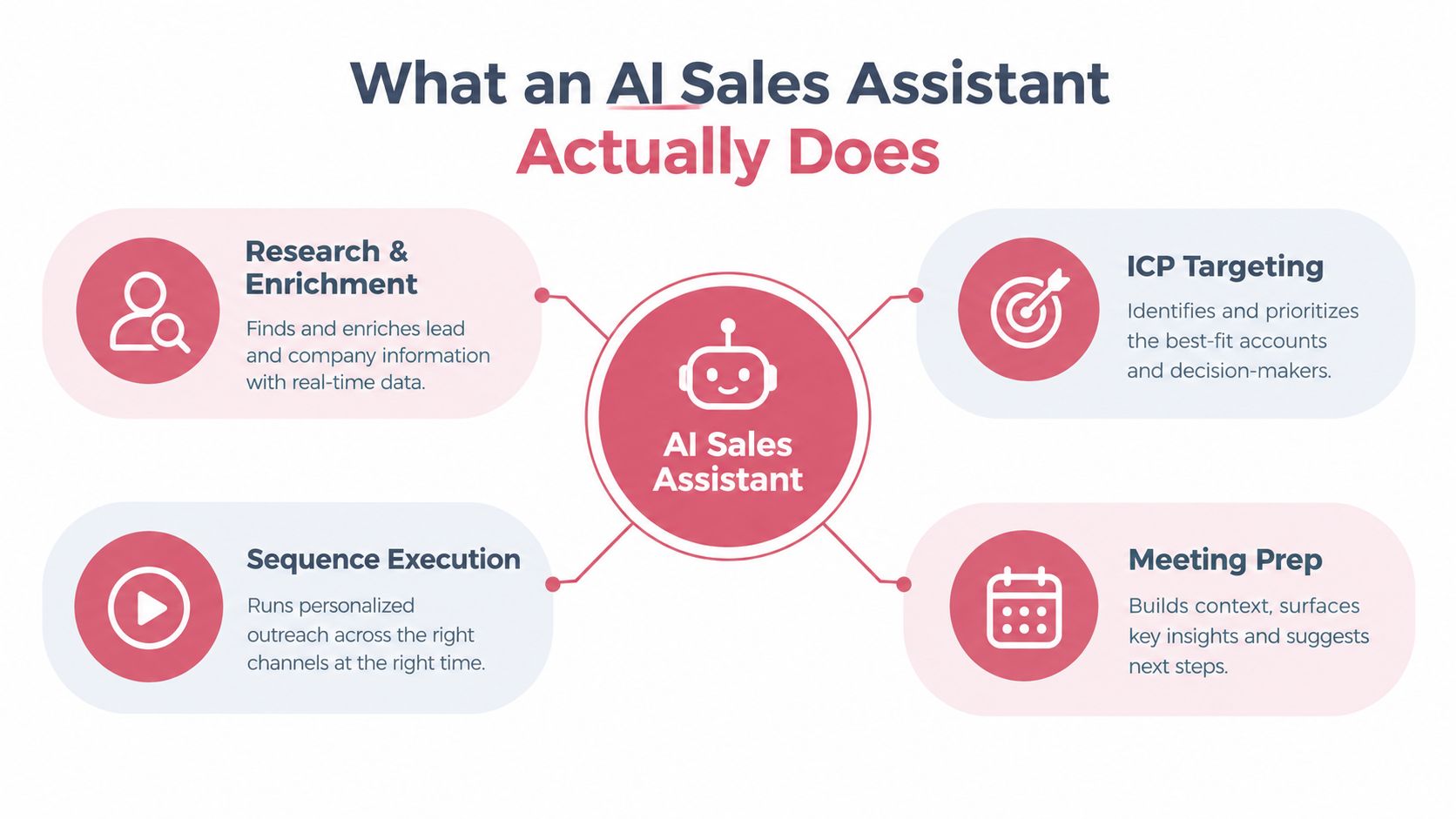
Four jobs that make up the system
Research and enrichment gathers company and contact information, fills known gaps, and gives a rep a grounded account summary. The assistant should show where important details came from, not present unverified guesses as facts.
ICP targeting and qualification compares accounts or contacts with the team's ideal customer profile. A score is useful only if sellers can see which criteria drove it and whether that score predicts the outcome the team cares about.
Sequence assembly and execution turns an approved audience and campaign goal into messages and steps across channels. Drafting can be automated; decisions about who receives a message, when it goes out, and whether a rep must approve it belong in the operating policy.
Reply handling and CRM writeback classifies responses, routes the right ones to a person, and records activity in the system of record. If sellers have to copy every result back into the CRM, the assistant has moved the busywork rather than removed it.
An AI sales assistant should prepare repeatable sales work, act within defined permissions, and leave a record a human can verify.
Teams comparing ways to automate appointment setting can use an AI appointment setter service as a reference point for how prospecting and meeting workflows are packaged. The key question is whether that service fits the team's approval rules and CRM process, not how much it automates in a demo.
How an AI Sales Assistant Works Under the Hood
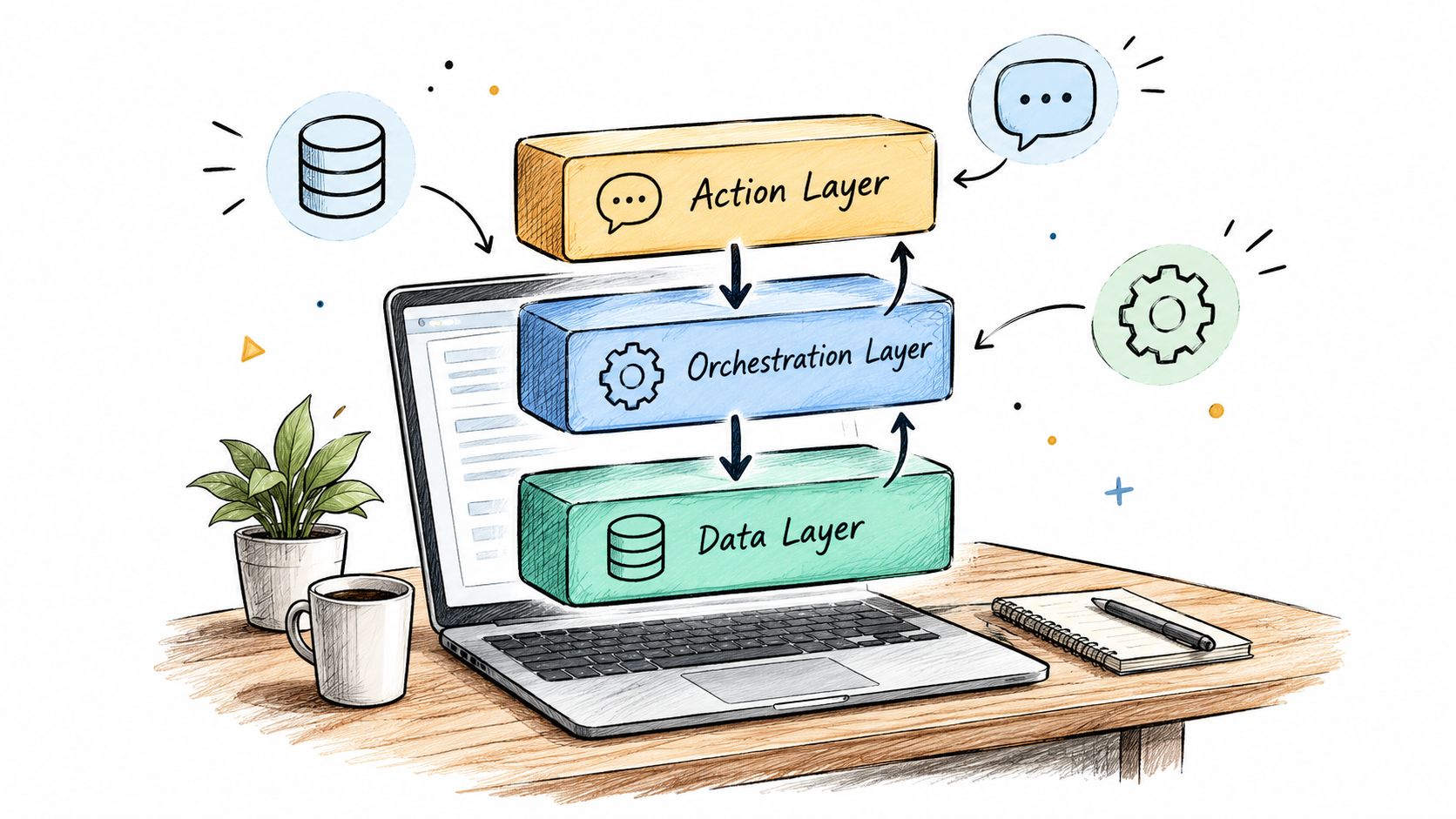
A sales assistant is only as dependable as the path from its source data to its final action. A polished chat interface can hide a brittle setup. Operators should inspect the system's data, orchestration, reasoning, and action layers before trusting it with a live campaign.
Start with the data, then follow the decision
The data layer holds the inputs: CRM records, firmographic and contact details, engagement history, and any intent signals the team has permission to use. The first demo question should be simple: can the assistant show the source and freshness of the details behind a recommendation? If the answer is unclear, reps will have to verify every output by hand.
The orchestration layer selects and connects tasks to meet a stated goal. Think of a senior sales operator receiving a clean brief: identify the right accounts, check the available evidence, prepare a play, and send uncertain decisions for review. The operator doesn't run the same checklist for every situation. A properly orchestrated assistant should likewise choose relevant steps based on the goal, available data, and policies.
The reasoning layer interprets context and drafts recommendations or messages. It should use approved playbooks and known account information, rather than filling gaps with plausible sounding claims. Teams can learn more about this design pattern in Yalc's guide to AI orchestration.
The action layer sends approved messages, updates records, or routes decisions to a human. Those actions should be traceable to the selected play and the data used to produce them.
The demo test that exposes a wrapper
Ask the vendor to change the goal or remove a data source, then show how the system changes its plan. If it can only replay a fixed prompt chain, it's a model call with automation around it, not an assistant that orchestrates work. Also ask whether the team can inspect each step, replace a provider, and retrieve campaign data without rebuilding the motion.
Productivity, Personalization, Qualification, and Forecast
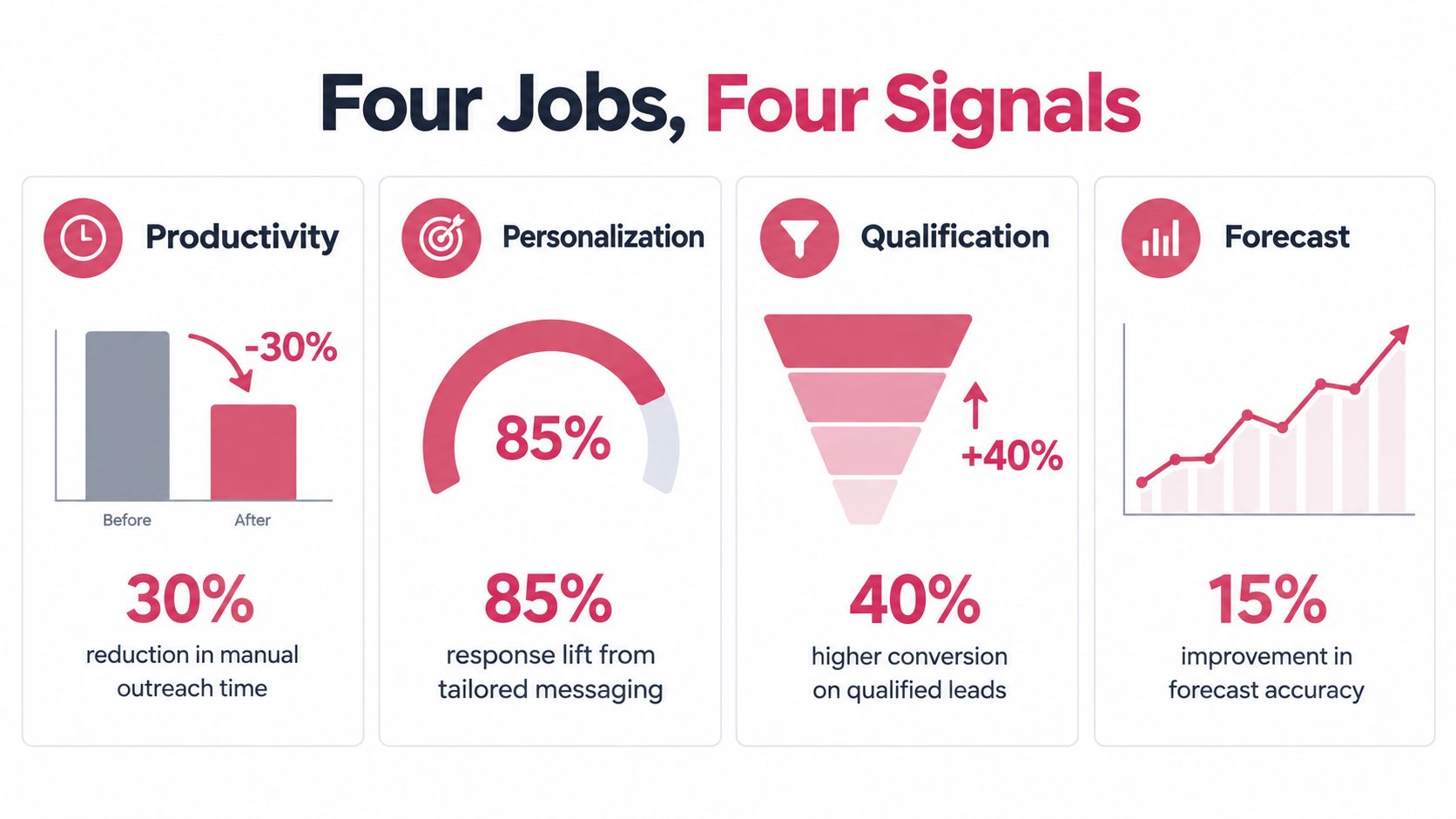
An assistant can make a team faster without making its pipeline better. The distinction comes down to whether it improves the quality of the work, not whether it produces more activity. Productivity, personalization, qualification, and forecasting therefore need separate tests.
Productivity depends on who does the work
A 2023 field study of 5,179 customer support agents found that a generative AI assistant increased issues resolved per hour by 14% on average. Novice and lower skilled agents improved by about 34%, while top performers saw little to no gain, according to the NBER working paper. Customer support isn't B2B sales, but both involve finding information, following workflows, and responding to people.
The practical lesson is to measure outcomes by rep experience and baseline performance. Track whether newer sellers prepare stronger outreach or qualify conversations more consistently, rather than judging the tool on a teamwide activity total. Operator test: does the assistant improve qualified conversations per hour for the reps who need the most support?
Personalization means relevant evidence, not a name token
A message isn't personalized because it includes a prospect's company name. Good personalization connects a specific, verified account detail to a reason for reaching out, then gives the rep a chance to correct the draft. A team exploring how interaction signals connect to sales outcomes may find this overview of revenue intelligence AI insights useful.
Operator test: can the rep trace each account specific claim in a draft to a source, and remove it easily when the evidence is weak?
Qualification is a hypothesis that needs a verdict
An ICP score shouldn't be a mysterious number that routes leads without explanation. Define the criteria, record the evidence, and compare the score with outcomes such as qualified conversations and pipeline progression. Teams refining this process can use Yalc's guide to lead qualification.
Operator test: can the team identify which qualification criteria led to a positive result, then revise the play when the result contradicts the score?
Forecasting needs a reality check
AI won't rescue a forecast built on inconsistent records or unreliable stage updates. Teams should treat forecast recommendations as decision support, then compare them with the team's actual outcomes and the quality of its underlying data.
Operator test: do forecast recommendations become more dependable when the underlying records are complete and current, or do they restate the CRM's existing assumptions?
Integration Patterns with CRM and the Rest of the Stack
Keep the CRM as the system of record. An assistant that creates another account database for sellers to maintain has failed the integration test, however polished its interface looks. Every action needs a destination, an owner, and a recoverable history.
Treat Salesforce's study findings as context for adoption, rather than proof that a particular integration will increase revenue. Evaluate the architecture through its handling of records, permissions, and failed handoffs.
Wire a complete workflow
Start with a concrete path: source a company profile, enrich a contact, score the account, draft a sequence, and write the result to the CRM. Preserve account and contact identifiers throughout. Record each handoff's status so a failed enrichment or sync cannot become an outreach-ready record.
Give each system a defined responsibility:
- CRM: owns account, contact, opportunity, and activity records, including updates created by the assistant.
- Enrichment and intent providers: supply attributable data within approved permissions.
- Sequencer: executes approved outreach and returns execution status.
- Chat surfaces: let reps review results and approve actions above the team's approval thresholds.
- Model layer: handles reasoning and drafting while leaving workflow ownership with the operating system.
Keep approval state attached to the action. A draft approved in chat should reach the sequencer with its approval intact, and the CRM should retain the resulting activity.
A unified GTM API lets the team swap an enrichment provider or model without rebuilding every campaign and connection. Examine how Model Context Protocol for sales can expose tools and actions through a consistent interface. Require the vendor to demonstrate how permissions and execution history survive those connections.
Require portability before committing
Ask what you can export: prompts, playbooks, event logs, campaign results, and records created during execution. Include campaign grades and approval decisions in that review so the team can retain what it learned when changing providers.
Test failure recovery, too. Ask the vendor to show what happens when a CRM write fails or an enrichment request returns incomplete data. Repeated execution should avoid duplicate records and duplicate sends. Reject vague answers about “automatic syncing.”
For a separate view of the early-stage sales automation market, consult Gritt.io's list of sales automation investors. Funding activity belongs in market research; demonstrated integration behavior belongs in the buying decision.
Running a 30 Day Pilot Without Buying the Wrong Layer
A pilot should test one revenue motion, not showcase every feature in a vendor's demo. Pick a motion with a visible baseline, define a control workflow, and judge each play by a result the revenue team values. More activity isn't proof of better performance.
G2's April 2025 survey of more than 1,000 B2B software buyers found that 60% were using AI in sales processes, while more than 30% were not yet using it, often citing fear or doubt about its capabilities (the HubSpot sales strategy report). A pilot should address that doubt with transparent evidence and an operating process, not a bigger promise.
Set up the test before the first run
Choose one motion. For example, test account research and outbound preparation for a defined segment. Don't combine inbound qualification, outbound prospecting, and meeting follow up into one measurement.
Establish the baseline. Record the current workflow's positive reply rate, meetings per 1,000 prospects, cost per qualified opportunity, and human review time per action. Where possible, compare the assistant workflow with a control group using the existing process.
Define the plays and owners. Stand up a small set of distinct plays, each with a target audience, message logic, approval rules, and a success threshold. Assign an operational owner who can manage data access and training, not just a revenue leader who sponsors the pilot.
| Play | Primary metric | Guardrail metric | Review cadence |
|---|---|---|---|
| Account research and enrichment | Enrichment coverage | Unsupported or inaccurate fields | At each run |
| ICP scoring | Qualified conversation rate | Disqualified accounts routed as qualified | At each scoring batch |
| Outbound sequence | Positive reply rate | Unsubscribe and complaint signals | After each campaign run |
| Reply handling and CRM sync | Correct routing and record completion | Human correction time | During the pilot review |
Decide in advance what happens next
Sales operations professionals using AI cited insufficient resources or headcount and inadequate employee training as implementation constraints, with each issue reported by 33% of respondents in Salesforce's study. Include an owner for system upkeep and rep enablement before the pilot starts, rather than treating both as afterthoughts.
At the end of the test, give each play a clear verdict. Go when it meets the predefined outcome and stays within guardrails. Kill it when it misses its threshold or generates too much correction work. Scale only after the team can explain which audience, message, and process produced the result.
Governance, Approvals, and the Audit Trail Buyers Underweight
The most important question is whether the team can verify what the assistant did and reconstruct the decision after something goes wrong. Treat governance as the operating system for automation: it defines what the assistant may do, when a person must approve, and what evidence remains afterward.
As noted earlier, trust in AI data accuracy is a concern for sales teams. Reps who doubt an assistant's output either ignore it or check its work themselves. Set controls and keep a usable audit trail, or adoption becomes a matter of personal judgment rather than a governed process.
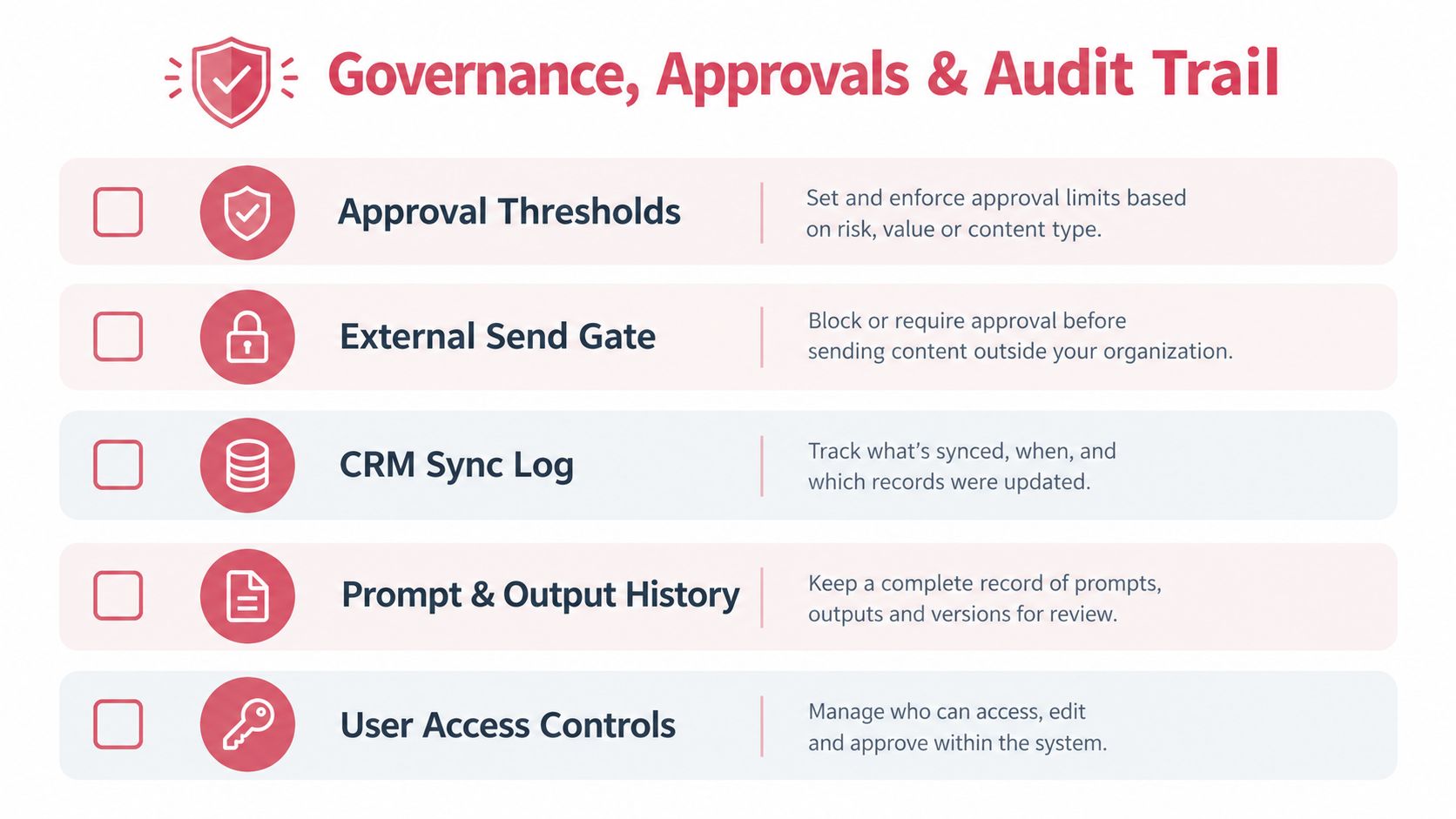
Set controls around the impact of an action
Automated research, enrichment, scoring, drafting, and reporting are sensible starting points. External messages, qualification-status changes, personal-data exports, and broad CRM edits can affect customers or business records. Set approval thresholds based on that impact, not on how impressive a vendor demo looks.
Require human approval for every external message at first. Remove that gate only after the assistant performs reliably on a measured sample and the team has written clear conditions for automatic sending. Limit permissions to the work assigned, and make significant changes reversible where possible.
Log the decision, not only the result
An audit trail should capture the input, selected play, data accessed, generated output, approval decision, and final result. Research summaries need identifiable sources. The record should also show who approved a message or CRM change, so an operator can investigate a bad outcome rather than trust a generic success status.
Operating rule: If the team can't see the evidence, permission, and approval behind an action, the action isn't ready to run unattended.
Your Next Three Moves to Put This Into Practice
A GTM leader can start with three concrete moves this week.
Pick the motion with the weakest baseline. Choose a workflow where repetitive work is visible and the outcome can be measured.
Instrument the test. Select two leading indicators, such as source coverage and review time, and two lagging measures, such as qualified pipeline and meeting conversion. Compare the assistant workflow with the existing process.
Write the approval policy before launch. Define which actions can run automatically, which need human review, and what must appear in the audit log. That policy is more useful than another feature comparison because it tells the team how to use the system safely.
The buying question isn't whether the tool can generate a message. It's whether the team can measure, govern, and improve the entire motion.
An AI sales assistant is a system to govern, not just a tool to buy.
Yalc connects GTM data and tools through a unified API, supports custom plays through its MCP and ready made playbooks through Slack and its interface, and records campaign outcomes with approvals and audit trails. Visit Yalc to see how that approach can fit a sales workflow the team can measure and control.