Clay Data Enrichment: How It Works and What to Know
The popular advice on clay data enrichment is to add more providers until the contact record is complete. That's an incomplete operating rule. A larger waterfall can increase coverage, but it won't tell a team whether a match is correct, whether a field is still current, or whether the added contact is worth putting into a campaign.
The useful question isn't how many fields a workflow can fill. It's whether the data stays reliable enough to drive the next GTM action, and whether that action produces a better outcome. That changes how teams evaluate Clay style workflows, point tools, and broader systems.
Table of Contents
- What Clay Data Enrichment Actually Is
- Entity Resolution and the Precision Recall Trade-off
- How a Clay Style Enrichment Workflow Is Built
- Common GTM Use Cases and Where Enrichment Fits
- Accuracy, Coverage, and the Real Cost of a Match
- Privacy, Compliance, and Field Level Freshness
- Where Clay Fits Against Point Tools and GTM Operating Systems
- The Operator Checklist Before You Press Send
What Clay Data Enrichment Actually Is
Clay data enrichment is best understood as orchestration across data providers, not as one master database. A workflow can take a lead or account, query different sources for contact, company, or signal data, apply logic to the returned values, and pass selected results to research, scoring, CRM, or outreach steps.
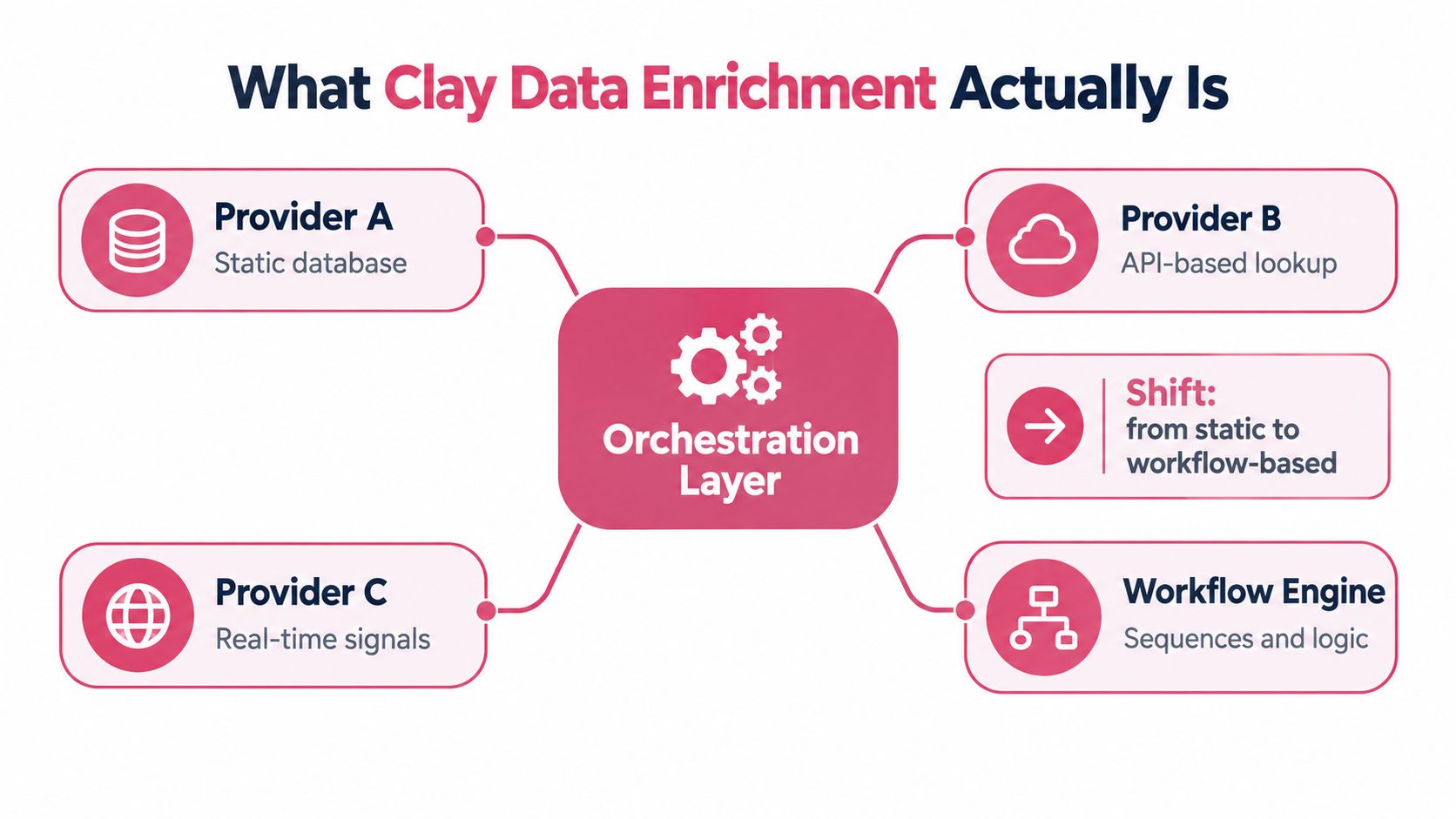
The distinction matters because a provider answers a narrow question, such as whether it can find a work email. The workflow decides which source to try, what to do when it returns nothing, how to handle conflicting values, and whether the record is ready for a downstream action. Clay's value is in giving operators a flexible place to build those steps across multiple providers. It doesn't make every provider equally accurate, nor does a completed field automatically become trustworthy.
From spreadsheet workflow to GTM system
Clay's history illustrates how enrichment moved beyond generic spreadsheet tooling. Founded in 2017, it reportedly had about 20 customers in 2021, with typical monthly contract values between $30 and $200. After its Product Hunt launch in February 2022 and a waitlist in May, the company repositioned around prospecting, enrichment, and personalized outreach. Its revenue reportedly grew tenfold between 2022 and 2023, while its customer base rose from 120 to 1,000 during 2023. By May 2025, more than 8,000 customers were reported to use the platform, including OpenAI, Intercom, and Rippling. The account of Clay's path from spreadsheet tooling to GTM infrastructure makes the operating lesson clear: enrichment becomes strategic when it sits inside repeatable prospecting and activation, rather than remaining a standalone lookup.
Coverage of Clay's Series B described the platform as connecting more than 75 enrichment tools, with providers spanning different kinds of contact and company data. The financing and product overview captures a broader shift: teams increasingly need orchestration across sources, not just one static contact database.
| Layer | What it does | Example |
|---|---|---|
| Data provider | Returns a specific field or signal | Contact detail or company information |
| Enrichment workflow | Selects sources and handles results | Waterfall, normalization, and review |
| GTM execution | Uses qualified records to take action | CRM update, scoring, or campaign handoff |
For teams comparing how an enrichment API fits into that stack, TaxID's explanation of enrichment APIs offers useful context on the provider layer. The buying decision should still start with the workflow the team needs to run.
Entity Resolution and the Precision Recall Trade-off
A record match is a claim that two rows refer to the same real world person or company. That claim may connect CRM data with contact, firmographic, or intent records even when identifiers are missing, inconsistent, or out of date. Entity resolution is therefore a probabilistic matching problem, not a simple exact email or domain join.
Two measures matter. Precision asks what share of proposed matches are correct. Recall asks what share of all true matches the system finds. Push matching aggressively and recall may rise, but the workflow can incorrectly combine different people or businesses. Set the threshold too conservatively and precision may be safer, but valid records stay unmatched.
Turn metrics into merge rules
A sales or RevOps leader doesn't need to accept one opaque confidence score as proof of quality. The team can set a decision policy:
- Auto merge only high confidence matches. Use a reliable deterministic identifier where available, such as a verified company domain or existing CRM identifier.
- Review ambiguous cases. When names, locations, or domains conflict, hold the record for a person to inspect.
- Keep provenance. Store where each field came from and when it was checked, so a reviewer can trace a disputed match.
F1, the harmonic mean of precision and recall, can help compare models. It shouldn't dictate the operating threshold by itself. The costs aren't symmetrical: a false merge can corrupt ownership, account history, and personalization, while a missed match usually means less complete coverage.
Practical rule: Ask vendors how they measure false merges, not only how many records they can match.
Matching quality should also be checked by entity type and segment. A company name, subsidiary, personal name, or international address can produce different error patterns. BatchData's overview of record matching provides helpful background, but a GTM team still needs its own thresholds, review queue, and audit trail. A high match rate without a false match policy is not a quality standard.
How a Clay Style Enrichment Workflow Is Built
A reliable Clay style workflow starts with a clear input and ends with a controlled handoff. It doesn't begin by running every available provider against every row. The operator first defines which records qualify for enrichment, which fields are needed for a specific action, and what evidence is sufficient to use those fields.
Build the sequence around the decision
A practical workflow follows a deliberate order:
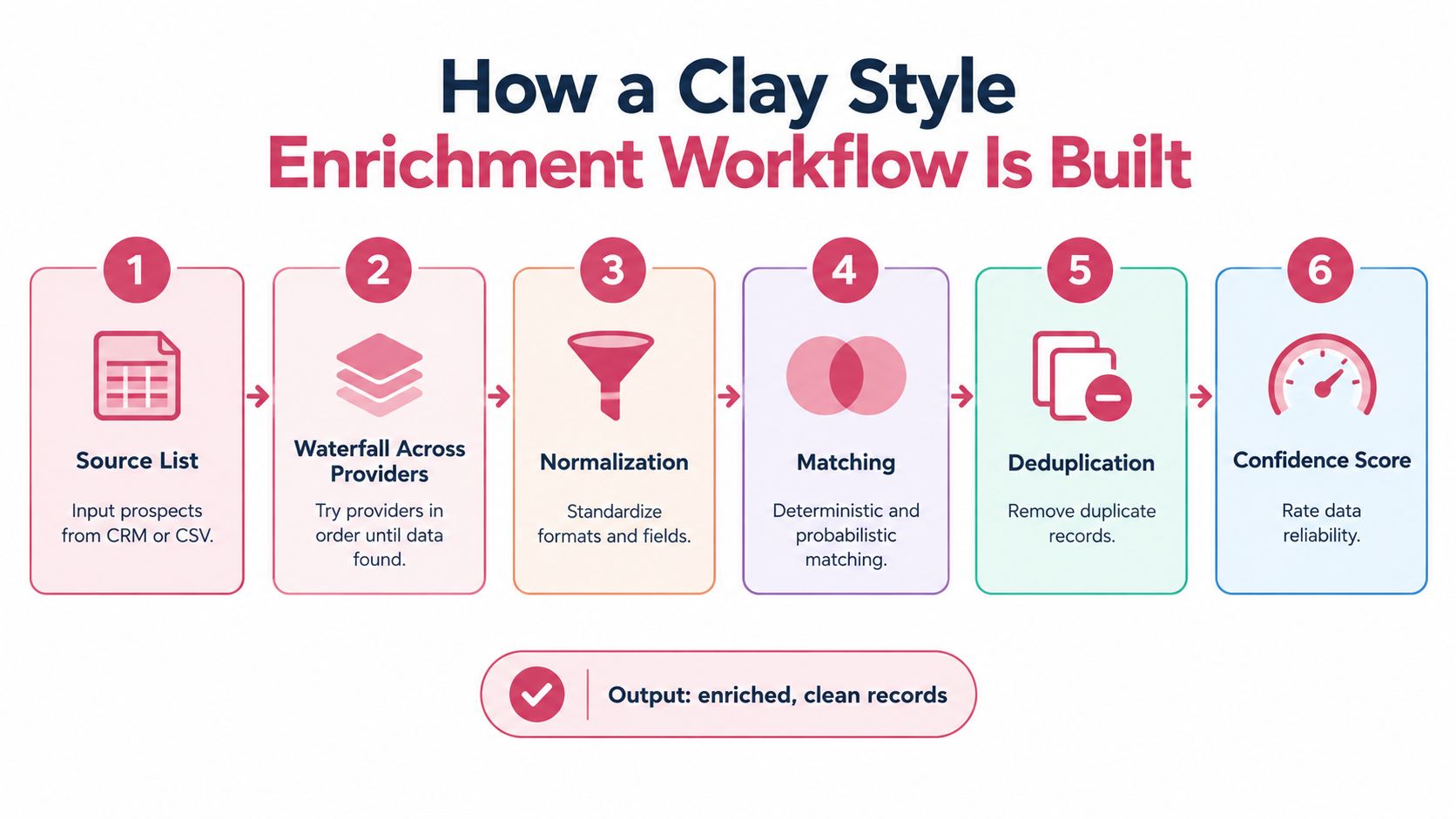
- Source the list. Start with eligible CRM records, inbound leads, or a reviewed prospect list. Keep the original record identifier so results can be written back to the right entity.
- Run a provider waterfall. Try relevant sources in a defined order. Stop when the field meets the quality threshold, instead of paying for redundant lookups.
- Normalize returned values. Standardize names, company domains, locations, and email formats before matching or deduplication.
- Resolve the entity. Use deterministic identifiers first. Apply probabilistic matching only when needed, with uncertain cases routed to review.
- Deduplicate and score confidence. A populated field isn't automatically ready for use. Preserve provider, timestamp, status, and reason codes alongside the value.
- Hand off selectively. Send approved fields to the CRM or sequencer, and block records that fail identity, freshness, or deliverability checks.
These controls make a workflow easier to debug. If an email turns out to be invalid, the team can identify which provider supplied it, when it was checked, and why the automation accepted it. Without that trail, operators have to reconstruct a decision from scattered tables and workflow history.
A waterfall should also have a stopping condition. Trying another source is useful when the expected value of the additional field justifies its cost and risk. More lookups aren't automatically better if the record still lacks a confirmed match or a clear reason to contact the person. Teams designing a provider sequence can compare their approach with Yalc's guide to waterfall enrichment, then define their own source order and approval rules.
Common GTM Use Cases and Where Enrichment Fits
Enrichment works best when it runs inside the GTM play, not as a separate list cleaning project. The same fields can serve different purposes depending on what the team is trying to do: respond to an inbound lead, qualify an account, or prepare an outbound sequence.
Inbound response
When an inbound form arrives, the system can resolve the company and person, check essential fields and consent status, apply fit criteria, and assign ownership before triggering the approved response. Speed matters here. Research summarised from an InsideSales lead response study covering more than 55 million sales activities and 5.7 million inbound leads found that conversion rates were eight times higher when the first attempt happened within five minutes rather than between five minutes and 24 hours. The same analysis reported that only 0.1 percent of inbound leads were engaged within five minutes, while 57.1 percent of first call attempts happened more than a week after arrival. The response time findings and their sales implications support an operational point: enrichment that feeds inbound routing needs to run with the event, not wait for a batch list build.
If enrichment can't finish in time, a team can send a compliant initial response and put the record in a priority queue for completion. That's more useful than delaying every response until every field is filled.
Account research and outbound
For account research, the workflow can gather company context, verify fit against the ICP, and identify missing information before a seller decides whether to pursue the account. The score should reflect the team's actual qualification criteria, not just the amount of data collected.
For outbound, enrichment should feed a decision: whether to contact the person, which channel is permitted, and what evidence supports the message. A high confidence company match with a stale job title shouldn't trigger personalization based on that title. Teams building this motion can use Yalc's overview of lead enrichment as a reference point for connecting enrichment to prospecting rather than treating it as an isolated data task.
Accuracy, Coverage, and the Real Cost of a Match
Coverage and accuracy aren't interchangeable. A provider may return a value for more records, while a smaller set of records may have values the team can safely use. A workflow that maximizes filled fields can still waste campaign capacity if it adds unverified contacts, duplicates, or people who don't meet the ICP.
The decision should be based on cost per qualified record, not raw match rate. A qualified record is one that passes the required identity, field validity, freshness, and fit checks for a defined GTM action. The team can then compare the cost of providers and review time with how many records become usable for that action. No extra lookup earns its place because it raises coverage.
Set enrichment depth by expected value
A high value account may justify more research and multi-source verification than a low fit prospect. A global team may also need different sources or review thresholds by geography, persona, company size, and channel. Email for a tightly targeted sequence needs a different standard from a company attribute used for broad segmentation.
A 2025 benchmark summary reported that no single email provider achieved both 95% quality and 90% coverage, a reminder that teams must choose thresholds rather than assume one source can maximize both. The comparison of data accuracy metrics can help teams think through what to measure, but the practical targets should follow the cost of a bad outcome in their own motion.
| Metric | What it measures | Practical target |
|---|---|---|
| Match precision | Whether proposed people or company matches are correct | Auto merge only above the team's approved confidence threshold |
| Field validity | Whether a returned value passes the relevant checks | Block invalid or high risk values from outbound use |
| Freshness | Whether a value was checked recently enough for its purpose | Set a field specific refresh policy |
| Cost per qualified record | Spend and review effort per record approved for an action | Keep provider depth proportional to expected pipeline value |
A higher match rate can hurt results if it expands outreach without improving relevance. The useful optimization is a better share of records that are correct, current, and worth acting on.
Privacy, Compliance, and Field Level Freshness
A populated CRM field isn't proof that the value is reliable. Personal data can become inaccurate after a job change, and stale employer or title information can misdirect account scoring, territory ownership, and personalization at once.
Under the GDPR, organisations must keep personal data accurate and up to date, and correct or delete inaccurate data without delay when it's no longer fit for its purpose. The regulation doesn't prescribe one universal refresh interval. A defensible process sets a refresh policy based on the volatility and use of each field, and gives people a way to correct information.

Maintain fields, not just records
Employment status, job title, and employer can change faster than a company's legal name. That means a single record level freshness label is too blunt. Teams should store the source and timestamp for each important value, then refresh fields according to their role in routing, scoring, suppression, or messaging.
A practical policy might mark a title as stale sooner than a company identifier. If a new source conflicts with the existing value, the workflow should preserve both values and route the conflict for review rather than overwriting the CRM. The correction path should identify who can resolve the conflict and how the verified value is recorded.
The scale of the problem is visible in published data quality reviews. A 2025 review reported that 91 percent of CRM data was incomplete, 70 percent of records contained some form of duplication, and 25 percent of the average B2B database contained critical errors. The same review reported an average error rate of 29.6 percent across standard fields and duplication rates of 15 to 20 percent in enterprise CRM systems, rising to 32 percent where automated deduplication was absent. The review of CRM data integrity research reinforces why teams should report coverage, validity, freshness, and uniqueness separately. A field that exists but is outdated isn't a successful enrichment.
Where Clay Fits Against Point Tools and GTM Operating Systems
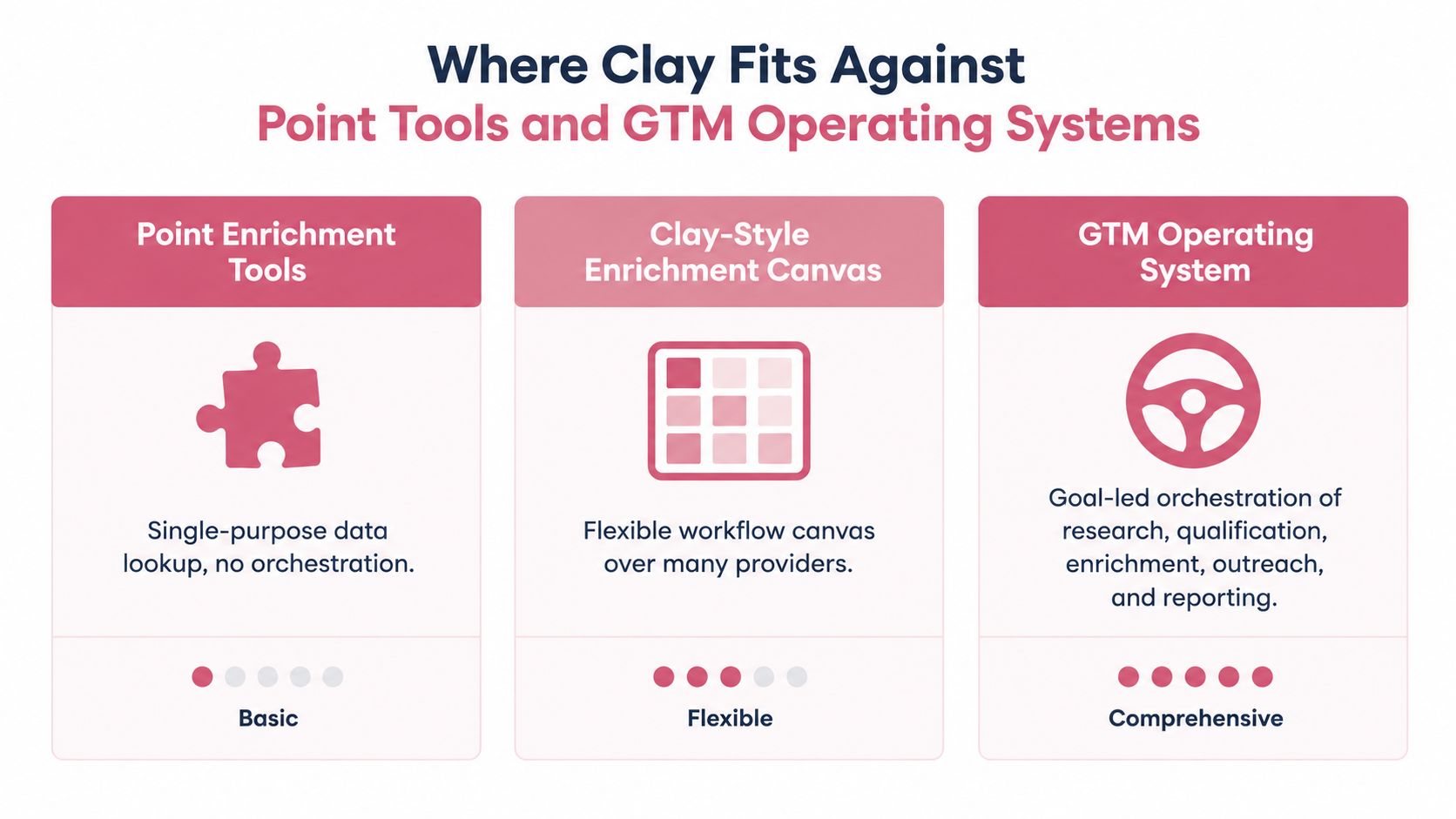
Clay style canvases, point enrichment tools, and GTM operating systems solve different layers of the work. A point tool can be a good fit when the team needs one reliable lookup. A Clay style canvas suits operators who want to choose providers and build custom logic. A goal led operating system is more relevant when the team wants research, qualification, enrichment, outreach, and measurement coordinated as one motion.
Choose the layer the team can operate
| Approach | Best fit | Main trade off |
|---|---|---|
| Point enrichment tool | A team with one narrow data gap and an existing workflow | Simple to adopt, but orchestration and downstream decisions stay elsewhere |
| Clay style canvas | A team with RevOps capacity to build and maintain provider logic | Flexible and configurable, but the team owns workflow design and upkeep |
| Goal led GTM system | A team that wants research, qualification, outreach, and reporting coordinated | Less need to assemble every step, but the system must fit existing data controls and operating habits |
Clay's model is compelling when the team knows the data problem and has the capacity to maintain its workflows. It can connect providers and automate research, but the platform doesn't remove the need to decide what constitutes a qualified record or how sales should act on it. If the team's bottleneck is not data access but choosing and executing the next action, a canvas alone may leave too much interpretation to the SDR.
A goal led system puts more emphasis on selecting and coordinating the play, then measuring the result. Yalc is one option in that category: it connects GTM tools and data sources through a unified API, supports enrichment and CRM updates, and lets teams run preconfigured plays or compose their own. For a broader comparison of tool categories, Yalc's guide to lead enrichment tools offers another way to frame the choice.
The right answer depends on how much of the workflow the team wants to own. A small team may prefer a focused point tool; a technical RevOps group may prefer the control of a flexible canvas; a team trying to coordinate multiple GTM steps may value an operating layer that includes outcome measurement. In every case, the team still needs clear approval rules, source tracking, and a way to retire workflows that don't perform.
The Operator Checklist Before You Press Send
Before an enriched record reaches a prospect, check that the workflow can answer these questions:
- Can the team trace every field? Store provider, timestamp, confidence, status, and reason codes.
- Is the match safe to use? Auto merge only high confidence records and route ambiguous cases for review.
- Will the contact pass pre send controls? Block invalid, disposable, role based, or high risk addresses, and suppress prior hard bounces. A practical governance target is to keep hard bounces below 2%, as described in the email validation case study.
- Is the data current enough? Revalidate volatile fields according to a documented freshness policy.
- Does the workflow learn from outcomes? Track bounce, reply, and meeting rates, then retire sources that underperform.
Clay data enrichment earns its place when it produces trusted records and improves the next GTM action. More populated fields aren't the finish line.
Yalc connects enrichment, research, qualification, outreach, and reporting through a unified GTM API, with workflows teams can run from Slack or its interface or compose through its MCP. Visit Yalc to see how its playbooks can make enrichment part of a measured GTM workflow.