CRM Integration API: A Practical Reference Guide
Most advice about a CRM integration API is wrong in one specific way. It treats integration like a setup task.
That mindset breaks as soon as the first token expires, the first custom field changes, or the first webhook gets dropped without anyone noticing. A connector can go live in a sprint. Keeping it correct for months is a different job entirely.
That difference matters because CRM is already a mainstream business system. Eurostat reported that 25.8% of EU enterprises used CRM systems in 2023 through its e business integration data. Once CRM sits in the middle of sales, marketing, support, and operations, the API layer stops being a convenience. It becomes the control point for revenue data and workflow continuity.
Table of Contents
- Why CRM Integration Is an Operating System Problem
- Integration Patterns and How to Choose One
- Authentication Scopes and Token Lifecycle
- Field Mapping Between Two CRMs
- Webhooks, Idempotency, and Retry
- Rate Limits and Pagination
- Recurring Failure Modes and Fixes
- Wiring CRMs into a Unified GTM API
- Source of Truth and Identity Rules
- Pre Launch Integration Checklist
Why CRM Integration Is an Operating System Problem
Teams usually budget for the first build. They don't budget for everything that starts after the first successful sync.
A CRM integration API lives in moving ground. OAuth scopes change. Admins add custom properties. One CRM returns nested objects, another returns flat records, and a third changes webhook semantics with a version update. The connector that looked done at day 60 looks like platform engineering at day 600.
The connector is the easy part
The part that often gets celebrated is the shortest lived part of the project. Reading contacts, creating leads, and posting activities are straightforward compared with the maintenance tail.
The hard work shows up later:
- Credential ownership means someone has to handle token refresh, revocation, scope drift, and secret rotation
- Schema ownership means someone has to catch renamed fields, changed enums, and new required properties before syncs fail
- Delivery ownership means someone has to inspect webhook gaps, retry dead letters, and duplicate writes
- Governance ownership means someone has to decide which system wins when two tools update the same record differently
Practical rule: If nobody owns integration lifecycle after launch, the CRM integration already has a reliability problem.
Independent coverage of CRM API integration maintenance burden gets this part right. The recurring failure points aren't setup tasks. They're ongoing operating concerns such as token lifecycle, pagination quirks, webhook reliability, field normalization, rate limits, versioning, and deprecations.
What changes when teams treat it like infrastructure
The best teams stop asking, "Can we connect these two tools?" and start asking, "Who runs the data plane for this connection?"
That shifts decisions fast. They assign an owner. They add observability. They version mappings. They test against sandbox data. They choose tools that absorb per CRM differences instead of spreading them across every workflow.
That's the right frame for the rest of the discussion. A CRM integration API isn't just transport. It's the operating system for how revenue data moves, mutates, and stays trustworthy.
Integration Patterns and How to Choose One
There are four patterns that cover almost every CRM integration API decision. Most bad outcomes come from picking the wrong one for the job.
The mistake isn't using the wrong tool in a technical sense. It's choosing a pattern whose maintenance cost doesn't match the business need.
Four patterns that actually matter
| Pattern | Control | Maintenance Cost | Best For |
|---|---|---|---|
| Native API | High | High | Deep integration with one CRM |
| Unified API | Medium to high | Lower across multiple CRMs | One normalized integration layer across many CRMs |
| iPaaS | Medium | Medium to high | Workflow ownership by operations teams |
| Reverse ETL | Low to medium for CRM writes | Medium | Warehouse driven one way updates |
Native API wins when one CRM matters more than the rest. If a team needs Salesforce specific objects, custom workflow behavior, or deep support for vendor specific features, direct integration makes sense. The cost is obvious. Every new CRM multiplies auth, schema, webhook, and retry work.
Unified API is the right fit when the same product has to support many CRMs at roughly the same depth. It normalizes common objects such as accounts, contacts, deals, and activities behind one contract. Breadth improves. Edge case depth usually drops.
iPaaS platforms like Workato or Tray are useful when business users need to own workflow logic. They add orchestration, approvals, and branching. They also add another runtime to monitor, another credential layer to secure, and another place where mappings can drift.
Reverse ETL works when the warehouse is already the system of record and the CRM is mostly an activation surface. It is usually a poor fit for high frequency bidirectional editing.
A simple decision rule
Use this as the fast filter:
- Choose native APIs when one CRM needs deep, vendor specific behavior
- Choose a unified API when many CRMs need the same core operations
- Choose iPaaS when ops teams must edit workflows without engineering help
- Choose reverse ETL when the warehouse drives outbound CRM updates
One more pattern is common in practice. Hybrid stacks.
A team might use reverse ETL for nightly account enrichment, a unified API for product level CRM support, and direct API calls for one Salesforce only edge case. That isn't architectural indecision. It's usually the realistic answer.
For teams that also need to enrich CRM records with web data, the pattern choice matters even more because enrichment adds another write source and another place where field ownership can go wrong.
Authentication Scopes and Token Lifecycle
Authentication fails in boring ways. That's what makes it dangerous.
Most CRM integrations use OAuth 2.0 in production, and CRM APIs commonly expose REST and JSON interfaces even though enterprise systems still surface SOAP, XML, GraphQL, or OData style contracts, as noted in this CRM API integration overview. The practical implication is simple. Teams can't assume one auth contract, one scope model, or one token behavior across every CRM.
OAuth 2.0 needs active management
A typical OAuth flow looks clean on paper. Exchange a code. Store an access token and refresh token. Refresh when needed.
In production, teams need a real policy for failures.
POST /oauth/token
{
  "grant_type": "refresh_token",
  "client_id": "app_client_id",
  "client_secret": "app_client_secret",
  "refresh_token": "stored_refresh_token"
}
{
  "access_token": "new_access_token",
  "refresh_token": "rotated_refresh_token",
  "expires_in": 3600,
  "token_type": "Bearer"
}
The integration layer should encrypt tokens at rest, refresh before expiry, and treat repeated 401 responses as an incident, not a retry loop. If refresh fails because a user revoked consent or an admin changed scopes, retries won't fix it.
A good reference point for teams working with HubSpot specific auth behavior is the Yalc HubSpot MCP surface, which shows the kind of structured tool access that becomes easier when auth is centralized instead of scattered across scripts.
Scoped credentials beat broad access
Least privilege is not optional. A secure integration should use scoped credentials rather than broad access. A concrete example appears in Klipy API scope design, where keys are created with exact resource and action scopes and there is no all access scope.
That is the right pattern. Credentials should be scoped by environment and by workflow. A sync worker doesn't need the same access as an admin repair tool.
Broad credentials hide mistakes. Narrow credentials surface them early.
What 401 handling should look like
When an API call returns 401, the handler should follow a narrow path:
- Check token freshness and attempt one refresh
- Replay the request once with the new token
- Stop on repeated 401s and mark the connection unhealthy
- Create an operator visible event with tenant, CRM, scope, and failing endpoint
What doesn't work is silent auto retry forever. That pattern fills queues, hides root causes, and delays recovery.
Field Mapping Between Two CRMs
Field mapping is where CRM integrations decay. The first version usually works. The fifth admin change is where the cracks show.
Two CRMs rarely agree on object models, identifiers, required fields, or enum values. That's why a good CRM integration API starts with a canonical model and treats each CRM as a projection of that model.
Start with a canonical record
The cleanest approach is to define four core records first: company, person, deal, and activity. Then map each CRM into those shapes.
That gives the integration layer a stable contract even when vendors disagree on naming and structure. It also prevents one CRM's design choices from infecting the rest of the stack.
A practical rule set looks like this:
- System of record fields can only be authored by one designated platform
- Mirrored fields move across systems but still need conflict policy
- Computed fields are generated in the integration layer and never edited directly in a CRM
- Custom objects get their own namespace instead of being stuffed into standard fields
A real mapping example
A common example is lifecycle state between HubSpot and Salesforce. The names look close enough to sync directly. They usually aren't.
| HubSpot Property | Salesforce Field | Normalization | Ownership |
|---|---|---|---|
email |
Lead.Email |
Lowercase and trim whitespace | Mirrored |
firstname |
Lead.FirstName |
Title case if needed | Mirrored |
lastname |
Lead.LastName |
Title case if needed | Mirrored |
phone |
Lead.Phone |
Normalize formatting to one standard | Mirrored |
properties.lifecyclestage |
Lead.Status |
Map vendor enums into one controlled vocabulary | System of record by business rule |
hs_lead_status or subscriberstatus |
custom lead state field | Collapse into one normalized status bucket | Computed |
Teams often need Salesforce specific handling for lead and contact models, custom fields, and object level write rules. The Yalc Salesforce MCP surface is a useful example of why that logic should live in one governed integration layer instead of in every playbook.
Version the mapping or expect breakage
A mapping file is code, even if it lives in YAML or JSON. It needs versions, diffs, review, and rollback.
schema_version: 3
object: person
fields:
  email:
    source: hubspot.email
    target: salesforce.Lead.Email
    ownership: mirrored
  lifecycle_stage:
    source: hubspot.properties.lifecyclestage
    target: salesforce.Lead.Status
    ownership: salesforce
    enum_map:
      subscriber: open
      lead: working
      customer: closed_won
Without versioning, teams can't answer basic production questions. Which mapping was live when this field started failing. Which enum changed. Which deploy introduced duplicate values.
Field mapping isn't clerical work. It's data governance expressed as code.
Webhooks, Idempotency, and Retry
Polling is fine for backfills. It is the wrong default for live CRM sync.
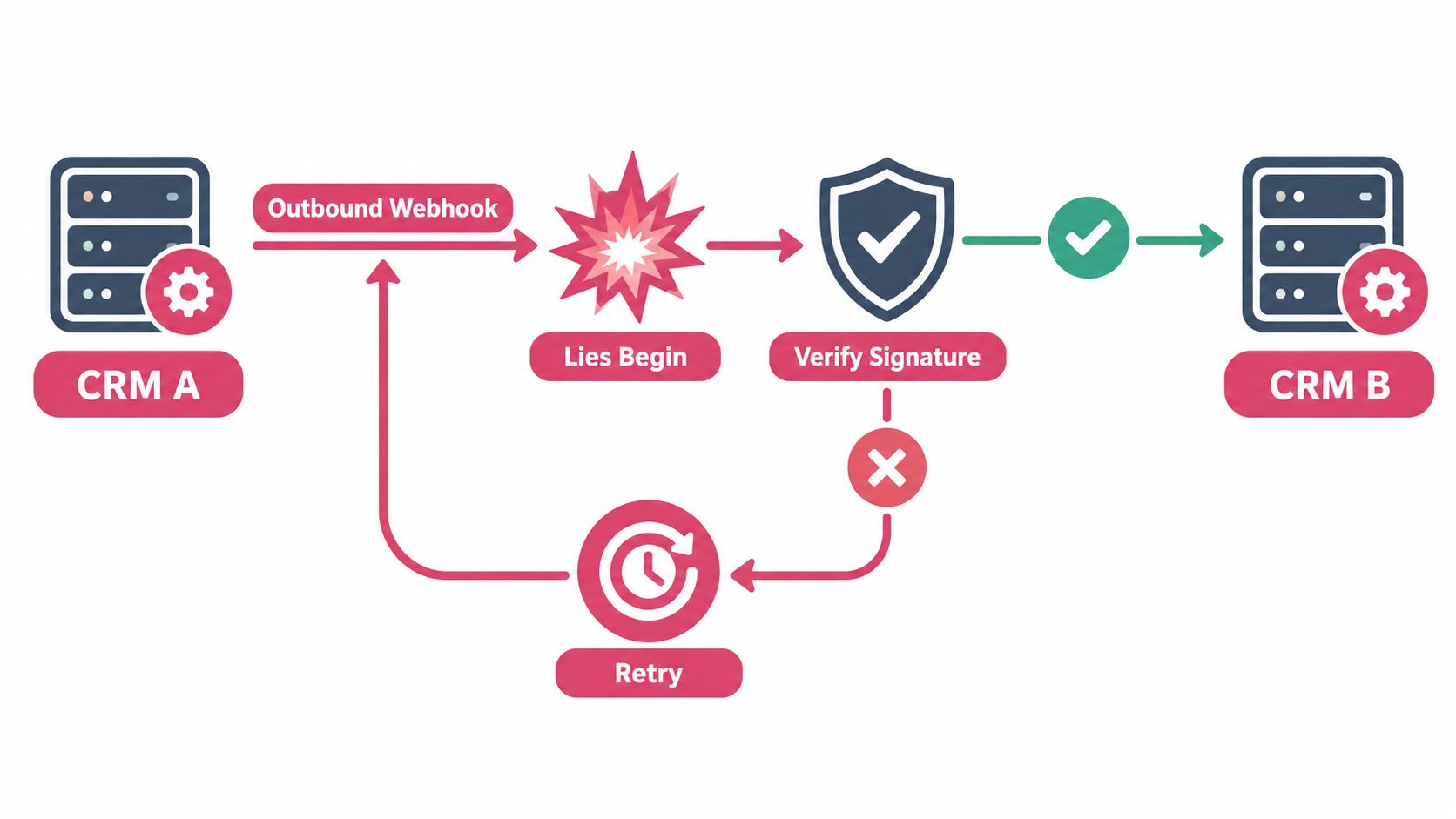
Webhooks are the only practical way to keep changes moving without wasting API quota, but they also create a false sense of certainty. Providers retry differently. Payloads arrive out of order. Duplicate delivery is normal, not exceptional.
Trust the signature, not the event
Every inbound webhook should be treated as untrusted until the signature is verified. The integration layer should validate the HMAC signature using the shared secret, reject stale events, and queue verified payloads immediately.
A safe inbound shape looks like this:
{
  "eventId": "evt_01HXYZ123",
  "type": "contact.updated",
  "occurredAt": "2025-02-11T14:03:21Z",
  "data": {
    "id": "contact_123",
    "changes": {
      "lifecyclestage": "customer"
    }
  }
}
The processing path should be short:
- Verify signature
- Reject replay outside policy
- Insert
eventIdinto a dedupe table with a unique constraint - Return 200 quickly
- Do the actual work asynchronously
The webhook request is a notification, not a work queue.
Idempotency is the real boundary
Reliable webhook consumers should assume duplicate delivery and build idempotent processing around a stable event key. For retries and outbound event handling, senders should use exponential backoff with jitter, cap retries, and stop within a bounded window such as about 24 hours or around 10 attempts, based on this webhook retry and idempotency guidance.
That guidance lines up with what works. If the handler isn't idempotent, retries create duplicates. If the sender retries too aggressively, incident recovery gets worse.
A lot of teams also miss the operational side of sync patterns and conflict resolution. Real systems need replay, not just delivery. Keeping raw events for a retention window makes incident repair possible when a downstream consumer falls behind or a bug corrupts a transform.
Schema versioning belongs in the payload
Webhook contracts change. Put a version in the event envelope and route handlers by version, not by hopeful parsing logic.
That one habit prevents a lot of brittle code:
{
  "version": "2025-01",
  "eventId": "evt_01HXYZ123",
  "type": "contact.updated",
  "data": { "id": "contact_123" }
}
When a payload changes shape, the old consumer can keep working while the new one rolls out. Without that, teams break production to ship parser changes.
Rate Limits and Pagination
Rate limits aren't a detail to patch later. They define the throughput of the whole integration.
This matters more now because CRM integration is no longer unusual. Independent market research summarized in 2026 says 84% of companies integrate CRM with other tools and the average deployment has 7.2 integrations, while common categories include email, marketing automation, calendar and scheduling, accounting or ERP, and support in the CRM statistics summary. More connected systems means more contention, more bursts, and more opportunities to flood an API.
Design for quota, not for hope
Some teams still code as if API capacity is functionally unlimited until a 429 appears. That isn't how CRM platforms work.
Google Cloud's Contact Center CRM rate limits documentation states that limits depend on both the CRM and the licensing level, and enforcement can apply per day and per minute. In practice, that means the integration layer needs tenant aware throttling and quota aware scheduling.
| CRM | Limit Window | Pagination | Recommended Strategy |
|---|---|---|---|
| Salesforce | Varies by org and plan | Prefer cursor style or vendor bulk patterns where available | Batch reads and use bulk or composite writes |
| HubSpot | Sliding or quota based by endpoint and plan | Cursor style preferred | Queue bursts and smooth webhook fan out |
| Pipedrive | Quota or token style behavior | Cursor or vendor specific pagination | Isolate noisy tenants with per tenant throttles |
The point of the table isn't exact platform comparison. It is architectural posture. Every CRM behaves differently, so the client needs to absorb those differences.
Cursor pagination wins
For list endpoints and large growing datasets, cursor or keyset pagination is preferred over offset pagination, as noted in the earlier webhook guidance source. Offset pagination breaks under concurrent writes, gets slower as offsets grow, and creates holes or duplicates during backfills.
Use shapes like this:
{
  "data": [{ "id": "c_101" }, { "id": "c_102" }],
  "next_cursor": "eyJpZCI6ImNfMTAyIn0"
}
Then persist the cursor by tenant and object type. That gives resumable sync without re scanning everything.
Prevent noisy neighbors
One tenant can consume shared quota if the integration layer doesn't isolate traffic. The fix is simple in concept and easy to ignore in practice.
- Use a per tenant token bucket so one account can't starve the rest
- Delay fan out slightly when a webhook storm triggers many follow up reads
- Surface
Retry Afterand remaining quota in metrics so operators can act before throttling cascades
The thundering herd problem usually starts after a legitimate event burst. The answer isn't turning webhooks off. It's making the client scheduler smarter.
Recurring Failure Modes and Fixes
Most CRM integration incidents repeat the same patterns. The details change. The signatures don't.
Treating every outage like a unique mystery wastes time. A better approach is to keep a short catalog of failure modes, the signal that identifies each one, and the first fix to apply.
The failures that show up again and again
| Failure Mode | Detection Signal | Fix |
|---|---|---|
| OAuth expiry or revoked consent | Burst of 401 responses for one tenant after a previously healthy period | Refresh proactively and mark repeated 401s as connection failure |
| Schema drift | Validation errors on fields that previously passed, or sudden missing field logs | Pin schema versions and require mapping diffs before deploy |
| Webhook delivery gap | Expected object changes stop arriving while API reads still show updates | Run webhook liveness checks and replay from retained raw events |
| Duplicate record creation | Same business entity appears multiple times after retries | Use deterministic upserts keyed by stable external IDs |
| Soft deleted record resurrection | Deleted rows reappear after sync job runs | Filter tombstones and respect deleted state from the source |
| Timezone drift | created_at and updated_at comparisons fail around local midnight boundaries |
Normalize timestamps to UTC at ingestion |
How to detect trouble early
Good detection is specific. "Sync is broken" isn't a useful alert.
Use signals tied to the failure class:
- Auth failures should alert on sustained 401 rates per tenant and per CRM
- Mapping failures should alert on sudden increases in field validation errors
- Webhook health should alert when expected event volume drops below baseline for an active tenant
- Duplicate creation should alert on repeated upsert misses for known external IDs
A CRM integration should also expose an audit trail that can be filtered by event type and time. The Merge style CRM audit trail endpoint is a good pattern because it returns audit events with cursor pagination and filter parameters such as end date and event type. That makes production debugging much faster.
When the incident starts with "sales noticed weird data," the first question should be "what changed first," not "who touched it last."
The triage rule that keeps incidents short
When production breaks, triage in this order:
- Authentication
- Schema and mapping
- Webhook intake
- Write idempotency
- Timestamp normalization
That order works because auth and schema failures usually create the widest blast radius first. Duplicate handling and time normalization still matter, but they rarely explain a total stop in sync traffic.
Wiring CRMs into a Unified GTM API
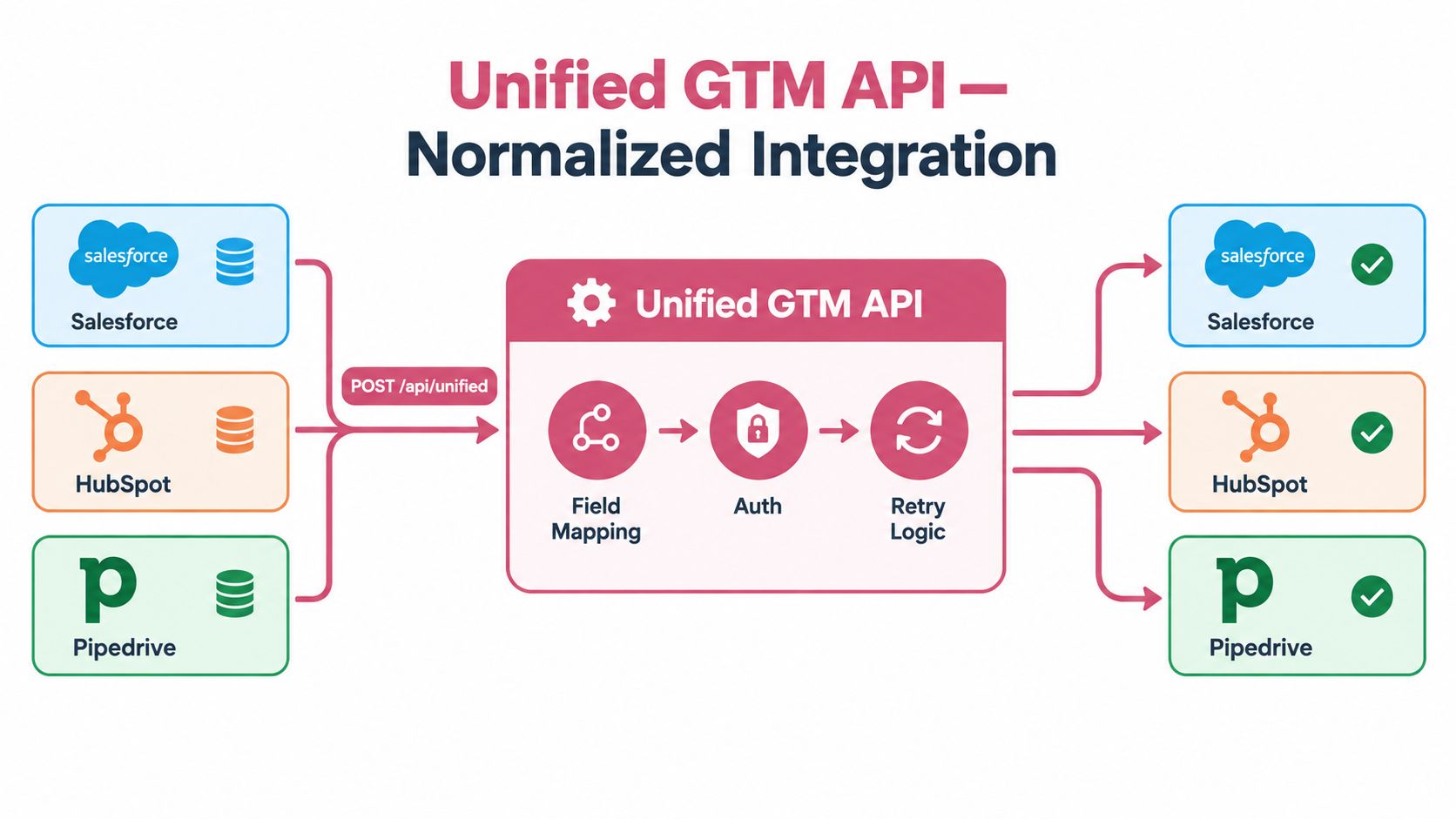
The cleanest way to survive CRM complexity is to centralize it. One normalized integration layer should absorb vendor specific auth, mapping, throttling, and replay behavior so the rest of the GTM stack doesn't have to care.
That is where a unified GTM API earns its keep. Not because it makes a demo simpler, but because it localizes the maintenance burden.
One request, many CRM shapes
A normalized contact create request can look like this:
POST /api/unified/crm/contacts
{
  "external_id": "person_789",
  "email": "alex@acme.com",
  "first_name": "Alex",
  "last_name": "Morgan",
  "company": "Acme",
  "phone": "+1 555 0100"
}
The unified layer then translates that payload into native writes for Salesforce, HubSpot, and Pipedrive. It owns token refresh, field translation, retry policy, and rate limit coordination behind the scenes.
A useful response shape is a per vendor status array:
{
  "status": "accepted",
  "results": [
    { "vendor": "salesforce", "state": "queued" },
    { "vendor": "hubspot", "state": "queued" },
    { "vendor": "pipedrive", "state": "queued" }
  ]
}
What the control point should own
A unified layer is only worth using if it takes full ownership of the ugly parts.
That means it should handle:
- Credentials for each CRM connection, including refresh and revocation paths
- Normalization between the canonical object model and vendor specific fields
- Quota coordination so one downstream CRM doesn't block the rest
- Webhook reconciliation so inbound changes map back to one normalized event stream
- Observability with audit logs, dead letter queues, and replay tools
Yalc fits this pattern in a practical way. Its unified GTM layer sits in front of CRM sync, writeback, and logging workflows, so teams can call one interface and keep provider level logic out of every outbound, scoring, or reporting play. That becomes even more useful when CRM data is combined with enrichment and orchestration logic, as shown in Yalc's unified API and bring your own enrichment model.
Why this model lasts longer
A direct integration multiplies maintenance by vendor count. A unified control point contains it.
That doesn't eliminate vendor specific work. It changes where it lives. Instead of five products each implementing Salesforce refresh logic differently, one layer does it once and exposes a stable contract to the rest of the business.
Source of Truth and Identity Rules
Most CRM integration problems that look technical are governance problems. Two systems changed the same field. Nobody defined who was allowed to win.
A workable model starts with primary ownership by object type. Marketing may own lead records. Sales may own contact and opportunity records. Product or customer success may own account level traits. The key is to encode those rules in the integration layer instead of relying on human memory.
Define ownership before sync policy
A source of truth framework needs three decisions for each object and field:
- Primary owner identifies which system can author the canonical value
- Write precedence defines what happens when a non owner attempts an update
- Compensating action defines whether the update is rejected, transformed, or written back elsewhere
That structure keeps conflict resolution boring, which is exactly what it should be.
Identity needs one durable key
Email isn't enough. People change emails, share inboxes, and exist in multiple object types across systems.
Use a stable external ID as the join key and keep CRM native IDs as secondary references. When duplicates surface, merge against the external ID first, then reconcile supporting identifiers such as email, domain, or association history.
Recent guidance on bidirectional CRM sync tradeoffs and conflict handling points to the issue. Two way sync only works when identity, deduplication, retry behavior, and scoped permissions are designed together. Otherwise, faster sync just creates faster corruption.
The decision rule that keeps systems aligned
When two systems disagree on a field, the owner wins. The losing system receives a compensating update through the integration layer, and the discrepancy should appear in a daily reconciliation report.
That rule sounds strict because it is. Soft ambiguity is what creates long lived data drift.
Pre Launch Integration Checklist
A CRM integration should not go live until these checks pass.
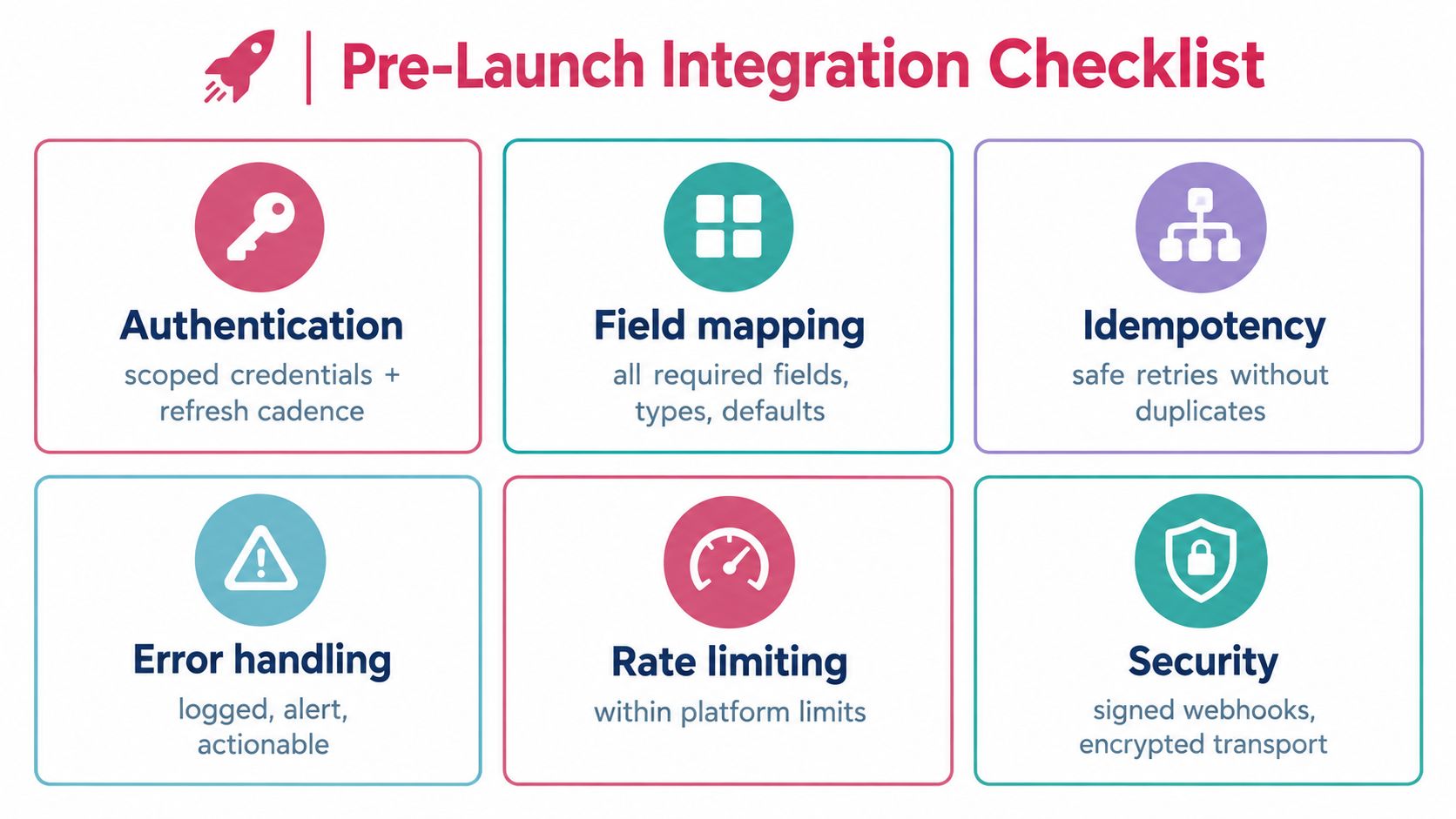
- Authentication has scoped credentials, encrypted storage, and a documented refresh cadence
- Field mapping has source of truth rules, normalization logic, defaults, and a tested schema diff
- Webhook handling verifies signatures, stores idempotency keys, and passes replay tests in staging
- Rate limit control reads quota headers, uses backoff correctly, and proves cursor pagination works at volume
- Observability includes structured logs, audit visibility, and alerts on 401, 429, and schema validation failures
- Secrets hygiene covers rotation policy, per environment separation, and least privilege scope review
If one of those is missing, the integration is still in development, even if records already sync.
Yalc gives GTM teams a unified API layer for CRM sync, writeback, orchestration, and audit so they don't have to keep rebuilding per CRM plumbing inside every workflow. If the goal is to make CRM integrations behave like managed infrastructure instead of fragile scripts, it's worth looking at how Yalc centralizes auth, mapping, retries, and telemetry behind one control point.