CRM Integration Software Compared for 2026
Most revenue teams do not lack a CRM. They lack agreement on which system may change an account, which record wins during a conflict, and how a team can trace an automated write after it lands. CRM integration software should settle those questions before it moves another field.
Table of Contents
- Why CRM Data Still Sits in Silos
- Pick the Right Approach for Your Stack
- Criteria That Decide the Right Fit
- API Limits That Break Sync Jobs
- What a Unified GTM API Changes
- How to Test a Vendor Before You Sign
- Choose the Layer You Will Own
Why CRM Data Still Sits in Silos
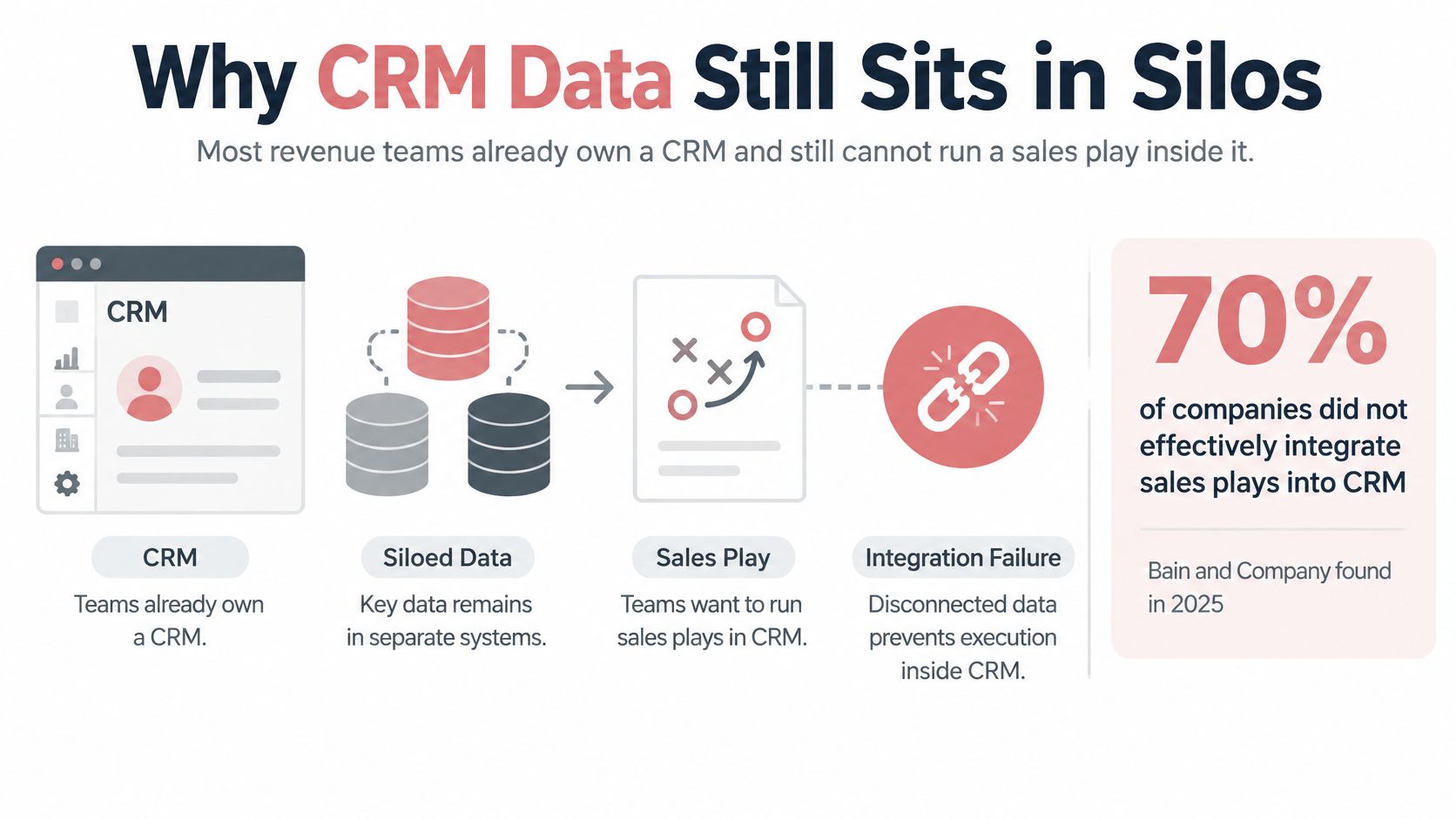
In 2025, 70% of companies surveyed by Bain & Company reported that they did not effectively integrate sales plays into CRM and other revenue technology tools, in a survey of more than 1,200 senior commercial executives across 18 industries worldwide, according to reporting on the Bain & Company survey. That result changes the buying question. A longer connector list will not help a team that cannot run its existing play inside the systems it already owns.
What breaks in daily work
Sellers see duplicate accounts with different owners and different activity histories. Operations teams see an opt out recorded in an outbound tool while another channel keeps sending. Managers see enrichment land in fields nobody owns, then watch forecast reports mix trusted values with values from an unknown source. Each failure looks small. Together they make sellers keep private spreadsheets because the shared record cannot be trusted.
CRM integration software is the layer that moves records, activities, and workflow state between the CRM and the rest of the go to market stack. Teams that need a plain definition of the underlying problem can start with understanding enterprise data silos from Kagool, then translate that definition into account, contact, consent, and activity rules for their own stack.
Judge an integration by who owns the conflicting record and who can explain the last write. Logo count proves almost nothing.
Four approaches claim this job. Teams can use native CRM apps, packaged connectors, a custom API build, or a unified GTM API. Each can move data. Each fails in a different place. A native app can trap a motion inside one marketplace. A packaged connector can hide the field map inside middleware. A custom build can depend on one engineer. A unified API can automate bad decisions faster when approval rules are missing.
The right comparison therefore starts with control. Which system is authoritative for an account? Which fields may an outside tool overwrite? How fast must consent reach every channel? Can a bad write be reversed without a manual cleanup project? Buyers who answer those questions before a demo will read vendor claims differently. Buyers who skip them will buy another connection and inherit the same dispute at greater speed.
Pick the Right Approach for Your Stack
Start with three questions. How many systems must stay in place? Who may write the account? What would a vendor change cost in engineering time, retraining, and lost history? The answers point to one row more reliably than a feature checklist.
| Approach | Best when | Data ownership | Lock in risk | Typical failure |
|---|---|---|---|---|
| Native CRM apps | One CRM and a few official apps | Shared by the CRM vendor and the customer | High if the motion lives in one marketplace | Breaks when a second CRM or sequencer appears |
| Packaged connectors | Standard objects and simple field maps | Split across apps, with the map held by the connector | Medium, because the maps live in the middleware | Silent sync gaps and duplicate accounts |
| Custom API build | A process you will not simplify, plus engineers on staff | Customer owns the code and can own the warehouse | Low if the team owns the code, high if one person does | Rate limits and retries nobody monitors |
| Unified GTM API | Research, enrichment, outbound, and CRM as one motion | Customer keeps keys and records behind one interface | Low if each provider can be swapped | Blind automation without approval gates |
Match the row to the team
- One CRM and a few official marketplace apps: Use native integration and keep the setup boring. Write the field owner down before connecting anything. This path strands the team when a second CRM, a separate sequencer, or an acquired business unit enters the stack.
- Standard objects across common SaaS tools: Use a packaged connector when field maps stay simple. Run a weekly check for duplicates, silent sync gaps, and consent mismatches because the map lives in middleware that sellers never see. Teams comparing packaged endpoints can explore RichAPI integrations from RichAPI as one example of a catalog view, but the catalog still does not answer ownership.
- A process the business refuses to simplify: Build a custom API layer only with engineers who will own batching, backoff, backfills, monitoring, and schema changes. A warehouse can act as the system of record in this model. The build stalls when the only engineer who understands it leaves.
- One motion across research and outbound: Use a unified GTM API when research, enrichment, qualification, sequencing, and CRM updates must run together. Keep provider choice open and require approval before a send. This approach fails when automation writes or sends without a gate.
A concrete pattern helps. The FullEnrich RevOps workflow pushes the ranked warm list into HubSpot or Salesforce, enriches missing fields on existing records automatically, and keeps the CRM clean as the network grows. That belongs in row four only if the ranked list, the enrichment source, and the write rule stay visible. A Salesforce specific implementation can be reviewed through the Salesforce MCP connection page, which is useful for checking how agent actions reach that CRM. Reply Handler works live on the customer inbox, so reply state also needs a clear rule for what returns to the CRM and what stays in mail.
Company size changes the answer. The Eurostat digital economy report states that 28.51% of EU enterprises used CRM software in 2025, an increase of 2.68 percentage points from 2023, while adoption reached 63.14% in information and communication businesses, website usage stood at 79.02%, and ERP software adoption stood at 46.45%. Smaller or less digitally mature teams should stay on native or packaged paths until duplicates or consent conflicts create visible pain. Larger firms usually need the opposite discipline. They already run CRM beside ERP, websites, analytics, and mail systems, so integration must preserve permissions, consistency, and reporting reliability across more systems.
Do not buy row four to look advanced. Buy it when separate tools force operators to stitch one motion together by hand. Do not stay on row one out of habit either. Move up when the CRM is no longer the only place where selling happens.
Criteria That Decide the Right Fit
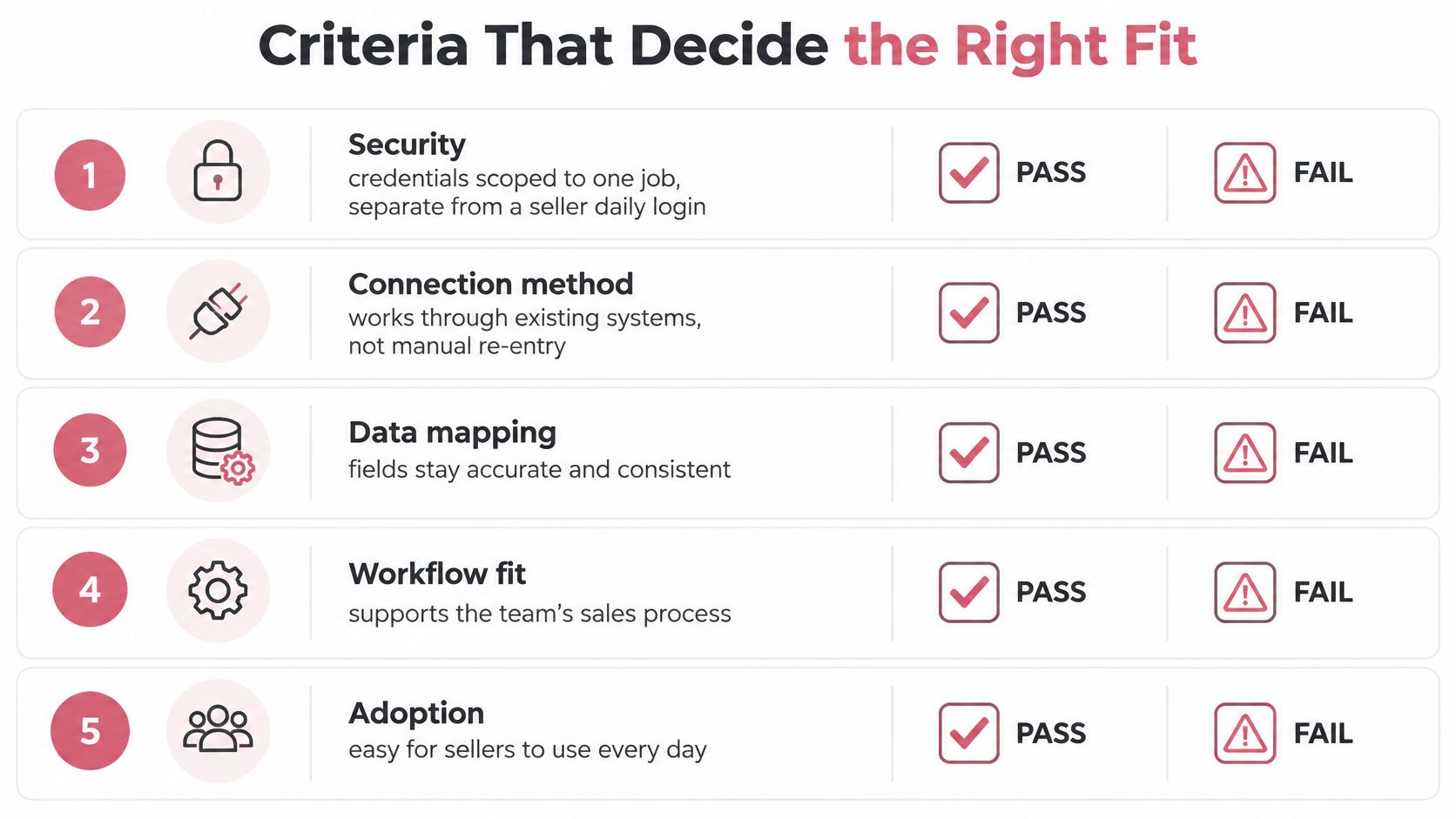
Five tests decide fit. Each test needs evidence a buyer can inspect during evaluation, not a policy statement from a sales deck.
| Criterion | What good looks like | What to reject |
|---|---|---|
| Security | Scoped credentials, separate from a seller daily login, revocable per workflow | One admin token reused by every job |
| Data ownership | A named system of record per object and a conflict rule | Last write wins with no owner |
| Auditability | Actor, source, time, and the reason for every retry or pause | A log that only says success or failure |
| API first design | Batching, a queue for work that is not urgent, and a capacity check before backfills | One request per record and no queue |
| Stack agnostic design | CRM, warehouse, enrichment, and model can change without rewriting plays | Plays coded to one vendor object model |
Security and ownership come first
Security passes when each job uses credentials scoped to that job. A connector that enriches accounts should not receive permission to delete activities or export the full database. Credentials must sit apart from a seller daily login and must be revocable without stopping the CRM for the whole team. It fails when one admin token serves imports, enrichment, outbound, and reporting. That setup turns one leak or one bad script into a company wide incident.
Data ownership passes when the team names one system of record for account, contact, and activity. It also needs a written rule for conflicts. Say enrichment finds a new title while a seller edits the same contact during a call. The rule must state which value wins, which fields require review, and where the losing value goes. It fails when the most recent write wins by default. Speed then beats accuracy, and the loudest integration becomes the owner.
This is the governance issue buyers often postpone. The MIT Technology Review Insights and Databricks report reports a 2025 global survey of 800 CIOs and CTOs in which 51% named governance improvement as a key objective. For CRM buyers, governance is not abstract. It answers who owns a conflicting account, how duplicates get resolved, and what happens when consent changes in one tool.
Auditability and portability decide trust
Auditability passes when every write stores the actor, source record, time, prior value, new value, and reason for a retry or pause. An operator should be able to trace an automated update to its input and reverse it. It fails when logs say only success or failure. A failed record then becomes detective work across three tools.
API first design passes when the integration batches records, queues work that can wait, caches stable data, and checks remaining capacity before a backfill. It fails when every record triggers an immediate request and retries compete with seller traffic. Stack agnostic design passes when the CRM, warehouse, enrichment vendor, or model can change without rewriting the play. It fails when play logic points directly at one vendor object model or one private field layout.
Operating rule: Do not approve a connection until the team has a canonical record, field level ownership, consent propagation, an exception queue, and a rollback path.
Those five operating pieces matter more than connector setup. A canonical record prevents each tool from minting its own version of an account. Field level ownership stops enrichment from overwriting seller verified data without review. Consent propagation stops every channel, not only the channel that received the opt out. An exception queue gives failed writes a visible home. A rollback path lets the team undo a bad job without freezing selling. More connections reduce trust when these decisions remain undefined.
API Limits That Break Sync Jobs
Platform limits belong in the design document. A connector that ignores them will work in a demo and break during the first serious enrichment run or historical backfill.
The Salesforce platform API limits guide documents a daily API allocation for paid editions that starts at 100,000 requests over a rolling 24 hour period and increases according to the number and type of licenses, covering REST, SOAP, Bulk, and Connect APIs, with a concurrent API request limit of 25 for a production or sandbox organization and 5 for a developer edition. One request per record burns that pool quickly.
| Constraint | Documented limit | What the integration should do |
|---|---|---|
| Daily API allocation | Starts at 100,000 requests per rolling 24 hours on paid editions, then rises with licenses | Batch records and queue work that is not urgent |
| Concurrent requests | 25 on production or sandbox, 5 on a developer edition | Cap workers below that ceiling |
| Connect REST over the limit | HTTP 503 Service Unavailable | Exponential backoff with a retry ceiling |
| Shared session quota | Apps on one session ID share the user general quota | Use OAuth where a per app limit applies |
| Limits resource freshness | Accurate within five minutes of consumption | Keep a local counter and do not trust two rapid checks |
Build for failure before scale
The Salesforce Connect REST API limits guide states that many Connect REST API requests return HTTP 503 Service Unavailable when the limit is exceeded, applications using a session ID share the user general quota, and Salesforce advises against using Connect REST API to extract data while recommending REST API or SOAP API for sObject extraction. Treat a 503 as temporary only within a strict retry policy. Use exponential backoff, set a hard ceiling, and move exhausted jobs to an exception queue. Endless retries convert a platform limit into an outage for other tools.
Monitoring cannot rely on one signal. The Salesforce Limits resource documentation states that returned values are accurate within five minutes of resource consumption and that REST responses include an Sforce Limit Info header with API usage and the organization API limit. Keep a local request counter beside the reported allowance. Pause bulk enrichment when remaining capacity falls below a buffer the operations team sets, continue essential updates, and record the reason for every pause in the audit log.
Latency needs the same discipline. The Truto guide to real time CRM sync architecture reports approximately 400 to 800 ms at P50 and 1 to 3 seconds at P95 for request time covering schema transformation, authentication, routing, and the upstream CRM API, while cached or synchronized reads can fall to roughly 10 to 50 ms. Set separate targets. Interactive lookups need a P95 under one second. Background workflows can tolerate roughly three to five seconds when the user is not waiting. Log P95 and P99 latency, cache age, upstream provider, and retry state on every call. Averages hide the tail behavior that makes multi step workflows feel unreliable.
The design lesson also applies when teams are mapping customer data across contact systems from Yellow.ai, because call activity, chat state, and CRM records still compete for the same platform capacity. Reject a vendor that cannot show remaining capacity, retry state, queue depth, and cache age before a large job connects.
What a Unified GTM API Changes
A unified GTM API changes control only when it makes responsibility and lineage visible. One interface by itself does not fix weak ownership. It can even hide weak ownership behind cleaner code.
The Infosys enterprise AI maturity report reports that only 15% of surveyed organizations had achieved broad cross departmental data accessibility for AI, 34% reported limited or no accessibility, only 28% had defined GenAI data governance frameworks, and 10% had none enterprise wide. Do not expect a new API layer to supply the missing framework. The team still needs rules for access, approval, correction, and retention.
Where lock in actually moves
The useful shift is narrower. Calls to CRM, enrichment, outbound, and reporting pass through one contract that the customer can log. A provider can then change without forcing operators to rebuild the motion in every play. Keys stay under customer control. Records stay in systems the customer can export. The dependency moves from scattered vendor interfaces to one visible layer that the team can inspect and replace in parts.
In a Yalc style build, agents run on the CRM, sequencers, and data tools the customer team already pays for, so those tools do not have to be replaced. Every call to its agents runs through one unified API to the customer data and tools. The software is built with the customer team on the customer data and stays in the customer stack. That structure avoids two common traps. The team is not confined to one CRM marketplace, and it is not dependent on a private script only one engineer can operate.
| Measure | What it shows |
|---|---|
| Sync completeness | Share of expected records that arrived |
| Freshness | Age of the newest synced record |
| Duplicate rate | Share of accounts with more than one record |
| Enrichment confidence | Score on each enriched field |
| Human approval rate | Share of writes approved before they send |
| Opt out propagation time | Time for an opt out to reach every channel |
| Error recovery time | Time from a failed sync to a corrected record |
| Sourced field coverage | Share of fields with a traceable source |
Fully automatic is not the goal. Revenue workflows need selective human checkpoints because a wrong send can damage a relationship faster than a slow send. Set approval by risk. A low confidence enrichment update can wait for review. A routine activity log with a clear source can write automatically. An outbound launch to strategic accounts should never rely on confidence alone.
Automation earns trust when a team can see completeness, freshness, duplicates, confidence, approvals, and consent timing on one screen.
If those measures are invisible, do not add another connection. More activity will look like progress while data quality falls. A unified API earns its place when it reduces provider switching cost and makes every automated action easier to audit, pause, and correct.
How to Test a Vendor Before You Sign
Run this test in a sandbox with realistic records before signing. Use test contacts for consent and sending checks. Ask the vendor to perform each step live, then inspect the records and logs without vendor narration.
- Name the record owner: State the system of record for account, contact, and activity. Ask the vendor to show where each field will be read, where it will be written, and which fields the integration may never overwrite.
- Force a conflict: Change the same account in the CRM and in the enrichment tool inside one minute. The written conflict rule must choose the winner, preserve the losing value for review where needed, and log both actors.
- Test consent: Opt out a test contact in one tool and time every channel. Email, LinkedIn, calling, and any sequencer must stop. A delay beyond a few minutes needs a documented reason and a named owner.
- Break the connection: Disable CRM access during a sync. Failed writes must enter an exception queue with the payload, source, error, and retry count. Restoration must not create duplicates.
- Run a pressure job: Backfill a sample batch while watching remaining API capacity, worker count, queue depth, and latency. The connector must pause below the buffer your team sets and write the pause reason into the audit log. A workflow that turns calls into CRM records, such as moving call transcripts into the CRM with Claude Code, should face the same queue and retry inspection because transcript writes can arrive in bursts.
- Check the exit: Export records, field maps, play logic, and logs in a documented format. Replace one provider in the sandbox without rewriting the play. If staff must rebuild the motion, lock in risk is high.
Reject any vendor that cannot pass conflict, consent, failure, and capacity checks live. A polished demo with clean records proves only that the happy path works. Production revenue data will arrive late, conflict often, and fail at inconvenient times.
Ask who receives the alert when a pipe breaks. A dashboard nobody watches is not an operating model. The answer should name a role, an escalation path, and a recovery target the team sets for each workflow. Put those commitments into the contract beside price and term.
Choose the Layer You Will Own
Choose the layer the team can still own in a year. That decision matters more than the first integration because staff, providers, territories, and CRM objects will change around it.
Before a demo, write three answers. Name the system of record for accounts. State the approval rule for automated writes. Identify one provider the team could replace within a short project without rebuilding its plays. Teams reviewing their broader setup can compare those answers against a practical view of the GTM stack, then match them to one row in the approach table.
Then run the vendor test on the shortlist. Pick native apps for one stable CRM. Pick packaged connectors for standard objects and modest maps. Pick a custom build only with durable engineering ownership. Pick a unified GTM API when research, enrichment, outbound, and CRM updates operate as one motion and provider choice must stay open.
If the three answers are unclear, do not add another connection. Fix the owner first. That work feels slower than buying software, but it prevents a year of duplicate cleanup and disputed reports.
For a unified layer built inside its own stack, Yalc follows five steps. Book a mapping call. Get a written audit of how the team sells. Have the agent fleet built for that motion. Approve the first handoffs. Then the system runs and learns. The build includes the audit, the fleet, the data layer the agents run on, two engineers inside the business, and a system the team owns. Price depends on build scope. Compare it with hiring a GTM engineer plus the data contracts already in place, not with one connector seat.
The durable advantage is not the number of connected tools. It is a revenue system where ownership is explicit, writes can be reversed, consent moves everywhere, and a provider change does not force the team to start again.
Yalc builds CRM integration software as a unified GTM API and agent system inside the customer stack, with customer keys, auditable writes, and approval rules for sensitive actions. Teams that want ownership rules tested against their real accounts before scaling automation can visit Yalc to book a mapping call and review the proposed build.