Find Email on LinkedIn: A Compliant Guide for 2026

The most popular advice for finding email on LinkedIn starts with a name, guesses a company address pattern, and treats a successful verification as permission to send. That skips the decisions that matter most: whether the address belongs to the right person, where it came from, and whether the sender has a lawful basis to use it.
For a GTM team, the deliverable isn't an email address. It's a contact record with documented provenance, a clear purpose, and an approval decision that can survive scrutiny after the address enters a CRM.
Table of Contents
- Permitted Ways to Get a Prospect Email From LinkedIn
- How to Find and Verify a Work Email Step by Step
- Handling Work, Role, Catch All and Inferred Addresses
- Lawful Basis and Opt Out Rules After You Find the Address
- Logging Provenance in a Yalc Enrichment Playbook
- Fixing Bounces, Complaints and Weak Address Yield
- Set Your Send Rules Before the First Import
Permitted Ways to Get a Prospect Email From LinkedIn
LinkedIn has no public lookup that returns a member's email address. A member's primary email is visible by default only to first degree connections, subject to their visibility choices, according to LinkedIn's email visibility guidance. Opening Contact Info reveals what the member has made available to that viewer, not a universal business contact directory.
Choose the discovery route before opening an enrichment tool. A direct request suits a short, carefully selected prospect list. A licensed provider can support a larger workflow, but its license doesn't replace the sender's responsibility to assess the source and intended use.
Permitted discovery methods compared
| Method | Permission basis | Cost and effort | Compliance risk |
|---|---|---|---|
| Email shown in Contact Info | Member chose to share it, usually with first degree connections | Free, a few minutes to check | Low when used for contact the member allowed |
| Ask the prospect directly | Prospect replies with their own address | Free, allow one to three days as a planning window | Low for the purpose agreed |
| Connected Outlook or mail app | Member granted access through an approved connected app | Free where supported, with initial setup | Low within the granted permissions |
| Licensed enrichment provider | Provider data license plus the sender's documented lawful basis | Per record fee, lookup and review effort | Medium, requires source and basis review |
| Address pattern from name and domain | None, the address is inferred | Free, minutes to construct | High, never treat as verified |
| Browser extension or scraper | None for prohibited scraping | May appear free until the account is restricted | Prohibited scraping creates account and legal exposure |
Reverse lookup is a different control. Members can decide whether others may discover their profile through an email address, with connection based, anyone, or nobody options that can differ between users, as explained in LinkedIn's discoverability settings. A discoverable profile doesn't disclose the underlying address or authorize marketing.
Exclude extraction and unsupported guesses
Don't use scrapers, crawlers, or browser extensions that copy LinkedIn profile data. LinkedIn explicitly prohibits these processes in its prohibited software guidance; the practical boundary is also covered in this guide to LinkedIn automation limits and rules.
Address patterns belong outside the confirmed contact list too. Combining a person's name with a company domain produces a candidate, not evidence of ownership. Pick a route that fits the list size and the team's ability to review risk, rather than the route that produces the most rows.
How to Find and Verify a Work Email Step by Step
Run discovery as a gated routine. Each stage should either add evidence or stop the record, rather than allowing incomplete contacts to drift toward a sequence.
Confirm the person. Check title, company, and location against the ideal customer profile, or ICP, before buying enrichment. The usual slip is matching a familiar name while missing a different employer, regional office, or outdated role.
Open Contact Info and record an address only when the member has shared it with the viewer. Note the connection degree and visibility context; the common mistake is saving the address without preserving how it became available.
Use a provider waterfall when no address is visible. Query a licensed provider, evaluate its result, and query the next only if the previous provider returns no verified address. Stop at the first qualifying result to avoid redundant lookups, but don't assume a waterfall guarantees a single billed lookup per successful record because unsuccessful attempts may also consume credits.
Run a separate syntax and mailbox status check, keeping the verifier's raw response alongside the normalized status. Mark catch all results as unverified rather than converting an acceptance response into proof; this comparison of email verification tools discussed on Reddit can help teams evaluate verification options.
Attach provenance before export. Save the source, collection date, confidence assessment, and documented lawful basis so the reviewer can explain the record's origin. A score without its supporting evidence is the usual failure here, especially when several providers contribute data.
Hold the record for human approval before any sequence starts. The reviewer should check identity, source, purpose, verification status, and suppression status together; approving only the mailbox result leaves the most important questions unanswered.
Treat the visual as a discovery aid
The visual below illustrates a candidate address workflow. Pattern discovery and address generation are optional investigative steps, not substitutes for the permission checks and approval gates above.
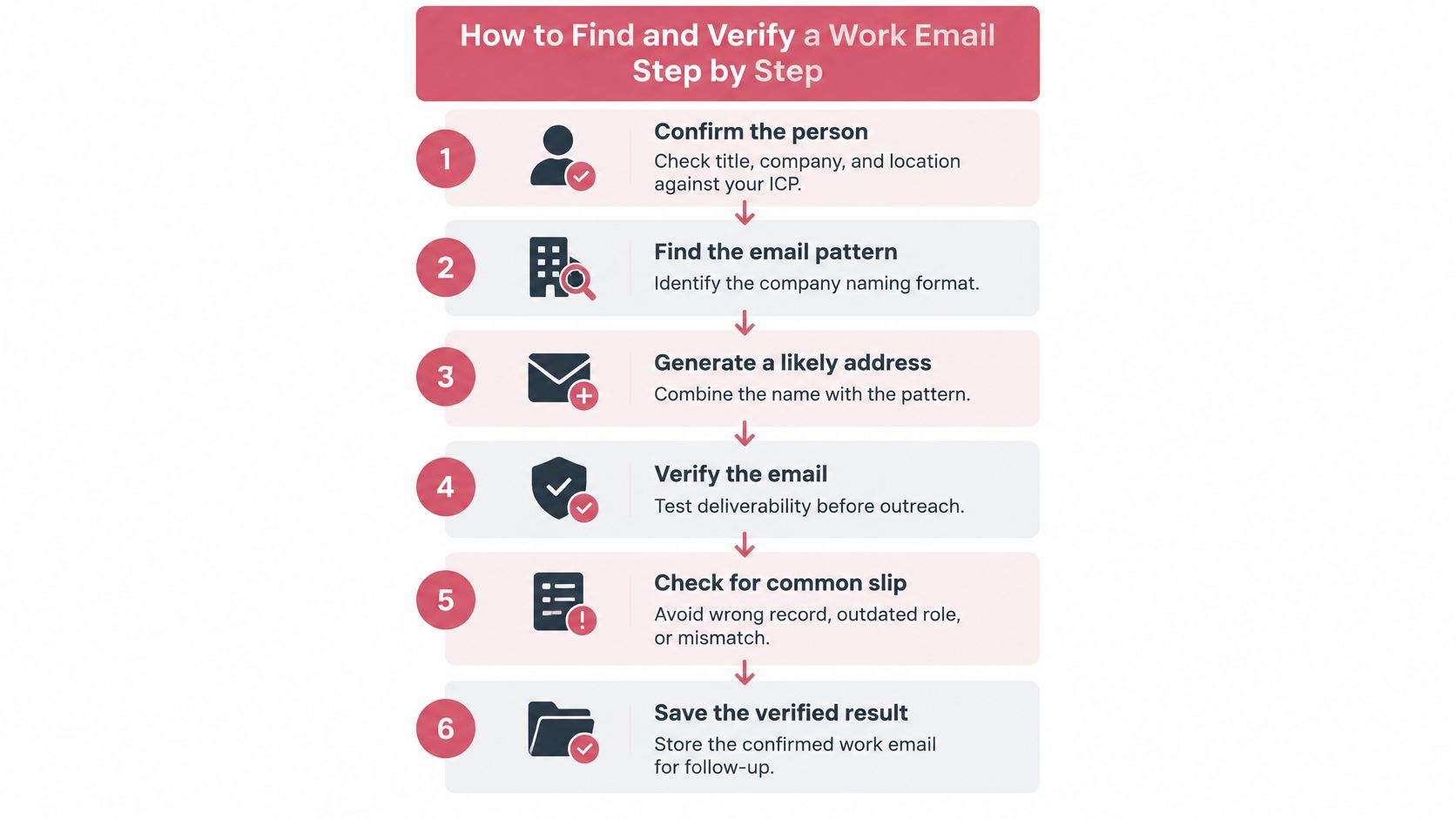
Approval rule: A generated candidate stays outside the send queue until the team has enough evidence to approve the person, address, source, and purpose together.
A good result contains a named person, a documented current role, a verified address or an explicitly reviewed exception, and a logged source. Keep provider confidence and verifier status separate because they answer different questions.
For example, a provider may confidently match the correct executive while returning an uncertain mailbox result. That record needs review, not a higher combined score that conceals the uncertainty.
Handling Work, Role, Catch All and Inferred Addresses
A valid mailbox isn't the same as a relevant, permitted contact. Verification evaluates technical signals; it doesn't establish the recipient's responsibilities, consent, or interest in an offer.
The trade off isn't coverage versus cost alone. Accepting ambiguous results expands a list while also expanding the number of records that require judgment before sending.
Address types and the action for each
| Address type | Example | Verification result | Action |
|---|---|---|---|
| Verified work address | jane.doe@example.com | Valid mailbox | Use after the lawful basis check passes |
| Role address | sales@example.com | Valid mailbox, not a person | Route to the shared inbox owner, don't personalize |
| Catch all domain | j.doe@example.com | Server accepts every address | Treat as unverified, send only with a second signal |
| Inferred pattern | jane.doe@example.com built from a name | Not checked against the person | Verify before use, never import as confirmed |
| Personal webmail | jane.doe@webmail.example | Valid mailbox | Don't use for B2B outreach unless the person gave it for that purpose |
| Invalid or bounced | Any address that hard bounced | Failed | Suppress the record the same day |
A verified work address still needs a current identity match. A role address requires a different message because a shared inbox owner shouldn't receive a sequence written as though the sender knows a named individual.
A catch all domain accepts recipients without confirming that the specific person's mailbox exists. Require another signal, such as the prospect directly supplying the address, rather than repeating the same verification test and calling that independent confirmation.
An inferred pattern is a hypothesis. A successful server response doesn't turn it into evidence that the intended person owns the mailbox.
Route uncertainty instead of averaging it away
Set the review threshold around required evidence, not an arbitrary blended score. If identity, ownership, or provenance falls below the team's standard, route the record to a human; any hard bounce should trigger suppression the same day.
Say an operator constructs jane.doe@example.com and receives a catch all result. The record remains unverified until Jane supplies that address for the proposed conversation or another acceptable ownership signal appears. If no supporting signal arrives, close the enrichment task without adding the candidate to a sequence.
Lawful Basis and Opt Out Rules After You Find the Address
Finding an address does not give the sender the right to send marketing to it. The collection decision and the sending decision require separate checks, especially when a contact crosses from a research tool into a campaign.
For United States commercial email, the Federal Trade Commission's CAN SPAM compliance guide requires a clear opt out method, accurate sender identification, and honored opt outs, and explains that unsolicited commercial email must be identified as advertising. A verified mailbox doesn't remove those obligations.
Consent and opt out requirements by market
| Market | Rule | What the sender must do |
|---|---|---|
| United States | CAN SPAM Act | Identify the sender, include a working opt out method, honor opt outs |
| European Union | GDPR | Document a legitimate interest where applicable, give transparency notice, honor objections |
| United Kingdom | UK GDPR and PECR | Document the basis, honor objections, follow PECR rules for electronic mail |
| Canada | CASL | Obtain consent before sending commercial electronic messages unless an exemption applies |
Publicly visible LinkedIn information can still be personal data in the EU and UK. Legitimate interest may support some B2B prospecting, but it isn't blanket authorization, and UK electronic mail rules require their own assessment.
Canada's consent first approach requires a different gate from a US campaign. Don't apply a US sending checklist globally or assume that a business address automatically qualifies for an exception.
Keep a decision record, not a legal label
A CRM field that merely says legitimate interest doesn't explain the assessment. Record the business purpose, why the contact is relevant, the expected impact on the recipient, and the safeguards applied; have the responsible privacy owner assess the applicable jurisdiction and recipient category.
LinkedIn also warns that prohibited automation may implicate privacy legislation in its guidance on unauthorized activity. A provider contract or a public profile can't resolve every collection and marketing obligation.
For every contact, preserve:
- Origin: Source and collection date.
- Use: Purpose and documented lawful basis.
- Lifecycle: Retention date and suppression status.
- Accountability: Decision owner and relevant approval evidence.
On an objection, stop marketing and update connected systems rather than removing the person from only the active sequence. For deletion requests, assign an owner, check the regulator's applicable response deadline, and remove data where required while retaining only an appropriate minimal suppression record. This table is an operational starting point, not a substitute for jurisdiction specific legal review.
Logging Provenance in a Yalc Enrichment Playbook
An email address is only one part of an enrichment record. The record should also show where the address came from, why it may be used, and who approved the next step.
A Yalc enrichment playbook can capture that evidence as the record moves through the workflow. The same controls can run in Notion, an existing CRM, or another workflow engine. The ICP Scorer checks fit using permitted profile inputs. The Email Enricher then calls licensed providers through the unified GTM API, using FullEnrich for email enrichment without treating provider access as permission to scrape LinkedIn.
Write evidence as the record moves
The enrichment step writes the source and confidence assessment to Notion. The campaign owner enters the purpose and calculated retention date; the approval gate records the status.
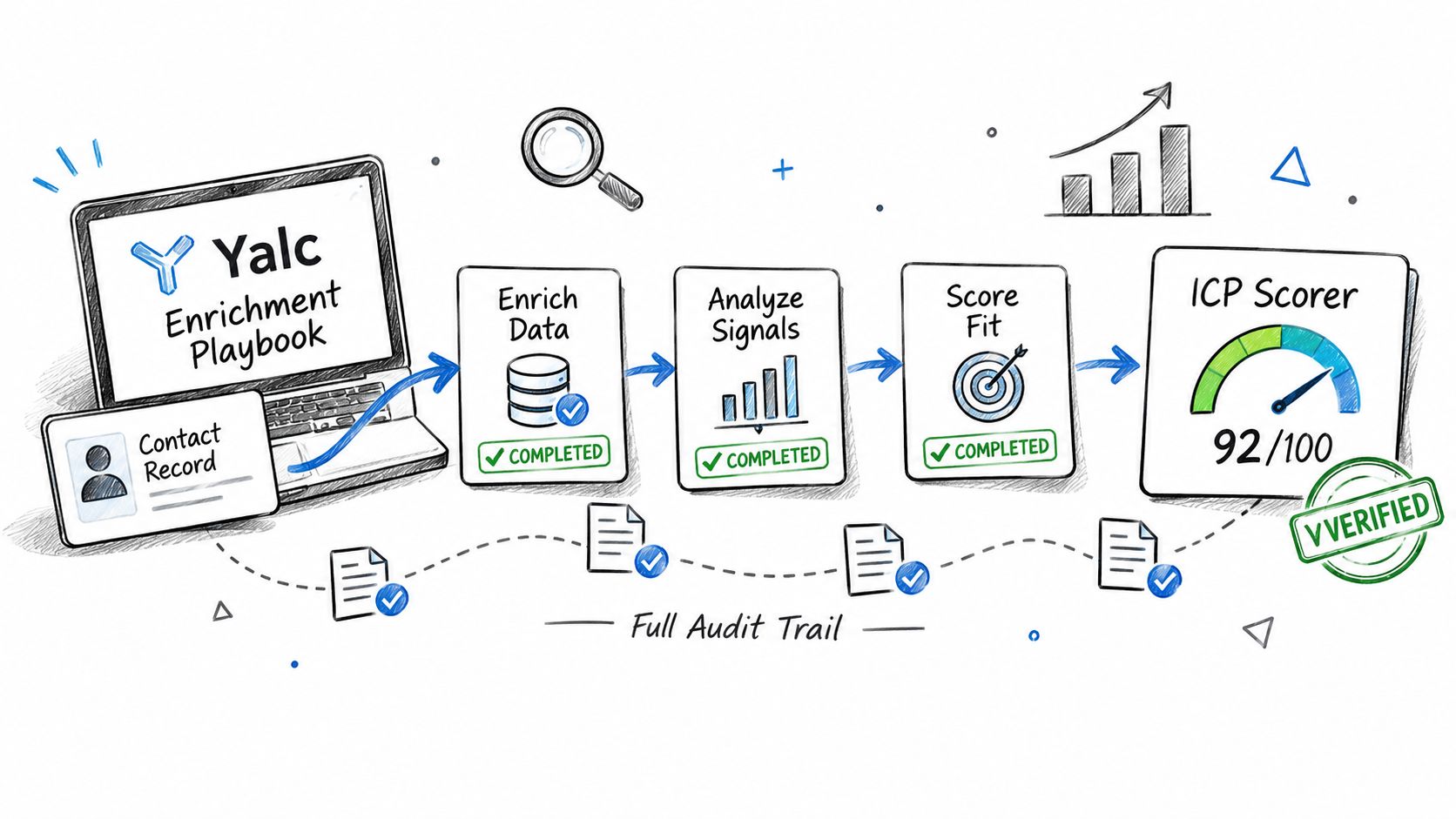
Keep identity fit, freshness, and sending risk separate. A strong ICP match does not make an old job record current or an uncertain mailbox reliable.
| Field | Example Notion row value |
|---|---|
| Source | FullEnrich, provider reference attached |
| Confidence | Identity confirmed, mailbox valid, role current |
| Purpose | Relevant introduction about revenue operations reporting |
| Retention date | 2027-06-30 |
| Approval status | Pending review by the revenue operations owner |
Attach the collection timestamp, provider evidence, and lawful-basis assessment to the row. The retention field should contain a calendar date calculated from the approved policy, not a description of that policy.
Block before sequencing
Records below the confidence threshold, including catch-all results, stay in the approval queue. Block suppressed records before a Sequence Runner using lemlist or Unipile can access them. Channel activity must also remain within applicable platform permissions.
Use campaign outcomes to update the record and the sourcing rule:
- Bounces: Update the address status and source verdict.
- Replies: Correct identity, role, and relevance assumptions.
- Complaints: Stop contact and review the sourcing rule.
Retire sources that repeatedly fail the team's acceptance criteria. These provenance fields and routing rules can be implemented in the CRM the team already uses.
Fixing Bounces, Complaints and Weak Address Yield
Unexpected bounces should trigger a sourcing review before a copy rewrite. Check whether the imported records included inferred addresses, uncertain verification results, or stale employment information rather than assuming the problem is message content.
For a hypothetical pilot, a team could use a bounce rate above 2 percent in the first batch as its pause trigger. That's an internal operating choice, not a universal benchmark or evidence that every bounce problem has the same cause.
Symptoms and fixes with time to effect
These are proposed operating targets for that pilot, not guaranteed recovery times. Mailbox providers and recipient behavior won't necessarily respond on the team's schedule.
| Symptom | First fix | Time to show results |
|---|---|---|
| Bounce rate above 2 percent in first batch | Verify before import and suppress hard bounces the same day | One day to apply controls |
| Low visible address yield | Use a licensed provider or a direct request and measure over one full sequence | One full sequence for evaluation |
| Rising spam complaints | Check sender identity and opt out link, suppress complainants and pause the sequence | A few days for initial review |
| Contact changed jobs | Reverify before the next touch and suppress the old record | One touch to apply the correction |
| Replies fall after broad expansion | Cut the list back to ICP matches and rerun verification | One week as a review window |
Low visible yield often means the team selected the wrong discovery route, not that operators need to inspect profiles faster. Change the source and track the full outcome rather than measuring addresses collected.
For complaints, test the sender identity and unsubscribe path first, then examine relevance and collection context. Pausing prevents further exposure while the owner investigates; this guide to cold email deliverability provides broader operational context.
Recovery check: Compare bounce, complaint, and suppression rates by source before and after the change, using consistent definitions.
Mailgun's State of Email report emphasizes consent and list health controls. Verification alone can't repair irrelevant targeting or an inappropriate reason for contact.
Set Your Send Rules Before the First Import
Set the send rules before the first import, not after the first complaint. Write down the confidence threshold that triggers review, the named approver for ambiguous records, the suppression list checked by every import, and the retention period for provenance records.
Make approval depend on evidence. A record missing ownership support should fail the gate even when a provider assigns a high score.
Run a bounded pilot
For example, schedule a pilot of 50 records from one source through the complete routine, from identity checks to approval. Before processing begins, define acceptance thresholds for verification pass rate, bounce rate, complaint rate, and suppression rate.
Keep the source only if it meets every agreed threshold. If it fails, suspend it until the owner documents a correction and reruns the evaluation rather than blending its results with stronger sources.
Restrict access to contact exports and review how enrichment files move between tools. Freeform Company's resource on tools for protecting sensitive email data is useful when assessing controls around those transfers.
This week's operating checklist
- Record the decisions: Review threshold, approver, suppression authority, and retention period.
- Load suppression data: Test that blocked contacts can't reenter through another provider.
- Name the approver: Assign a backup and a clear escalation path.
- Schedule the pilot: Agree on acceptance criteria before importing contacts.
The pilot should produce a defensible set of decisions, not just a larger contact list.
Yalc offers enrichment playbooks that connect contact research, provider lookups, approval gates, and execution logs through a unified GTM API. Visit Yalc to explore a workflow that keeps source evidence and human review attached to each contact before outreach begins.