Follow-Up Automation That Books More Meetings
Follow up emails collectively generated 58.6% of all replies in Belkins' 2023 analysis, while more than 53% of email sourced meetings came from sequence step 3 or later (Belkins follow up statistics). The first message starts the conversation. The system that recognizes intent, changes context, and stops at the right moment books the meeting.
Teams build follow-up automation as a delivery machine. They pick a template, add delays, and increase the number of touches when results disappoint. That approach confuses persistence with repetition. Buyers don't need more identical reminders. They need a relevant reason to respond when their priorities, research, or internal timing changes.
Table of Contents
- Why Follow Up Automation Is a Timing Problem
- Wiring Goals, ICP, and Voice Before You Send a Single Touch
- Designing Cadence and Sequence Steps That Actually Convert
- Choosing Channels and Orchestrating Email, LinkedIn, and Chat
- Tooling and Integration Checklist for a Reliable Stack
- Compliance, Localization, and Response Speed
- Measurement, Iteration, and Ready to Run Playbooks
Why Follow Up Automation Is a Timing Problem
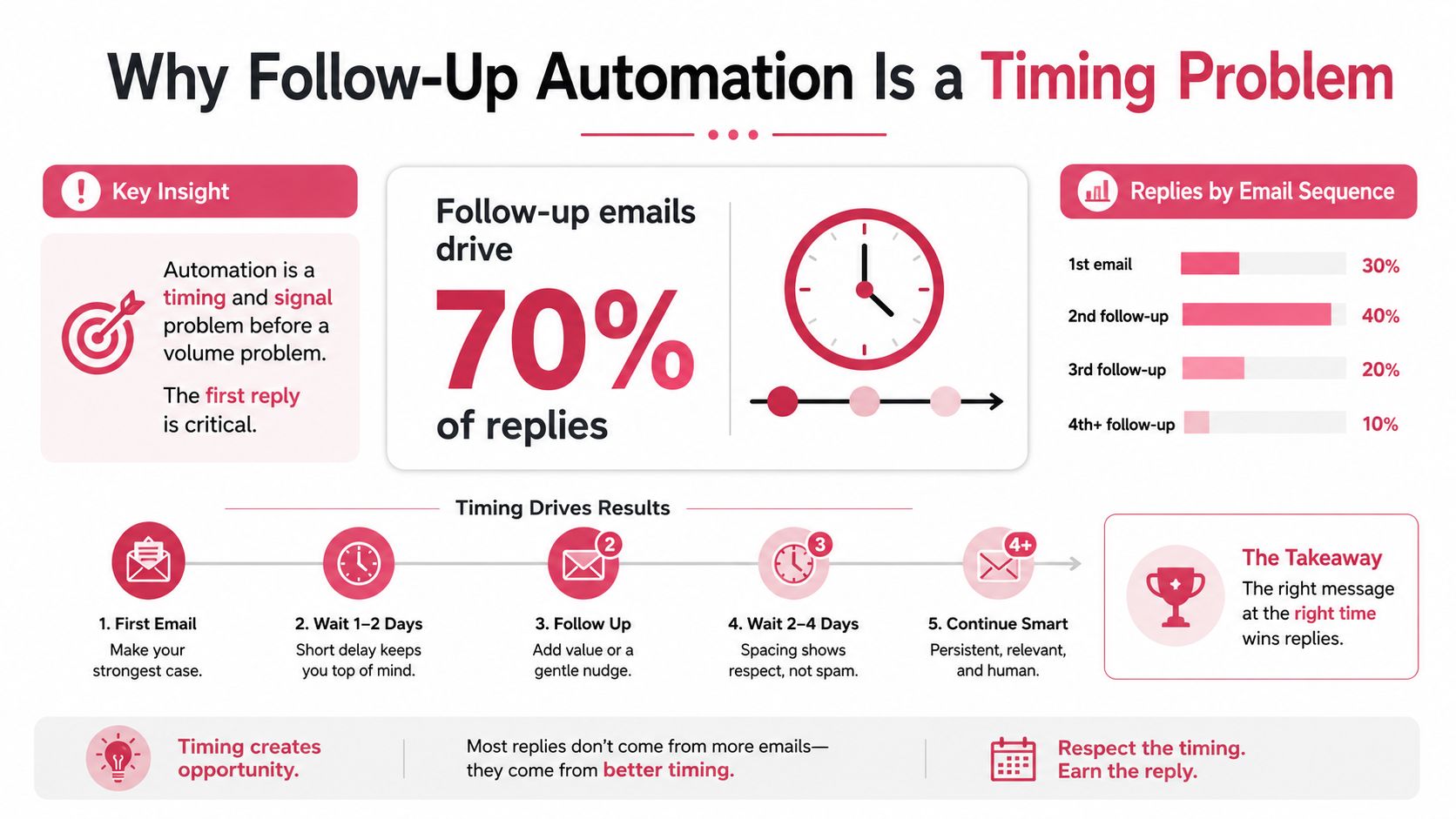
The first email produced the highest per-step reply rate at 0.59%, while IRC Sales Solutions reports that response rates fall sharply by the third or fourth follow up (sales follow up statistics). These figures point to a practical constraint: sequence performance depends on what happens between touches, not on how many reminders the system can send.
A buyer who visits a pricing page after ignoring an introduction has created a different situation. The system should pause the generic sequence, record the visit, and send a message that addresses evaluation criteria or implementation questions. If that buyer replies, every promotional touch should stop and the owner should take over. If the visit is followed by an out of office message, extend the wait and resume after the stated return. If there is no signal, change the evidence or stop instead of adding another reminder.
Repetition creates sequence decay
Repeated copy on one channel loses force. Give each touch a job: establish relevance, add proof, answer a likely objection, or introduce a new trigger. A third message can reference a changed business signal or ask a narrower question. Three versions of “just checking in” provide no new information and give the system no useful learning.
IRC Sales Solutions attributes 60% of non responses to irrelevant messaging. The same source reports average cold email reply rates of 5.1% to 5.8% in 2024, with the first email at 8.4% and response rates falling sharply by the third or fourth follow up. Use that pattern to set a hard rule: later touches need more context, not higher frequency.
Operating thesis: Treat every follow up as a context check. If the system has no new signal, change the value offered, change the channel, or stop.
An automated lead follow up system should connect timing to behavior. Route replies and positive sentiment to a person, branch on pricing-page visits, and use LinkedIn or chat only when those channels fit the buyer's activity. Email can carry the reasoning, LinkedIn can create a pattern interrupt, and chat can support active research. The sequence succeeds when its triggers encode buyer context, ICP, and voice, rather than just scheduling more touches.
Wiring Goals, ICP, and Voice Before You Send a Single Touch
A sequencer can't repair an undefined audience. Before choosing a tool, the team needs three operating decisions in writing: the outcome, the audience, and the voice.
Start with one commercial outcome
Choose one primary objective for each playbook. It can be booked meetings, qualified replies, or pipeline created. Don't ask one sequence to optimize all three at once. A meeting sequence should measure qualified meetings and the quality of those meetings. A reply sequence should distinguish a real buying conversation from a polite refusal.
Secondary metrics should prove whether the primary result has substance. Track positive reply rate, meeting set rate, opportunity progression, and opt outs by sequence step. A high reply count means little if most responses are wrong person messages or unsubscribe requests.
Encode the ICP at enrollment
The ideal customer profile belongs in the data layer, not in a rep's memory. Define the firmographic, technographic, and trigger conditions that qualify an account. Then define exclusions, including competitors, students, existing customers, and contacts already owned by another motion.
Every enrolled contact should have a clear reason for entering the playbook. A new role, relevant technology, hiring activity, funding event, product page visit, or form submission can provide that reason. The system should reject incomplete records rather than filling gaps with invented personalization.
Teams building a broader outbound lead generation process should document the enrollment contract in plain language:
- Required fields: Define the account, role, geography, trigger, owner, and permitted channels.
- Exclusion rules: Suppress customers, competitors, opted out contacts, duplicates, and active opportunities.
- Signal rules: State which behaviors accelerate, reroute, pause, or end a sequence.
- Outcome definition: Specify what counts as a qualified reply or a useful meeting.
Capture voice as an operating document
A one page voice brief keeps human edits and AI drafts aligned. It should specify tone, banned phrases, sentence length, proof points, approved claims, and the level of directness expected from each persona.
The brief should also include examples of acceptable and unacceptable language. “Just checking in” should be banned because it adds no context. A useful alternative refers to a specific trigger and offers a concrete next step. The team doesn't need ornate copy. It needs a consistent point of view that sounds like the same company across email, LinkedIn, and chat.
Launch only after these artifacts exist: a goal sheet, ICP definition, exclusion list, signal map, voice brief, and reply classification guide. Without them, the tool will automate ambiguity.
Designing Cadence and Sequence Steps That Actually Convert
Cadence should give the buyer room to act while preserving momentum. A practical starting point is roughly two business days between early touches, expanding to three to five days later, with a hard cap of seven touches across fourteen business days unless a positive signal resets the clock. A separate benchmark reports that sequences with 4 to 7 messages achieved about a 27% reply rate, compared with roughly 9% for sequences with 1 to 3 messages (Cirrus Insight sales follow up statistics).
The sequence below uses each touch for a different job. The day values are operating offsets, not permission to send every contact the same message regardless of behavior.
| Step | Day | Channel | Purpose | Example Hook |
|---|---|---|---|---|
| 1 | 0 | Establish relevance | “Noticed your team is hiring for revenue operations.” | |
| 2 | 2 | Add proof | “A practical way teams handle that handoff.” | |
| 3 | 4 | Create a pattern interrupt | “The issue may sit between routing and follow through.” | |
| 4 | 6 | Change channel and create warmth | “Sent a short note by email about the routing gap.” | |
| 5 | 8 | Offer a different value angle | “A simple checklist for reviewing the current process.” | |
| 6 | 11 | Chat or SMS | Reach active researchers where compliant | “Would a quick answer on implementation help?” |
| 7 | 14 | Invite an honest response | “Should this be closed, redirected, or revisited later?” |
The first follow up should arrive 2 to 3 days after initial contact, a spacing pattern supported by sales follow up analysis. Use buyer timezone windows, not the sender's calendar. Run a small test with one subject line variable and one opening hook variable. Keep the offer, audience, and timing stable so the result remains interpretable.
Branch logic matters more than the table. Pause immediately when the contact replies, books a meeting, sends positive sentiment, says the message belongs with another person, or reports an out of office period. Resume only when the stated return date or human review says it's appropriate. For a deeper breakdown of Cold Email Sequence Structure, the same principle applies: every step should earn its place.
A useful cold email follow up templates library should contain angle variations, not seven versions of the same reminder. Skip automatic phone or SMS unless consent and regional rules support it.
Choosing Channels and Orchestrating Email, LinkedIn, and Chat
Channel selection should follow buyer context. Email carries detailed reasoning, links, and attachments. LinkedIn provides warmth and a useful pattern interrupt. Live chat or SMS works best when a buyer is already researching a pricing or comparison page, provided the team has the required permission.
| Situation | Best channel | Why it wins | Watch out for |
|---|---|---|---|
| Complex explanation or proof | Supports detail and persistent reference | Long copy and weak relevance | |
| Executive outreach with shared context | Creates a warmer interruption | Generic connection notes | |
| Active pricing or comparison research | Chat | Matches immediate intent | Consent, staffing, and response delay |
| Previous email opened with no reply | Changes the attention environment | Overly aggressive personalization | |
| Contact unreachable after step 3 | Alternate approved channel | Prevents email fatigue | Channel rules and message overlap |
Email usually works as the backbone, but it shouldn't become the entire motion. Never stack more than two touches on the same channel inside 48 hours. If a prior touch receives an open but no reply, shift the channel and change the reason for contact.
Practical rule: A channel change must carry a context change. Moving the same pitch from email to LinkedIn doesn't create relevance.
LinkedIn automation should remain tightly controlled. Use a linkedin post scheduler for publishing workflows, but don't confuse scheduled content with permission to automate every private interaction. Connection requests and direct messages need human review when the context is sensitive or the personalization is uncertain.
For teams designing LinkedIn outreach automation, the fallback rule is simple. If the contact remains unreachable on the primary channel after the third step, move once to an approved secondary channel, then either route the account to a lower frequency nurture path or close the task. Don't let an automation loop turn silence into harassment.
Tooling and Integration Checklist for a Reliable Stack
A reliable stack has four separate layers. Each layer owns a specific decision, and a missing layer creates a predictable failure.
Data enrichment
The enrichment layer supplies firmographic, technographic, and intent context to one contact record. It should also run deduplication before enrollment. If it fails, the sequencer sends to the wrong person, references stale information, or enrolls the same contact in competing campaigns.
Sequencing engine
The sequencing tool owns delays, throttling, bounce handling, channel steps, and reply detection. Choose native controls over bolt on schedulers. The engine should detect replies at each step and stop the sequence before another message fires.
CRM of record
The CRM remains authoritative for stage, owner, suppression, and commercial status. Enrollment, pause, reply, meeting, and opt out events should sync within minutes. If the CRM is stale, the sequence may continue after a deal changes stage or a rep has already taken over the conversation.
Reasoning and signal layer
Many teams underinvest in this area. A lightweight signal such as a product page visit, hiring post, or funding event can reorder the queue and select a different next step. The reasoning layer should decide whether the next action is an email, a human task, a channel change, or a stop.
Yalc can sit across these layers as one option. Its unified GTM API connects sources such as Unipile, FullEnrich, lemlist, Crustdata, Notion, Claude, Slack, and other API enabled channels, while its knowledge layer stores ICP, voice, positioning, and prior plays. Teams can compose plays through its MCP in Claude Code or run configured playbooks from Slack and its interface. That makes it relevant when the issue is orchestration rather than another isolated sender.
Before launch, verify:
- Authentication alignment: Check SPF and DKIM alignment.
- Record quality: Confirm required enrichment fields and deduplication.
- Suppression sync: Test customer, competitor, and opt out exclusions.
- Reply parsing: Send positive, negative, out of office, and wrong person replies.
- Pause behavior: Confirm every reply stops future touches.
- Bounce handling: Verify hard bounces suppress further delivery.
- Timezone logic: Test send windows across target regions.
- Owner routing: Confirm the correct rep receives positive signals.
- Audit trail: Confirm every enrollment, action, approval, and exit is logged.
Compliance, Localization, and Response Speed
More touches cannot repair unlawful delivery, weak localization, or a delayed response from the assigned rep. Set compliance rules before writing copy, then make them executable inside the workflow.
CAN SPAM requires commercial email to avoid deceptive headers and subjects, identify the message as an ad when appropriate, include a valid postal address, and provide a clear opt out honored within 10 business days (CAN SPAM and GDPR follow up guidance). GDPR requires valid consent or another lawful basis before processing personal data, and people must be able to withdraw consent as easily as they gave it. LinkedIn connection and InMail activity must follow its automation user agreement. SMS and WhatsApp add TCPA or PECR requirements, so document consent before either channel enters a playbook.
Every email needs a physical address and a clear unsubscribe mechanism. Sync suppression across the CRM, sequencer, enrichment system, and reporting layer. Test the full path with an opt out, then confirm the contact cannot re-enter through another campaign.
Localization requires rewriting, not just translating. Independent clinical evidence found that automated text reminders improved appointment adherence for English speaking patients but had no effect for Spanish speaking patients (clinical evidence on automated reminders). Treat language, market, and use case as sequence inputs. Encode local phrasing and buyer context instead of cloning one English sequence across regions.
| Phrase or element | Rewrite decision |
|---|---|
| Greeting | Adjust formality, titles, and name order |
| Call to action | Replace directness that feels unnatural in the market |
| Proof point | Use locally recognizable context and terminology |
| Send window | Schedule around the recipient's working hours |
| Opt out language | Use clear, natural wording that preserves legal meaning |
| Follow up tone | Rework urgency, apology, and persistence for local norms |
Response speed needs its own trigger and owner. In a test of 433 companies, only 7% responded within the first five minutes after a form submission, while more than 50% didn't respond within five business days (response speed and follow up statistics). The same source reports a 90% chance that an email reply arrives within two days of sending. Route high intent replies immediately, stop automation on any reply, and send an approved assistant or human alert when a message arrives outside working hours. Persistence matters less than recognizing intent and acting while the context is still fresh.
Measurement, Iteration, and Ready to Run Playbooks
Every touch needs a job and a score. Track per step reply rate, positive reply rate, meeting set rate, and opt out rate by step. Then connect those results to the commercial outcome selected before launch.
Retire weak variants instead of defending them. A practical internal threshold is to drop any email step below 2% reply, then replace one variable at a time. Test the opening hook, proof point, CTA, or timing, but don't change all of them in one revision. Run a 30 day learning cycle around one hypothesis, such as “a role specific operational problem will outperform a product description for this ICP.”
Playbook one for cold form fills
This path should respond quickly, then rotate channels and value. Stop on any reply, booking, opt out, wrong person response, or clear negative sentiment.
Playbook two for event no shows
This path should preserve goodwill. It should make rescheduling easy, offer a useful recap, and close cleanly if the buyer doesn't engage.
| Step | Channel | Timing Offset | Primary Hook | Exit Condition |
|---|---|---|---|---|
| Cold form fill 1 | Immediate | Confirm the request and ask the most relevant qualification question | Reply or booking | |
| Cold form fill 2 | LinkedIn connection | Day 2 | Reference the form topic without repeating the email | Acceptance or reply |
| Cold form fill 3 | Day 4 | Share one practical answer tied to the request | Reply, booking, or opt out | |
| Cold form fill 4 | LinkedIn message | Day 6 | Offer a concise route to the desired outcome | Reply or negative sentiment |
| Cold form fill 5 | Day 8 | Present a different proof point or implementation angle | Reply or booking | |
| Cold form fill 6 | Chat | Day 11 | Offer a fast answer during active research, where compliant | Engagement or opt out |
| Cold form fill 7 | Day 14 | Ask whether to close, redirect, or revisit | Any response or sequence close | |
| Event no show 1 | Shortly after missed meeting | Acknowledge the missed meeting and offer a simple reschedule | Booking or reply | |
| Event no show 2 | Chat | Next business day | Ask whether the topic is still relevant | Reply or opt out |
| Event no show 3 | Three business days later | Send a useful event takeaway or answer | Reply or booking | |
| Event no show 4 | Chat | Five business days later | Offer one alternate time or route | Reply or close |
| Event no show 5 | Seven business days later | Close the loop without pressure | Any response or suppress |
Keep the playbooks small enough to inspect. A system that scores every campaign, records the verdict, and promotes proven plays while retiring weak ones will outperform a larger library that nobody reviews.
Visit Yalc if the team needs follow up automation connected to its ICP, voice, enrichment, CRM, reply handling, and signal monitoring. Yalc lets operators compose plays through Claude Code with its MCP or run configured playbooks from Slack and its interface, while keeping data, credentials, approvals, and audit trails under the team's control.