How to Use a CRM System: A Step by Step Setup Guide
The usual advice about how to use a CRM system starts with importing contacts and teaching reps where to click. That's the wrong starting point. A usable CRM needs agreed sales stages, named data owners and clear next actions before anyone loads a spreadsheet.
A CRM is a shared record of who the team sells to, what the buyer has done and who acts next. Software can enforce those decisions. It can't make them for the sales team.
Table of Contents
- Six Steps That Make a CRM Usable
- How to Map Your Sales Process to Stages and Fields
- Model Accounts, Contacts and Deals Before Importing
- Import, Enrich and Clean Records Without Duplicates
- Automations That Save Rep Time
- Common Pitfalls and How to Fix Them
- Roll Out in 90 Days and Track Adoption
- Confirm Your Setup Before the Next Pipeline Review
Six Steps That Make a CRM Usable
In a 2024 survey of 600 business owners and professionals, 73% of surveyed U.S. businesses reported using CRM software, according to Freshworks. For teams that already have a CRM, the useful question isn't whether people can access it. It's whether managers can trust what they find.
Run the setup in order: define the sales process, set fields and stages, clean the import, assign stewardship, automate routine work and stabilize usage through a controlled rollout. Starting with automation only makes unresolved decisions harder to diagnose.
Six setup steps, outputs and owners
| Step | What It Produces | Owner | Done When |
|---|---|---|---|
| Define the sales process | Stage map from lead to close | Revenue lead | Every stage has an entry rule and an exit rule |
| Set fields and stages | Field list for routing, forecasting and segments | RevOps | Each required field is named for each stage |
| Import and clean records | Deduplicated contacts with owners | Operations | Duplicate rate is under the agreed target of 1 percent |
| Assign owners | Named steward for each field | Sales manager | No field lacks an owner |
| Automate routine work | Routing, follow up tasks and stale deal alerts | RevOps | Alerts fire correctly in test deals |
| Run a 90 day rollout | Adoption scorecard at 30, 60 and 90 days | Sales leader | Pipeline reports are trusted for forecasting |
These owners don't all need to be different people. In a startup, the revenue lead may also manage operations. The responsibility still needs a name, an output and an acceptance test.
Treat the duplicate threshold as an internal operating target, not an industry benchmark. Apply the same discipline to the other checks: someone should be able to demonstrate completion using actual records, not a configuration screenshot.
Practical rule: If a rep can't say which stage a deal is in and why, the setup isn't finished.
How to Map Your Sales Process to Stages and Fields
Build stages around buyer evidence, not seller effort. Sending a proposal doesn't prove that the buyer has reviewed it, and booking a meeting doesn't prove qualification.
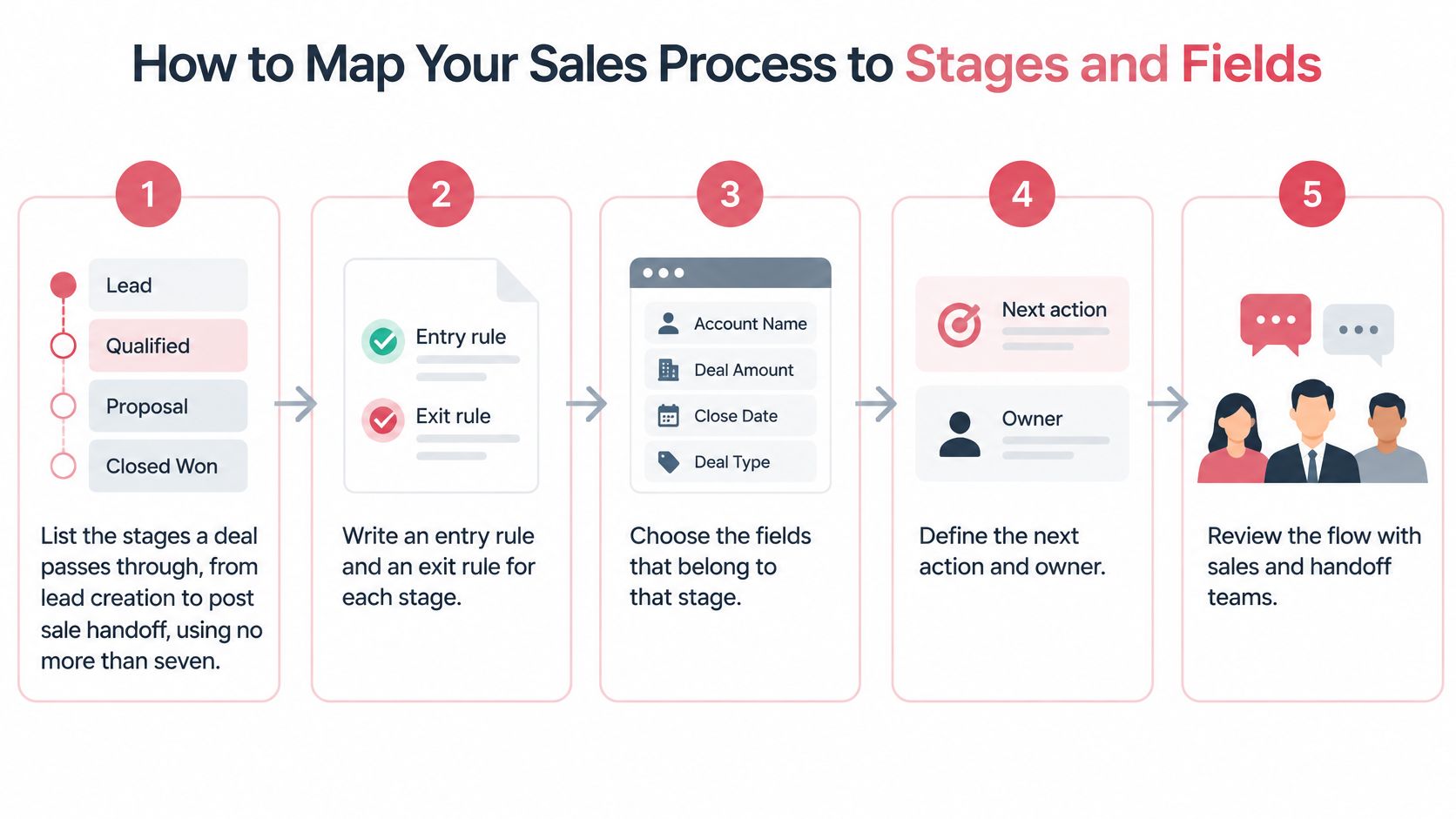
- List the journey. Keep the initial map to no more than seven stages, from lead creation through qualification, proposal, negotiation, close and post sale handoff. Keep lead status separate from opportunity stage in the actual configuration.
- Write entry and exit rules. A qualified opportunity needs a named business problem, an identified decision process, estimated value, expected close date and scheduled next activity. Its exit rule should require evidence that the buyer has agreed to evaluate a proposed solution.
- Name the buyer action. Proposal stage should mean the buyer has reviewed the solution and commercial terms are under discussion. Store the review date and relevant meeting notes rather than treating an attachment sent by email as proof.
- Define forecast eligibility. A commit deal needs a confirmed decision date, buyer access and an agreed next step. Without that evidence, it stays in an earlier forecast category or moves to nurture.
- Choose fields by purpose. Require only information used for routing, compliance, forecasting or segmentation. Make later discovery fields mandatory when the deal reaches the relevant gate, not when a rep first creates it.
- Record movement. Capture stage entry and exit timestamps, movement reasons and a required loss reason. RevOps can then calculate conversion and aging by segment, source and rep without reconstructing history from notes.
Make the rule usable during a review
Start with sales pipeline templates to draft the map, then replace generic labels with the team's actual buying milestones. Sales, finance and customer success should agree on what close and handoff mean before the workflow goes live.
Nucleus Research's CRM benchmarking found that 80% of potential CRM benefits remained unrealized, supporting an emphasis on workflow integration rather than license deployment alone.
A manager can run a practical acceptance check in ten minutes: select ten open deals and verify that each meets its current stage rule. Any disagreement exposes an ambiguous definition or missing evidence.
Model Accounts, Contacts and Deals Before Importing
Define the records and their relationships before mapping spreadsheet columns. An account is the company that buys. A contact is a person. An opportunity is a commercial deal. An activity records work against that relationship.
Use company domain and work email as matching keys, while retaining the CRM's permanent system identifiers. A domain can change, and a person can change jobs. Neither event should erase the historical record.
Core objects and their keys
| Object | Purpose | Unique key | Links to |
|---|---|---|---|
| Account | The company that buys | Company domain | Many contacts and opportunities |
| Contact | A person at an account | Work email address | One account |
| Opportunity | A deal with a value and stages | Account plus deal name | One account and many contact roles |
| Activity | A call, meeting, email or task | System ID | One contact and one opportunity |
| Lead | An unqualified inbound or outbound record | Email address | Converts to a contact and an account |
Store relationships as lookup fields, not typed company names. Keep lifecycle status on the contact and deal stage on the opportunity. Where the CRM uses a separate lead object, conversion should preserve source and activity history.
Test the model with a buying scenario
Say Northwind Logistics has an account with the domain northwind.com, three contacts and two opportunities: a renewal and a new site. Each opportunity connects to the relevant people through contact roles such as economic buyer, champion or technical evaluator.
Reports should count those opportunities, not count every participating contact as a separate deal. Activity records should link to the relevant contact and opportunity whenever both are known.
Decide who can create, merge and reassign each object. Before import, also test restricted exports and permission changes against the audit log, following the control considerations in HubSpot's CRM data privacy guidance.
Import, Enrich and Clean Records Without Duplicates
Validate the file before loading it. A successful import message proves that the CRM accepted rows, not that the rows describe usable accounts or buyers.
A 2025 research paper on CRM data quality reports that representatives can spend about 30 percent of their time managing data quality issues rather than engaging customers. Operations should own the exception queue so sellers aren't left diagnosing import defects during calls.
- Set acceptance rules. Define required fields and approved values for country, currency, lifecycle stage and industry. Reject invalid rows into a correction file with a reason, rather than dropping values.
- Normalize before matching. Standardize email addresses, company domains and phone numbers. Acme Inc and ACME may be the same company, but a shared name alone isn't enough to merge them.
- Use multiple identifiers. Match contacts using email and company context, and accounts using domain plus corroborating details. Put conflicting or ambiguous matches into manual review.
- Choose the master record. Specify which record survives and which system is authoritative for each field. Carry over ownership, activity history and consent information without overwriting a human correction.
- Enrich accepted records. Append industry, employee count and region only after matching succeeds. Record the source and update date for enriched fields so operations can identify stale or conflicting values.
- Inspect the result. Run a small test import, reconcile accepted and rejected rows, then load the remaining records. Keep an import log that identifies the file, operator and corrections.
Keep cleanup running after import
Use lead enrichment to fill specific gaps, not to replace verified information indiscriminately. Quarantine uncertain updates until a steward approves them.
Archive records without a current business purpose when retention and privacy requirements allow it. Archiving preserves history, but it shouldn't override an applicable deletion obligation.
The weekly exception report should flag missing emails, invalid domains, duplicate contacts, accounts without owners and opportunities without recent activity. Track field completeness, duplicate rate, invalid record rate and time to correction after every import.
A clean import isn't a permanent clean state. Every form, integration and manual edit needs the same validation rules.
Automations That Save Rep Time
Activate automation only after matching and ownership work. Dirty trigger data can route the wrong lead, create irrelevant tasks or send a message based on a false assumption.
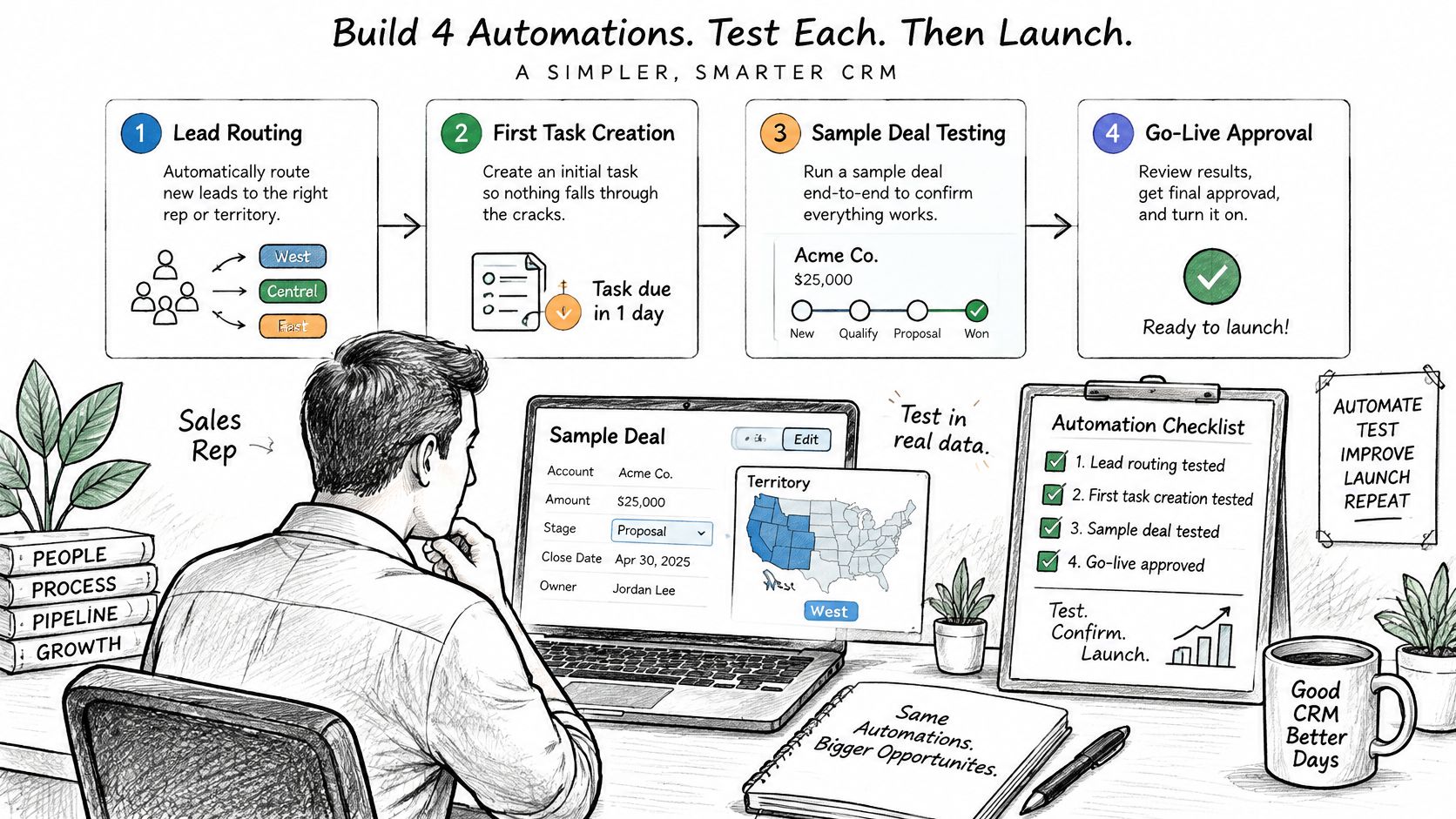
Build these workflows in order. The timing below is a starting configuration to test against the team's service expectations, not a universal benchmark.
- Lead routing. Trigger: a lead is created. Action: assign an owner by territory or segment and create a first task due within one business day. Test: sample leads from each territory reach the correct owner, with a fallback queue for unmatched records.
- Stage follow up. Trigger: an opportunity changes stage. Action: create the next task with an owner and due date. Test: moving a sample deal creates exactly one task, including when an integration retries the update.
- Stale opportunity alerts. Trigger: no activity during the service window, for example seven days for a mid market deal. Action: alert the owner, then escalate after a second missed window. Test: an inactive deal generates one alert followed by one escalation.
- Loss validation. Trigger: a rep selects closed lost. Action: require a loss reason. Test: saving without a reason is blocked, including through supported import and integration paths.
Separate preparation from buyer communication
For implementation detail, Cyndra's CRM automation for operations teams is a useful companion to the broader sales process automation workflow. Give each automation a named owner and a way to pause execution.
Yalc's agents run on the CRM, sequencers and data tools the customer already pays for, so those tools don't need replacing. Every message written by Yalc agents starts from the customer's own CRM, calls and won deals.
Any automated message to a buyer waits for a person's approval.
Common Pitfalls and How to Fix Them
Excessive mandatory fields can make the rest of the setup irrelevant. When reps can't finish an update without entering information they don't yet know, they postpone it or enter placeholder text.
Cut requirements to routing, compliance and forecasting needs, then capture calls and meetings from approved calendar and email integrations. Reps should still record outcomes and buyer commitments. An automatically logged meeting doesn't explain what changed.
Ownership needs the same attention. In a 2025 survey of 602 CRM users and stakeholders across the United States, United Kingdom and Australia, 34% didn't know who was responsible for data accuracy and completeness, according to Validity's survey announcement.
Symptoms, likely causes and fixes
| Symptom | Likely Cause | Fix |
|---|---|---|
| Reps stop logging activity | Too many mandatory fields | Cut fields to routing and forecast needs and capture calls and meetings from calendar and email |
| Forecast misses every quarter | Stages advance on judgment | Add stage exit criteria and audit ten deals each week |
| Two records for one buyer | Matching on name only | Match on email address and company domain, then merge with a master record rule |
| Reports disagree with each other | Free text stage names | Use a fixed picklist for stage values |
| Dashboard looks empty | Accounts without owners | Block saving an active opportunity without an owner |
| Automation sends the wrong message | Dirty trigger data | Pause the automation, correct the field and rerun on a test segment |
Distinguish configuration defects from habits
A picklist or validation rule can be configured quickly. Consistent outcome logging takes coaching and repeated inspection.
Assign a steward to each field, with authority to resolve conflicts and change validation rules. Managers should inspect a sample weekly and distinguish missing information from information the process never made available.
Start by removing unnecessary mandatory fields. Every other correction depends on sellers continuing to maintain the records.
Roll Out in 90 Days and Track Adoption
CRM adoption guidance from Flectic cites estimates that 47 percent to 70 percent of deployments miss their intended objectives, with weak adoption and poor change management identified as major causes. Configuring every feature before testing actual work creates avoidable rollout risk.
Start with a defined path from lead intake to opportunity handoff. Train each role on real tasks and realistic exceptions, not on a tour of every menu.
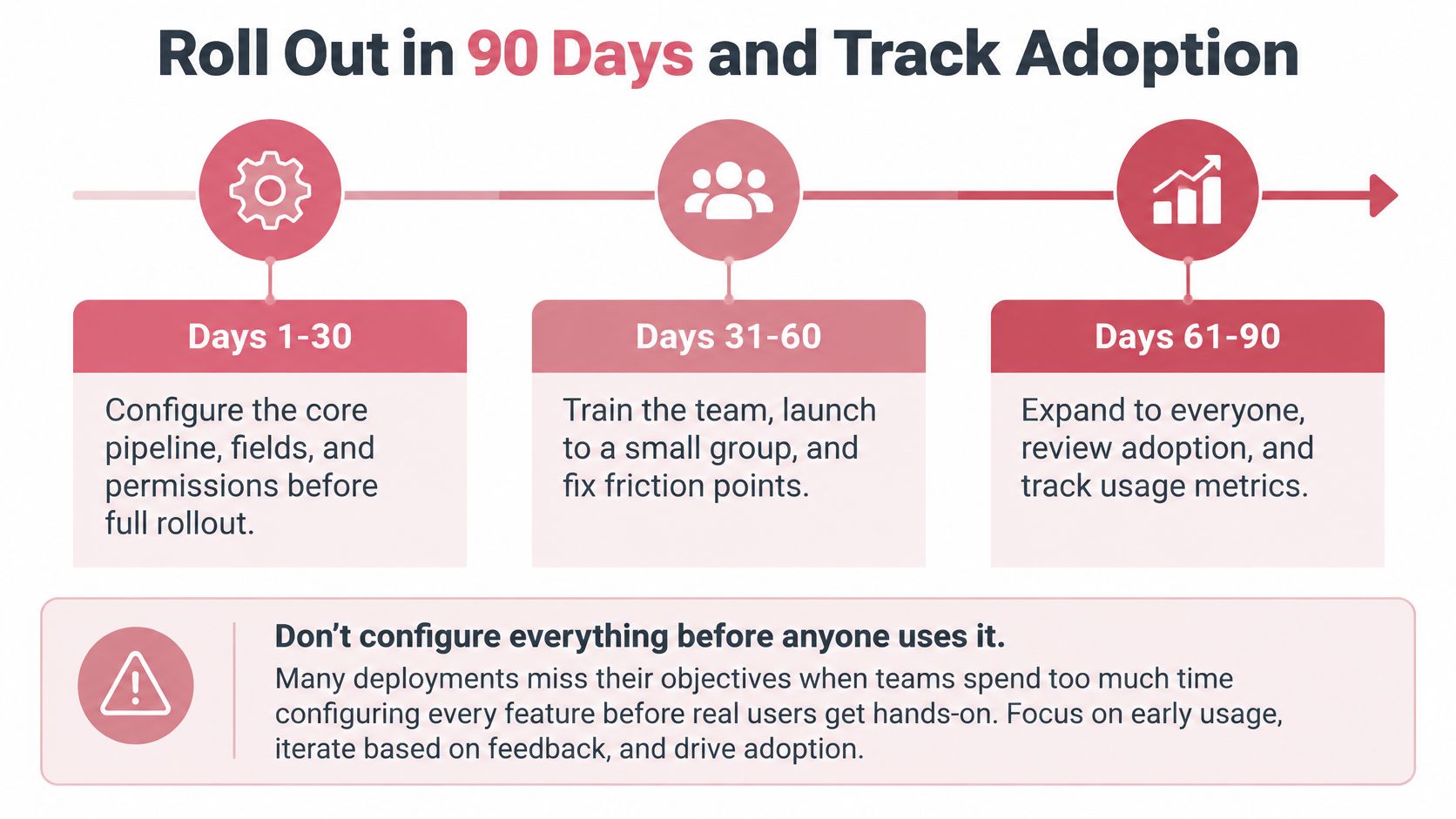
Day 30 removes friction
Pilot the core pipeline with a small group after fields and permissions are configured. Ask reps to create a lead, qualify it, record a buyer response, advance an opportunity and complete a handoff.
Remove unnecessary fields and repair blockers before expanding. Document the approved workflows with screenshots and short task instructions. Trupeer Inc.’s how to guides provide a resource for creating repeatable task documentation instead of relying on a recorded product tour.
Day 60 checks consistency
Compare pipeline hygiene across teams and coach exceptions using actual records. Managers should use the same definitions rather than accepting local workarounds.
The weekly scorecard needs these measures:
- Weekly active users: Show whether assigned users are working in the system.
- Required field completeness: Break missing values down by stage.
- Overdue tasks: Separate overdue work from tasks that are no longer relevant.
- Opportunities without a next step: Identify deals without a scheduled action.
- Changes outside the process: Review unsupported imports, edits and stage movement.
Day 90 establishes operating confidence
Decide which reports and automations are reliable enough for forecasting. Expand only the workflows that passed testing, and retain an owner for unresolved defects.
Adoption isn't maximum feature usage. It's consistent execution of the behaviors that make customer history and pipeline trustworthy.
Confirm Your Setup Before the Next Pipeline Review
Use a decision checklist before treating the CRM as the forecast record. A polished dashboard isn't a substitute for evidence that the underlying process works.
- Stage rules exist: Every stage has an entry rule and an exit rule.
- Stewardship is named: Every required field has an accountable steward.
- Import quality is measured: The latest import has a recorded duplicate rate and time to correction.
- Routine workflows pass testing: Routing, stage tasks and stale opportunity alerts work on sample deals.
- Rollout reviews are scheduled: The 30, 60 and 90 day checkpoints have owners and calendar entries.
Review evidence rather than confidence
If an item is missing, the forecast hasn't yet earned the team's trust. Assign the correction to the owner responsible for stage design, import quality, automation or adoption, rather than asking every rep to compensate manually.
Hold the first pipeline review on cleaned records. Each rep should state the stage of each deal and the evidence that satisfies its rule. A rep who can't do that has identified a setup gap, not necessarily an effort gap.
The next step is a mapping call grounded in actual sales work. Bring the current stage list, required fields, a recent import and representative open deals so the discussion produces decisions rather than another feature list.
Yalc starts with one mapping call to map how the customer's team sells and where it leaks, then builds around the customer's CRM, data and voice. After the build, the system lives in the customer's stack, the customer owns it, and every reply sharpens it. Visit Yalc to arrange that mapping call and identify which stage rules, ownership gaps and routine tasks need attention first.