Lead Generation CRM: Features, Setup and How to Choose
Most advice says a lead generation CRM is a place to collect more contacts. That misses the operational test: what share of leads gets a timely, documented next action? A large database can still hide slow routing, repeated outreach, missing consent, and leads no one owns.
A useful system makes the path from first signal to qualified opportunity visible and accountable. The comparison below shows how that differs from a CRM built mainly to manage deals already in progress.
Table of Contents
- What Separates a Lead Generation CRM From a Sales CRM
- Five Features to Test Before You Sign
- Speed to Lead Targets Your Routing Must Hit
- Data Quality and Consent Records to Set Up First
- How to Configure Lead Flow From Capture to Reply
- Account Signals Before the First Form Fill
- Weighted Scorecard for Outbound and Inbound Teams
- Use Cases by Team Type
- Confirm Your Setup With a Two Week Pilot
What Separates a Lead Generation CRM From a Sales CRM
A lead generation CRM captures unknown prospects, enriches and scores them, assigns an owner, runs timed outreach, and logs every touch and consent event until a lead is qualified or closed.
A standard sales CRM typically begins once a deal exists. A lead generation CRM starts when a stranger shows interest, so its fields, timers, and rules have to cover the gap before a deal is created.
| Capability | Standard sales CRM | Lead generation CRM |
|---|---|---|
| Primary purpose | Tracks deals already in the pipeline | Captures and qualifies unknown prospects |
| Lead intake | Manual entry or basic import | Forms, visitor signals, list imports, and API events |
| Assignment | Owner set by hand | Routing by territory, round robin, or score |
| Enrichment | Optional add on | Built in or a waterfall across several providers |
| Response timing | Not tracked | First touch timestamp and latency alerts |
| Outreach | Activities logged after sending | Sequences with stop rules and reply handling |
| Consent | One opt in field or none | Consent wording, channel, date, and withdrawal log |
| Success metric | Pipeline value | Share of leads with a timely, documented next action |
The success metric changes what the team fixes first. If leaders judge the system mainly by pipeline value, new leads can sit unassigned while the team focuses on deals already in motion. If they track the share of leads with a timely, documented next action, routing, ownership, and follow up become visible problems to solve.
The boundary matters: once a lead qualifies, the record still needs a deal pipeline and a clean handoff to sales. The CRM shouldn't force the team to copy records or lose interaction history at that point.
The rest of the evaluation comes down to five features: enrichment, sequences, integrations, scoring, and automation. Two controls sit alongside them: data quality and consent records. A vendor that handles the features but can't enforce those controls is storing risk as well as contact details.
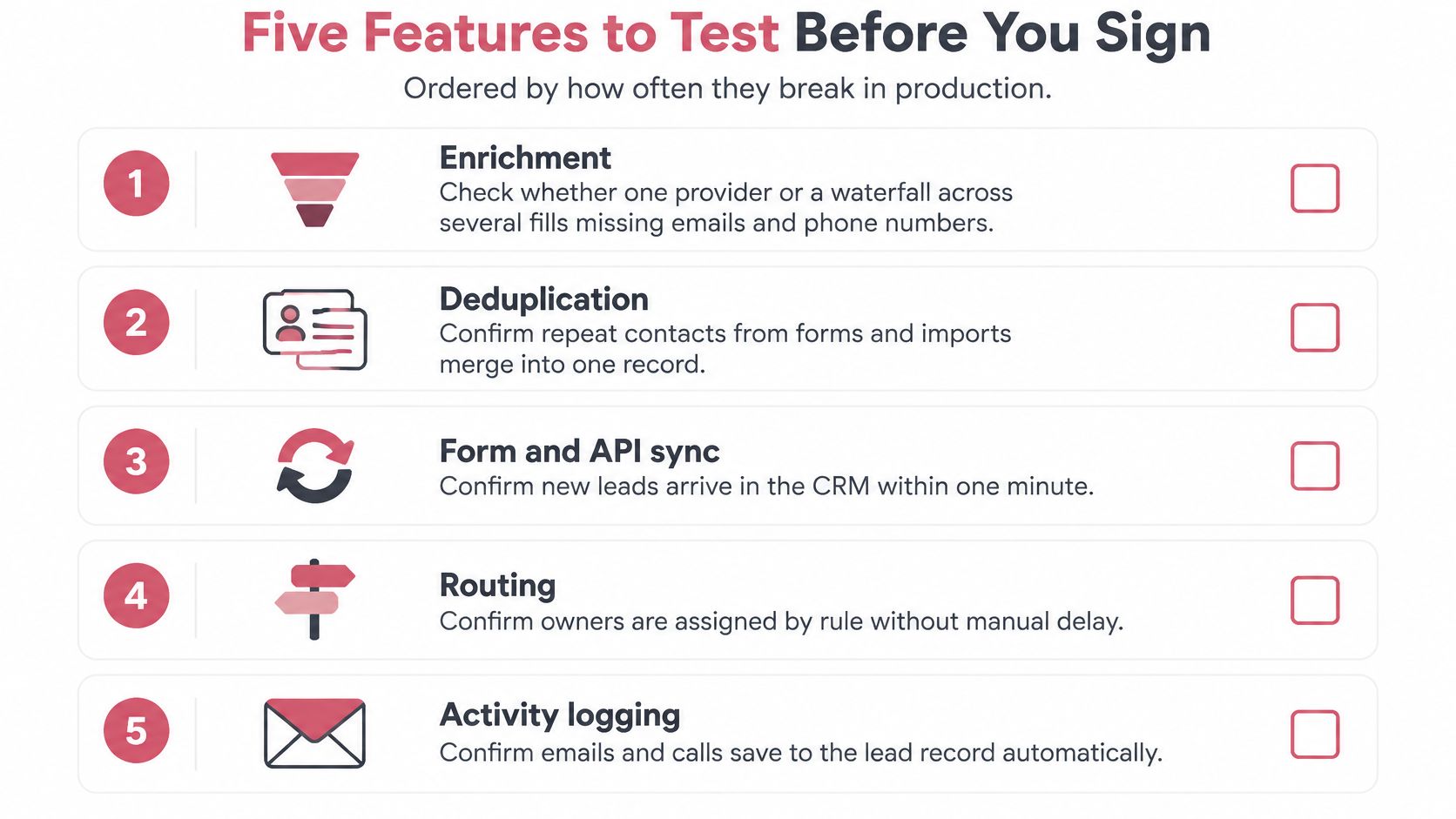
Five Features to Test Before You Sign
Test features against real records and real workflows. A polished demo can show that a button works; it won't reveal what happens when providers disagree, a person replies, or a sync creates a duplicate.
1. Enrichment
Check whether the CRM uses one provider or a waterfall across several, how it fills missing emails and phone numbers, and how it handles conflicting values. Load 200 known records and measure field fill rate and bounce rate. A strong setup preserves the source of each value and lets the team decide which source wins.
Red flag: the CRM overwrites existing fields without preserving provenance or showing the conflict.
2. Sequence support
Build a multichannel sequence with email and LinkedIn steps. Confirm that a reply pauses the sequence, a bounce or unsubscribe stops it, and every step reads from the same contact record.
Red flag: a prospect replies, but the next automated message still goes out.
3. Integrations
Separate native two way sync from one way exports. Test field mapping, duplicate handling during sync, and API limits. For example, Yalc connects FullEnrich for email and phone, Crustdata for firmographics, and lemlist or Unipile for outbound. The practical question is whether a team can swap a provider without rebuilding the workflow.
Red flag: the integration exports a file but can't reliably update the system of record.
4. Scoring
Look for visible rules that combine ideal customer profile fit with engagement. Each score should include a reason, and missing data should remain distinct from negative intent. Teams that want a starting point for separating fit from activity can review this guide to lead scoring.
Red flag: a score appears without an explanation a representative can check.
5. Automation
List the triggers, delays, approval gates, and escalation rules available without code. Test whether the CRM can assign an owner, create a task, pause for approval, and escalate when no one accepts the lead.
Red flag: important routing or stop rules require a manual export or an untracked workaround.
Speed to Lead Targets Your Routing Must Hit
Don't assume the team will respond in time just because someone owns the inbox. In a Harvard Business Review audit of 2,241 U.S. companies, only 37 percent responded to a web lead within one hour, 23 percent never responded, and companies that replied within 30 days took an average of 42 hours to make first contact. Companies contacting a lead within one hour were nearly seven times more likely to qualify it than those waiting an additional hour, and more than 60 times as likely as those waiting at least 24 hours, according to the Harvard Business Review lead response findings.
| Metric | Observed benchmark | Target to set |
|---|---|---|
| Leads contacted within one hour | 37 percent of companies in the audit | 90 percent of inbound leads |
| Average first response time | 42 hours among companies that replied within 30 days | Median under 60 minutes |
| Leads never answered | 23 percent of companies in the audit | Under 2 percent, with escalation |
| Qualification odds within one hour versus later | Nearly 7 times higher within one hour than after an additional hour | Routing SLA of one hour or less |
| Escalation when no one accepts | Not tracked in the audit | Alert after 5 minutes |
Build the service level agreement into the event flow. Stamp the form submission time, assign ownership in that same event, and alert the owner immediately. If nobody accepts the task within five minutes, escalate it to a backup owner or manager instead of leaving it in a shared queue.
Report median first response time by channel, lead source, and business hours. That breakdown shows whether delays come from a particular campaign, a team's coverage window, or a routing rule. Track attempted contact separately from a response and a qualified conversation, so a logged task doesn't masquerade as progress.
Set the operating target directly: contact 90 percent of inbound leads within one hour, and treat five minutes without acceptance as the failure trigger. A team that can't measure latency can't improve it.
Data Quality and Consent Records to Set Up First
Duplicates and missing consent are pipeline blockers, not cleanup tasks. Duplicate or incomplete records can trigger repeated outreach, distort scores, and make funnel reports unreliable. Benchmark summaries place ordinary CRM accuracy around 86 to 93 percent, while duplicate rates of 10 to 30 percent are common where teams lack an active data quality program, according to CRM data quality benchmarks.
Match records before they enter a sequence
Start with deterministic matching on normalized email and company domain. If that doesn't find a match, use a probabilistic check on name and company, then apply survivorship rules to decide which source wins when fields conflict. Use idempotent upserts keyed to a stable person or account ID, so repeated submissions update a record instead of creating another one.
Track five measures by acquisition source: duplicate rate, invalid email rate, required field completion, enrichment freshness, and merge reversal rate. Teams setting up enrichment can use this practical guide to lead enrichment to evaluate where missing data should be filled and how it should be reviewed.
Keep evidence of permission
A single “marketing approved” field can't show what a person agreed to. The UK Information Commissioner's Office says direct marketing consent needs to explain what the consent covers, identify who will rely on it, and explain how it can be withdrawn. Its direct marketing guidance supports recording the wording shown at capture, date and time, collection source, organization relying on consent, channels covered, and any withdrawal event. For teams reviewing how privacy obligations apply to messaging, GDPR requirements for live chat offers useful context.
When consent is withdrawn, suppress future marketing immediately and keep the suppression timestamp. Before a sequence starts, block records below the identity confidence threshold and route conflicting records to a human reviewer. Add attribution checks to that same gate: flag conflicting source records on one lead, compare CRM sourced conversions with the source system monthly, and label conversions that can't be tied to a record as unverified in reports.
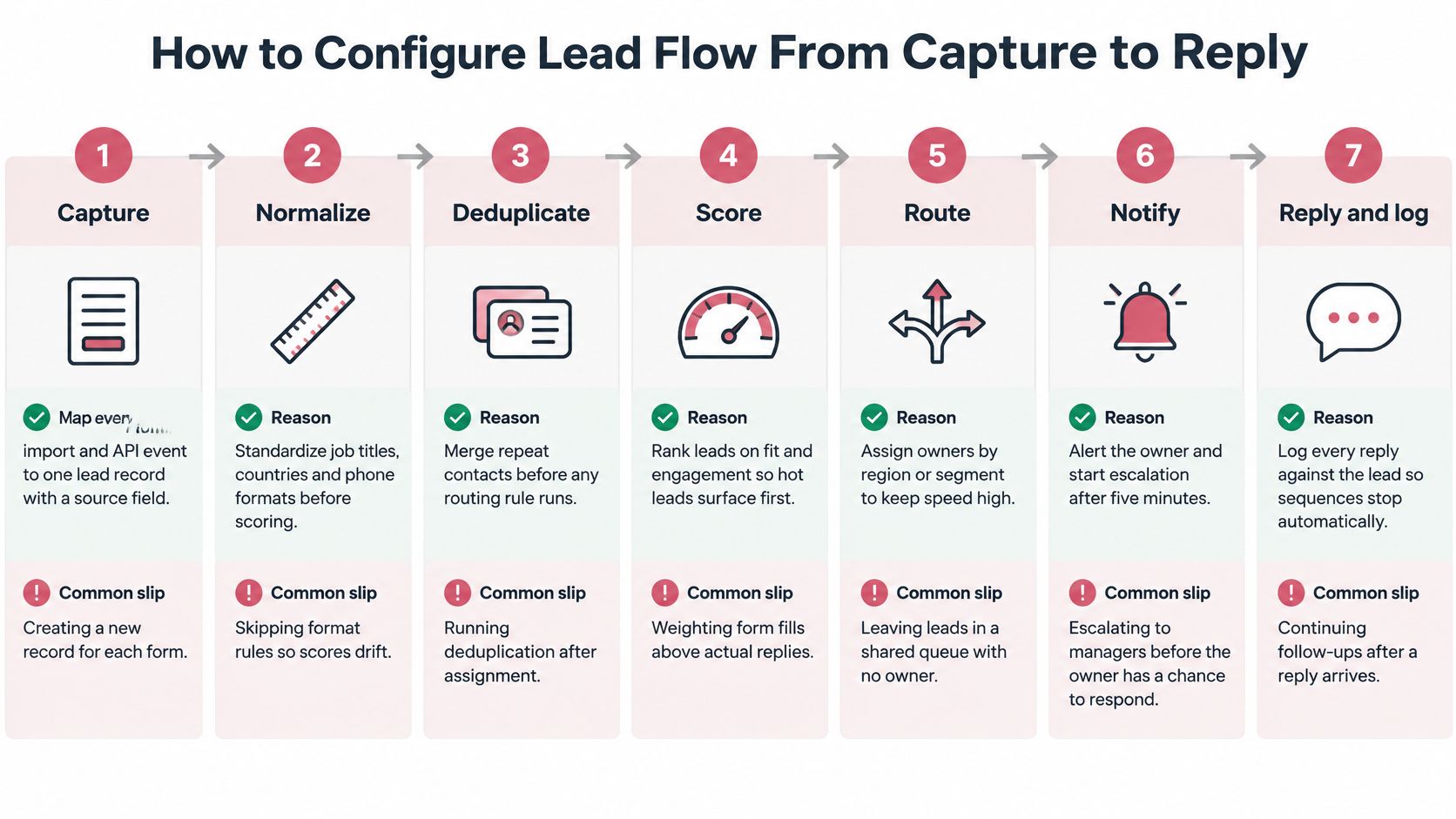
How to Configure Lead Flow From Capture to Reply
A reliable flow handles each record in order. The lead response study analyzed more than 15,000 leads across six companies and found that contacting a lead within five minutes produced odds of reaching the person 100 times higher than waiting 30 minutes. The odds of qualification were 21 times higher within five minutes than at 30 minutes. Those findings support event driven assignment and separate measures for attempted contact, reached contact, and qualification.
Capture. Map every form, import, and API event to one lead record with a source field and arrival timestamp. This preserves where the record came from; the common slip is letting a form create a new contact instead of updating a match.
Dedupe. Match normalized email first, then domain plus name, and apply survivorship rules before enrichment runs. Otherwise, the same person can be scored and routed twice before the CRM notices the duplicate.
Enrich. Fill required fields from the provider waterfall and mark unresolved gaps as missing, not negative. Treating an empty field as evidence against a lead can unfairly penalize people the system couldn't identify.
Score. Calculate ideal customer profile fit and engagement as separate numbers, and store the reason for each. Combining them into one unexplained score makes it hard for representatives to tell a poor fit from a strong fit with little recorded activity.
Route. Create the task immediately, assign by territory or round robin, and escalate after five minutes without acceptance. Routing on a schedule instead of on the form event creates avoidable delay.
Sequence. Start timed outreach only for consented, validated records, with stop rules on reply, bounce, or withdrawal. Businesses comparing specialist outbound support can also review this overview of a franchise lead generation company.
Log outcomes. Record attempted contact, reached contact, and qualified opportunity as separate fields, with reason codes, then review scoring weights monthly. If the CRM records only whether someone eventually called, the team can't tell where the process failed.
Account Signals Before the First Form Fill
A CRM that waits for a form fill sees only the moment a buyer identifies themselves. Recent B2B research reports that buyers may complete as much as 69 percent of their journey anonymously and consult an average of 27 information sources before selecting a vendor, according to the 2025 AI driven demand generation benchmark report. Treat those signals as evidence to review, not proof that an individual is ready to buy.
Start with account level activity. Store repeat visits from a company domain, pricing page views, and content downloads on the account record without attaching an invented person to them. Teams building a signal framework can use this guide to intent data and buying signals.
Set a threshold, such as three or more signals within 14 days, to trigger enrichment of the account's likely buying group. When the account crosses it, route the account to its owner and create a research task, not an automated sequence.
Tag these records as account signals so they don't count as inbound leads in conversion reports. Review the threshold monthly against accounts that later submit a form or create an opportunity. Any person level outreach still needs the person's own consent record before the first message.
Weighted Scorecard for Outbound and Inbound Teams
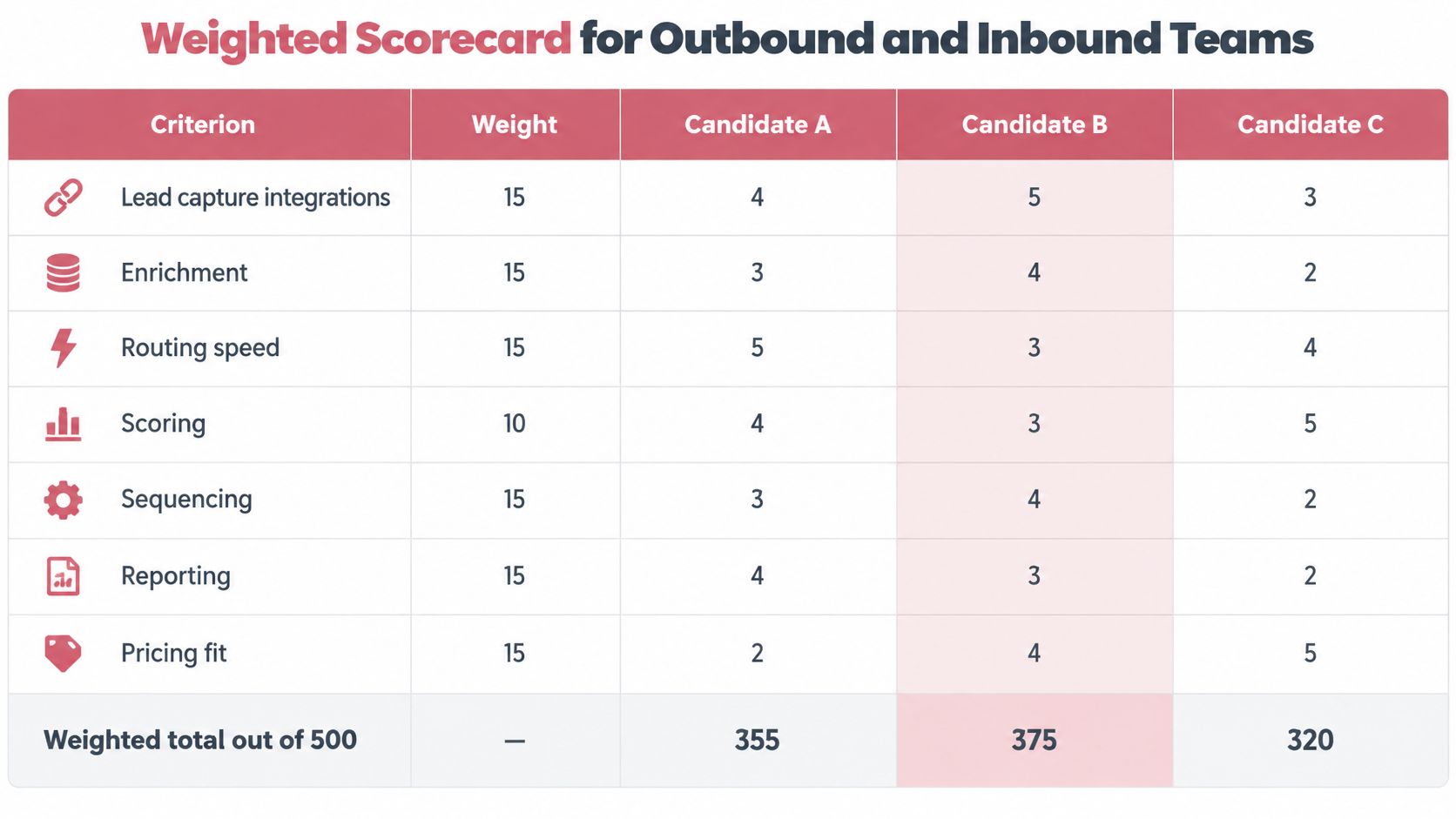
Score each candidate from zero to five on every criterion, multiply by the weight, and add the results. The weights total 100, so each team type has a maximum score of 500. Outbound teams put more weight on sequencing and on reporting by latency and source; inbound teams shift that weight toward scoring, routing speed, and SLA escalation. Enrichment, integrations, and consent logs carry identical weight for both, because a team that skips them pays for it either way.
| Criterion | Outbound weight | Inbound weight | Test to run |
|---|---|---|---|
| Enrichment and data hygiene | 15 | 15 | Load 200 known records and measure fill rate, bounce rate, and duplicate rate |
| Sequencing and multichannel outreach | 15 | 10 | Build a three step email and LinkedIn sequence that stops on reply |
| Integrations and sync | 20 | 20 | Sync 200 records both ways and check field mapping, duplicate handling, and API limits |
| Scoring and routing | 15 | 25 | Submit test leads with different fit and activity, then confirm scores, reasons, and owners |
| Automation and SLA alerts | 10 | 15 | Let a task go unaccepted and confirm escalation reaches the owner |
| Consent and audit logs | 10 | 10 | Withdraw consent on a test record and confirm suppression and its timestamp |
| Reporting by latency and source | 15 | 5 | Pull median first response by source and business hour |
| Total | 100 | 100 | Maximum score: 500 |
A CRM that wins a demo can still lose time to integration gaps and manual exports, so test sync with real records before scoring features.
Run the same test in each candidate rather than scoring from a vendor presentation. Load 200 records, build one sequence, set one routing rule, and produce one report. Include duplicates and missing fields so the team sees how each system behaves under ordinary operating conditions.
For the scoring and routing row, a documented score matters more than a high one. The system should show which fit and activity inputs produced each number, since a score without stated reasons can't be audited or improved. If the team hasn't agreed on those inputs yet, this overview of how lead scoring works is a reasonable place to set them before weighting the row.
Use the test column as the scoring script, and keep the evidence beside each score. A high score should mean the workflow worked end to end, not that a feature appeared in the interface. When two candidates finish within a few points, weigh the consent row and the reporting row first. Those are the controls that decide whether the pipeline you measure is the pipeline you ran.
Use Cases by Team Type
The right configuration follows the team's lead flow, not a vendor's feature checklist. An inbound operation usually breaks first at ownership and response time. An outbound operation usually breaks at data quality, sequencing, or record sync.
Inbound SaaS team
For a team receiving 300 or more form leads a month, prioritize scoring and routing, and escalate unaccepted tasks after five minutes. Delay waterfall enrichment until the existing provider's fill rate falls below the team's target, so enrichment cost doesn't slow every new submission. Skip a dialer at the start; first make sure leads reach an owner.
Outbound team with four SDRs
Prioritize multichannel sequencing, enrichment waterfalls, and consent logs. Make reply, bounce, and withdrawal stop rules part of the sequence test. Deep scoring can wait on day one if the team is still validating its ideal customer profile and basic message.
Agency serving several clients
Require separate workspaces or data partitions, client level reporting, and suppression lists that never cross between accounts. Shared outreach infrastructure can save setup work, but shared suppression or contact data can expose one client's records to another. Skip any setup that can't prove where each record and message belongs.
Solo founder
Choose one CRM with native sequences and one enrichment source. Each extra provider creates another sync point to maintain, so add tools only when the current setup creates a specific bottleneck.
Phone led teams selling large deals are the exception. Call logging and dialing should be must have features even when email volume is high, because the core sales motion depends on reliable call activity and follow up.
Confirm Your Setup With a Two Week Pilot
Write the pilot brief and scorecard before the first vendor demo. Shortlist two or three CRMs using the weighted results, then load 200 to 500 real leads into each, including duplicates and records with missing fields.
Run the same checks in every system:
- Measure duplicate rate, invalid email rate, median first response, and consent field completeness.
- Build one three step sequence with a reply stop rule.
- Log outcomes as attempted, reached, or qualified, with a reason code.
- Compare the manual work needed to sync records and produce the report.
Choose the platform that contacts 90 percent of inbound leads within one hour in the pilot, meets consent record requirements, and needs the fewest manual exports. Teams managing franchise relationships may also find this practical franchise CRM advice from Franchise Foundry useful when shaping their workflow.
If the team already runs a CRM, keep it as the system of record and test a GTM layer on top rather than replacing the core platform by default. Yalc is one option for connecting an existing CRM to enrichment and sequencing tools.
Yalc connects GTM tools through a unified API and supports configurable plays for prospecting, enrichment, scoring, sequencing, and CRM sync. Visit Yalc to assess whether its workflows fit the lead flow your team wants to test.