LinkedIn Lead Generation Strategy: A 2026 Playbook
The team has a polished LinkedIn page, a Sales Navigator list, and a sequence that took days to write. Yet the pipeline report still shows activity without qualified conversations. Reps send connection requests to cold names, treat every form fill as a sales opportunity, and judge the program by total messages instead of stage conversion.
A workable LinkedIn lead generation strategy treats the platform as a pipeline system. The operating model is simple: define the right accounts, identify buying signals, send a relevant message, require approval before sensitive actions, and connect every response to a measurable CRM stage. Warm intent deserves priority over volume, while cold outreach remains a controlled source of coverage rather than the whole motion.
Table of Contents
- Set the ICP and Pick LinkedIn as the System
- Optimize the Profile Like a Landing Page
- Choose the Right Entry Points and Channels
- Design the Connection and Messaging Sequence
- Run Automation With Approval Gates and Daily Caps
- Measure Acceptance, Reply, and Pipeline by Stage
- Roll Out the Playbook in 30 Days
Set the ICP and Pick LinkedIn as the System
The first asset isn't a Saved Search. It's a written ideal customer profile, or ICP, that names the industry, company size band, seniority, function, and trigger event that created the buying window. A revenue operations team might target Series B software companies hiring sales leaders, while a cybersecurity vendor might prioritize firms that recently announced a compliance initiative. Without that context, Sales Navigator turns prospecting into a slot machine.
Teams should document four decisions before opening LinkedIn:
- Account fit: Which industries and company characteristics make the problem urgent?
- Buyer fit: Which function and seniority can approve, sponsor, or block a purchase?
- Trigger fit: What visible event creates a credible reason to contact the person now?
- Disqualification: Which accounts look attractive but lack the timing, authority, or problem?
The ICP definition guide helps turn those decisions into fields reps can use consistently. That matters because LinkedIn exposes signals such as profile visits, post engagement, event attendance, job changes, and company activity before a prospect replies. Email often gives the seller only a send, open, or response event. LinkedIn provides more context around the person and account.
LinkedIn also has unusual reach for business prospecting. LinkedIn reports more than 1 billion members globally, and a widely cited B2B benchmark says 89% of B2B marketers use LinkedIn for lead generation while 62% say it generates leads, more than twice the next highest social channel. Those figures support choosing LinkedIn as a core prospecting system, not treating it as an awareness add on. See the Legacy Builder approach to LinkedIn leads for another practical framing of the platform as an operating process.
The trade off is throughput. A human led motion can't personalize unlimited touches, so the team should set a realistic daily ceiling and measure quality rather than chase activity.
| Channel | Avg Reply Rate | Warm Intent Signals | Daily Ceiling Per Rep |
|---|---|---|---|
| LinkedIn connection notes | About 3.0% on note replies | Profile activity, post engagement, job changes | Limited by review capacity |
| LinkedIn accepted follow ups | About 10.4% on accepted message follow ups | Acceptance, profile context, content activity | Limited by accepted connections |
| Varies by list and message | Opens, clicks, replies | Higher sending capacity, weaker identity context |
LinkedIn's own benchmark shows that Lead Gen Forms convert at about 13% on average, compared with 4.02% for standard landing pages. The practical conclusion is not to move every offer into LinkedIn. Native forms reduce friction for top of funnel capture, while a landing page may still be better when the buyer needs detailed education or qualification.
Optimize the Profile Like a Landing Page
A prospect who accepts a connection often checks the sender's profile before replying. The profile therefore acts as a landing page for the outbound motion. It should answer three questions quickly: who does this person help, what problem do they solve, and what useful next step can the visitor take?

Rewrite the visible promise
The banner should state the value proposition, the buyer served, and one proof asset. A sales leader might replace a generic background with a clear line about helping revenue teams improve qualification, alongside a link to a relevant guide or customer story.
The headline needs to explain the outcome, not the employee's internal title.
- Before: Account Executive at Acme
- After: I help Series B RevOps teams cut SDR ramp time from 90 to 30 days
The example is a positioning format, not a promise every profile can substantiate. The writer should replace the outcome with a result supported by genuine evidence. A claim that can't survive a prospect's follow up question weakens trust.
Make the About section do useful work
The first line should name the buyer's problem. The next lines can explain the operator's point of view, relevant experience, and evidence. The close should offer a low pressure action, such as sending a checklist or discussing the problem, rather than forcing a booking request.
A strong structure looks like this:
- Problem: “RevOps leaders often inherit a sales process that depends on individual rep judgment.”
- Point of view: Explain why the problem persists and what teams usually try first.
- Proof: Mention a real capability, customer result, or practical asset.
- Soft CTA: Invite the visitor to message the rep for the asset or context.
The Featured section should hold one case study, one short Loom, and one lead magnet. Each item must support the same positioning. A collection of unrelated posts creates work for the visitor instead of reducing uncertainty.
Profile rule: The Experience section should explain the problems the rep solves and the evidence behind the work. A copied job description tells a prospect what the company assigned, not why the conversation matters.
The profile also needs evidence of current activity. Posting or commenting twice weekly keeps the page from looking abandoned and gives warm visitors something relevant to inspect. The common mistake is treating Experience as a résumé archive and leaving the rest of the page static. A profile can be accurate and still fail as a conversion surface if it doesn't connect the buyer's problem to a credible next step.
Choose the Right Entry Points and Channels
The best entry point is the one that combines a credible reason to contact someone with a signal that the person may be receptive. A cold connection request can create coverage, but it shouldn't receive the same priority as a profile visit, event attendance, or recent engagement with a relevant post.
LinkedIn's benchmark data shows that connection note replies are about 3.0%, while accepted message follow ups reach about 10.4%. The stages should therefore be reported separately. A note is primarily an acceptance mechanism. The post acceptance message is where the seller tests relevance.
Warm intent deserves the next layer of attention. In a dataset covering more than 70,000 campaigns, profile visitor campaigns produced a 13.4% reply rate and event attendee campaigns produced 14.21%, compared with 10.3% across all LinkedIn direct messages. Those figures support a practical conclusion: a visitor or attendee is not automatically qualified, but the signal can justify a more specific opening than a generic invite.
| Entry Point | Acceptance % | Reply % | Volume |
|---|---|---|---|
| Connection request with note | About 28.5% platform wide acceptance | About 3.0% note replies | Broad |
| Accepted connection follow up | Acceptance is measured first | About 10.4% on accepted message follow ups | Moderate |
| Profile visitor campaign | Signal dependent | 13.4% in the cited campaign dataset | Lower |
| Event attendee campaign | Signal dependent | 14.21% in the cited campaign dataset | Lower |
| Native Lead Gen Form | Not an acceptance stage | About 13% conversion | Campaign dependent |
The strongest motion is a warm intent stack. Sales Navigator or another approved signal source identifies the event, a connection request creates access where appropriate, and a direct message or InMail handles strong intent. Cold requests still have a role when the target account matters and no visible signal exists, but they should not consume the same attention as a prospect who has already shown interest.
The trade off is volume. Warm signals produce smaller lists, so teams need a content trigger such as a useful post, event, report, or practical checklist to keep the pool active. For operational teams coordinating discovery calls after a prospect responds, a scheduling workflow such as sync interview schedules can reduce unnecessary back and forth. The tool choice matters less than preserving the signal, the message, and the resulting stage in one record.
Design the Connection and Messaging Sequence
A sequence should respond to events, not send arbitrary messages because a calendar reminder fired. Each touch needs one reason, one useful idea, and one clear action. The first reply isn't the place for a full product pitch.
Touch one after a relevant trigger
Trigger: The prospect posts about the problem, attends a relevant event, visits the profile, or changes into a target role.
Acceptance stage: No connection yet.
“Hi [Name]. Your post about [specific problem] caught my attention. I work with [buyer type] on [relevant outcome]. Happy to connect.”
A blank connection request can also work when the profile and trigger already provide enough context. The note should explain the reason for contact, not compress a sales deck into a small text field.
Touch two after acceptance
Trigger: The prospect accepts the connection.
Acceptance stage: Connected, no reply.
“Thanks for connecting. Teams in [specific context] often tell me that [pain the ICP admits publicly]. I put together a short checklist for diagnosing it. Want me to send it?”
This message earns the right to continue by naming a problem the buyer recognizes. It doesn't ask for a meeting before the prospect has shown interest.
Touch three with proof
Trigger: Four to six days have passed, or the prospect engages with a related post.
Acceptance stage: Connected, no response or light engagement.
“Sharing the checklist here because it relates to [specific issue]. The most useful part is the section on [relevant point]. If this is on your roadmap, I can also share how another team approached it.”
The proof must come from a real customer story, report, or asset that the sender can provide. It shouldn't imply a result the company hasn't verified.
Touch four to close the loop
Trigger: Twelve to 14 days have passed with no meaningful response.
Acceptance stage: Connected, no conversation.
“I'll close the loop after this. If [problem] becomes a priority, reply with ‘checklist' and I'll send the practical version. If it isn't relevant, no action needed.”
Every message should contain one ask. The first reply shouldn't contain a product pitch. Once a prospect expresses interest, route the conversation to a calendar link instead of asking another qualifying question that adds friction. The operator should also stop the sequence when the person declines, changes roles, or requests no further contact.
Run Automation With Approval Gates and Daily Caps
Automation should prepare and route work, not impersonate a seller. The safer design gives software responsibility for list movement, reminders, enrichment, and reporting while a human approves sensitive first touches and responses.
A practical control layer has four gates:
- First touch approval: Every initial connection request or message enters a review queue before sending.
- Template governance: Each template change receives an owner, version number, timestamp, and approver.
- Reply approval: A reply trigger routes to a person before any automated response leaves the account.
- Account audit: The log records which account sent what, when it was sent, which trigger started it, and which template version was used.
The team should set conservative caps based on its review capacity. A workable operating range is 20 to 25 connection requests, 40 to 60 profile views, and 25 to 35 messages per rep per day. These are internal guardrails, not a promise of platform safety. If any limit trips, pause the workflow, inspect the cause, and apply a hard weekly reset before resuming.
Approval principle: If a message could damage the sender's reputation, a human should see it before delivery.
LinkedIn's User Agreement and Professional Community Policies govern how members use connection requests and messages. Third party scrapers, fake accounts, and high volume unverified sends create restriction risk and can breach those terms. A compliant program uses legitimate accounts, accurate identity, relevant targeting, and a clear stop process. The absence of a warning from a tool doesn't make a workflow permissible.
A queue also improves quality. Reviewers can reject a message that cites an unverifiable trigger, uses an outdated job title, or sends a pitch to someone who only downloaded an asset. Teams evaluating implementation options can compare the LinkedIn automation tools for 2026 against these controls rather than choosing on task volume alone.
Measure Acceptance, Reply, and Pipeline by Stage
Activity totals hide failure points. A manager needs four stage metrics: connection acceptance rate, first reply rate, positive reply rate, and meetings booked per 100 sends. Each metric should have one definition and one source, so reps don't report numbers from different windows or labels.
LinkedIn's help documentation says Sales Navigator usage reporting defaults to the last 30 days, updates daily, and counts a user as active when they access Sales Navigator or LinkedIn through desktop, email, the mobile app, or a CRM embedded profile. Usage Reporting is available to Advanced and Advanced Plus users. That makes it an operational reference for access and activity, not a substitute for message outcomes.
| Metric | Definition | Data Source | Benchmark |
|---|---|---|---|
| Connection acceptance rate | Accepted connections divided by requests sent in the same cohort | Sales Navigator outcomes or approved connection tool | About 28.5% platform wide acceptance |
| First reply rate | Prospects who reply to the first accepted message divided by accepted connections | Messaging inbox with campaign labels | About 10.4% on accepted message follow ups |
| Positive reply rate | Replies classified as relevant interest divided by delivered messages | Inbox labels reviewed by a human | Establish an internal baseline |
| Meetings booked per 100 sends | Qualified meetings attributed to the LinkedIn campaign divided by sends | CRM opportunity stage and campaign tag | Track by cohort, not activity total |
The LinkedIn outreach automation guide can inform workflow design, but the CRM remains the source of truth for qualified meetings and pipeline. Attach a LinkedIn UTM, campaign member tag, or equivalent source field to every record. The sales manager should then trace the lead from signal to message, reply, qualification, meeting, and opportunity.
LinkedIn also provides a useful account coverage concept. Its documentation defines a buyer finding metric as 25 or more decision makers connected, messaged, or saved as leads. The team can use that threshold to distinguish account coverage from raw rep activity. Sales Navigator reporting also includes leads saved, including automatically saved leads from a synced CRM.
When acceptance falls, revisit targeting, profile positioning, or the trigger. When acceptance is healthy but replies are weak, change the message and offer. When replies are strong but meetings don't qualify, inspect the ICP, the handoff, and the definition of a positive response. Don't rewrite everything at once, or the team won't know which change mattered.
Roll Out the Playbook in 30 Days
The rollout should produce evidence each week, not just a completed set of templates. The team starts manually, adds controls before scale, and keeps a record of every decision. That sequence makes it possible to stop a weak motion before it consumes more prospect attention.
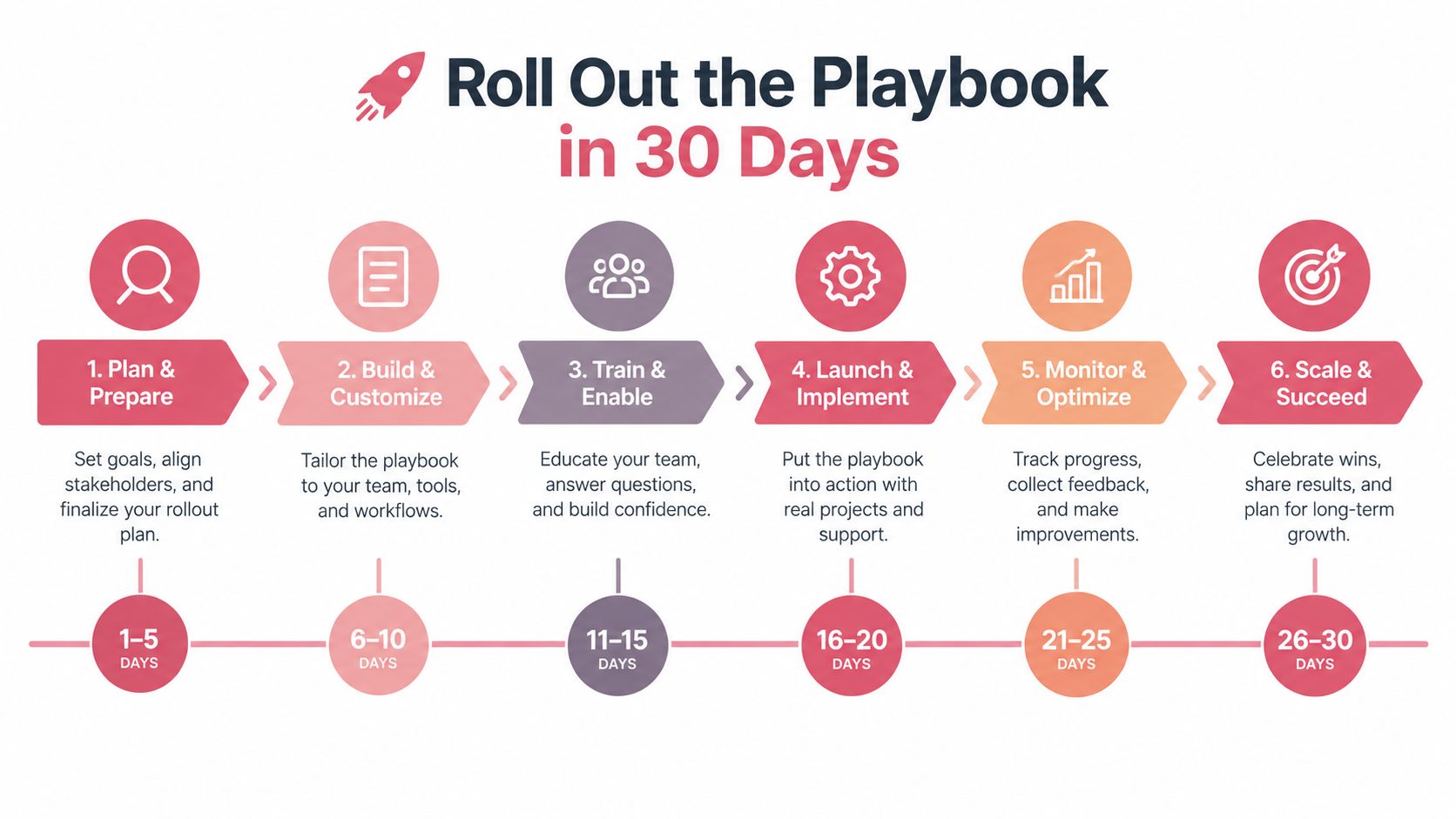
Week one builds the foundation
Write the ICP, define the trigger events, and build the target account list in Sales Navigator. Rewrite two rep profiles using the landing page checklist, then review both profiles as if arriving from a connection request. The Friday deliverable is a screenshot of the CRM stage dashboard and one decision logged in the playbook document.
Week two validates language manually
Draft the four touch sequence in a shared document. Run it manually on 50 prospects, as specified by the rollout plan, and record the trigger, message version, response category, and next action for every prospect. Create CRM fields for acceptance, first reply, positive reply, and meetings booked per 100 sends. Practical outreach tips for sales teams can help the team tighten execution outside LinkedIn, but the LinkedIn experiment should keep its own source tracking.
Week three adds controlled automation
Turn on automation behind the approval gates. Cap invites at 20 per rep per day, route every reply to a human reviewer, and preserve the template version in the audit log. The reviewer should also verify that the trigger still exists when the message is ready to send. A changed role, deleted post, or stale event can turn relevant copy into an awkward message.
Week four makes the decision
Audit acceptance, reply, qualified meeting, and pipeline rates against the benchmarks established earlier. Kill sequences that fall below the team's agreed threshold after a fair cohort, then increase attention on the winner rather than multiplying unproven variants. The weekly scorecard should show stage conversion rates, and a recorded sales call should prove that the lead source was LinkedIn.
Every Friday, require two deliverables: one screenshot of the CRM stage dashboard and one logged decision in the playbook document. After 30 days, the team should know which signals create conversations, which messages earn replies, and where qualified pipeline drops. If it only knows how many messages were sent, the system isn't measuring the funnel.
Yalc gives GTM teams a controlled way to coordinate prospecting, enrichment, LinkedIn actions, reply handling, CRM updates, and reporting through one operating layer, with approval gates and step by step telemetry for sensitive work. Visit Yalc to see how its playbooks can connect a measurable LinkedIn motion to the rest of your pipeline.