8 Marketing Automation Workflow Examples for B2B GTM
Automation works when the handoff is specific, not when a workflow contains the most steps. A sequence that sends emails, updates fields, and posts alerts creates little value if nobody owns the next action or if the team can't connect the result to pipeline. A useful workflow starts with a defined signal, runs a controlled sequence, gives the next owner enough context to act, and stops when the outcome is reached.
The strongest marketing automation workflow examples form a connected B2B system. They prepare reliable data, qualify accounts, turn meaningful visits and content engagement into sales signals, coordinate prospecting, triage replies, capture competitive learning, and improve campaigns based on commercial outcomes. Each play below includes the trigger, ordered actions, integrations, decision points, KPIs, failure controls, and the situations where it belongs.
Yalc fits where teams need orchestration across these plays. Its playbooks, unified GTM API, confidence scored verdicts, human approvals, and audit trail support workflows that need to execute across data sources, channels, CRM records, and reporting without hiding the logic from operators.
Table of Contents
- 1. Lead Scoring and Qualification Workflows
- 2. Email Enrichment and List Building Workflows
- 3. Visitor to Lead Pipeline Workflows
- 4. Content Triggered Engagement Workflows
- 5. Multichannel Prospecting Sequences
- 6. Intelligent Reply Handling and Triage Workflows
- 7. Competitive Intelligence and Win Loss Workflows
- 8. Campaign Measurement and Feedback Loop Workflows
- 8 Marketing Automation Workflows Compared
- Build the Handoff Before Adding More Automation
1. Lead Scoring and Qualification Workflows
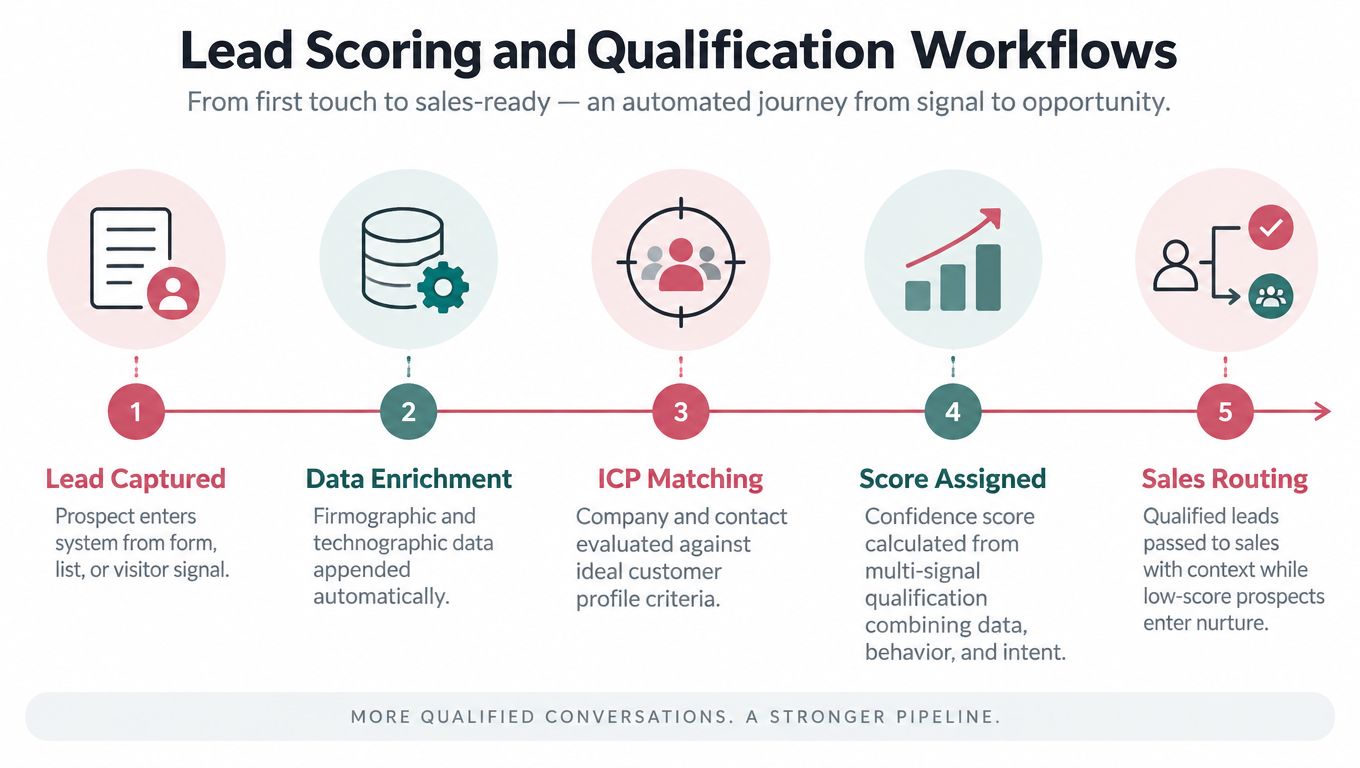
Lead scoring should decide who gets attention now, not produce an impressive number that sales ignores. A practical model combines firmographic fit, behavioral activity, and recency, then routes only leads that meet a clear qualification standard.
A B2B SaaS company might score website visitors against company size, technology stack, and hiring patterns. An enterprise team might check whether an inbound account meets its minimum ARR requirement and has recent funding activity. An outbound team could score prospects sourced from LinkedIn based on title relevance, company growth signals, and engagement with relevant content.
The operating play
Trigger: A new lead enters the CRM, a known contact performs a high intent action, or an existing record changes enough to recalculate its score.
Actions: Normalize the company and contact record, evaluate three to five core ICP signals, add recent engagement, assign a confidence score, and route qualified records to the correct sales owner. Keep lower fit or lower intent leads in nurture.
Integrations: CRM, enrichment provider, website event tracking, marketing automation platform, and an internal alert channel.
Decision points: Does the account match the ICP? Is the activity recent and meaningful? Is the record a duplicate, suppressed contact, or existing opportunity? If the score is high but fit is weak, send the record to review instead of creating an automatic sales handoff.
KPIs: Qualified lead acceptance, sales response time, opportunity creation, stage progression, and closed revenue by scoring factor.
Practical rule: A score should explain a routing decision. If a sales representative can't see which signals created it, the model will lose trust.
The workflow needs a manual override. Sales should be able to reject a lead, mark a false positive, or promote a missed account, with the reason recorded for recalibration. Teams should review which factors correlate with closed deals and adjust the model quarterly, rather than treating the first version as permanent.
The mechanics are covered in this guide to lead scoring. A broader guide to revenue focused automation is useful when the scoring workflow must connect to a wider revenue process. Deploy this play when manual triage delays sales follow up or when marketing and sales disagree about what “qualified” means.
2. Email Enrichment and List Building Workflows
Bad data turns every later workflow into a liability. Enrichment belongs before CRM import or outreach enrollment, because an incorrect role, stale company record, or unverified address can create poor routing and damage deliverability.
An outbound team might upload a CSV containing company names and job titles, then append verified email addresses, phone numbers, LinkedIn URLs, and company information. Growth marketing can enrich an existing customer list with industry, company size, and technology data to identify similar accounts. An enterprise account executive can clean a Salesforce list by finding bounced addresses and updating contact details for known companies.
The operating play
Trigger: A new record enters a prospect database, a campaign list is uploaded, or a high value account reaches its review date.
Actions: Normalize names and domains, deduplicate against the CRM, append only required fields, verify email status, check suppression rules, and send uncertain records to human review. Import approved records with source and enrichment timestamps.
Integrations: CRM, enrichment service, email verification tool, suppression list, warehouse, and campaign platform.
Decision points: Is the contact still at the company? Is the role relevant? Is the email usable for the intended channel? Does the record already exist under another domain or contact identity?
KPIs: Enrichment completeness, verification accuracy, duplicate rate, bounce rate, reply quality, and accepted records by source.
The workflow should enrich new leads as they enter the system, but high value account lists need periodic re enrichment because roles and contact details change. It should also segment by industry, company size, and technology so that messaging reflects the recipient's context instead of treating every record alike.
Use this lead enrichment tools resource when designing the provider layer. The main trade off is coverage versus control. Enriching every field can increase cost and create unnecessary data exposure, while enriching too little leaves sales without the context needed to prioritize. Deploy this play before any scaled outbound sequence or account based campaign.
3. Visitor to Lead Pipeline Workflows
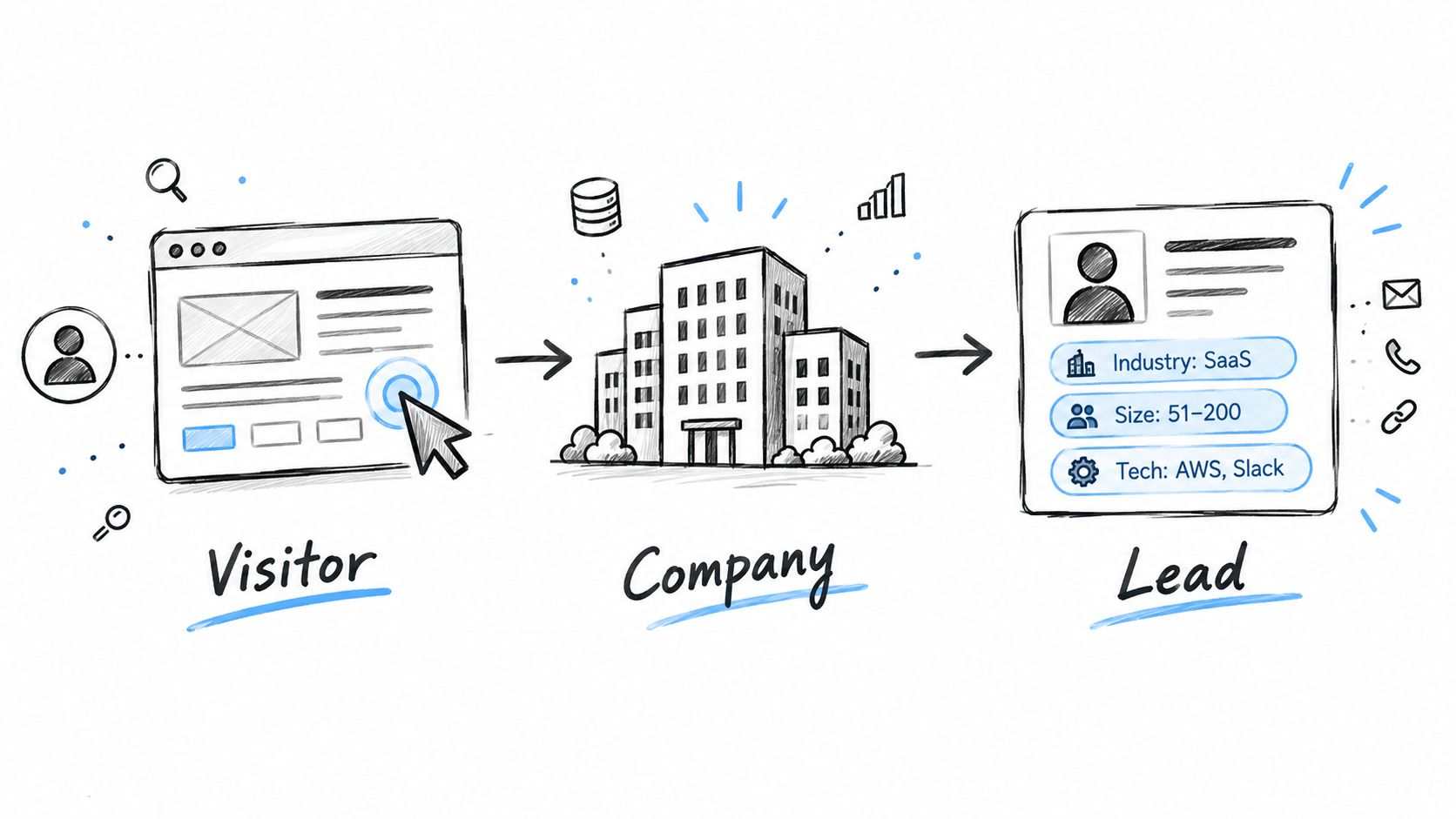
A visitor signal becomes useful only when it creates a focused account action. Broad alerts for every anonymous session overwhelm sales. A threshold based on account fit, page intent, repeat activity, and timing gives the team a signal it can use.
Consider a SaaS company that identifies a technology startup with roughly 500 employees spending 15 minutes on pricing pages. The workflow can alert the assigned SDR, identify relevant technical and executive contacts, and prepare an email for review. An enterprise security firm might alert an account executive when a target company returns to product pages for the third time in a week.
The operating play
Trigger: A known contact submits a form, an account matching the target list visits a high intent page, or a target organization returns repeatedly.
Actions: Resolve the account where the data and consent rules allow it, attach visited page context to the CRM record, calculate visitor intent, alert the owner, and create a suggested outreach task. Use retargeting or relevant content for lower intent visitors.
Integrations: Website analytics, reverse company identification, CRM, advertising platform, enrichment service, and Slack or Teams.
Decision points: Is the visitor from a priority account? Did the session show meaningful intent? Has the account already entered an active opportunity or sequence? Can the team contact the person lawfully and appropriately?
KPIs: Visitor to lead conversion, account engagement, meeting creation, opportunity influence, response time, and outreach acceptance.
The message shouldn't reveal surveillance. “Your team may be evaluating security options” is not a safe opening if the recipient never identified themselves. Sales should instead reference a relevant problem, resource, or product area without exposing the underlying tracking method.
Set realistic thresholds and cap alerts by account. If volume remains high, restrict the workflow to target account lists and use content or advertising for the rest. Deploy it when account based teams need earlier buying signals, not as a replacement for demand creation.
4. Content Triggered Engagement Workflows
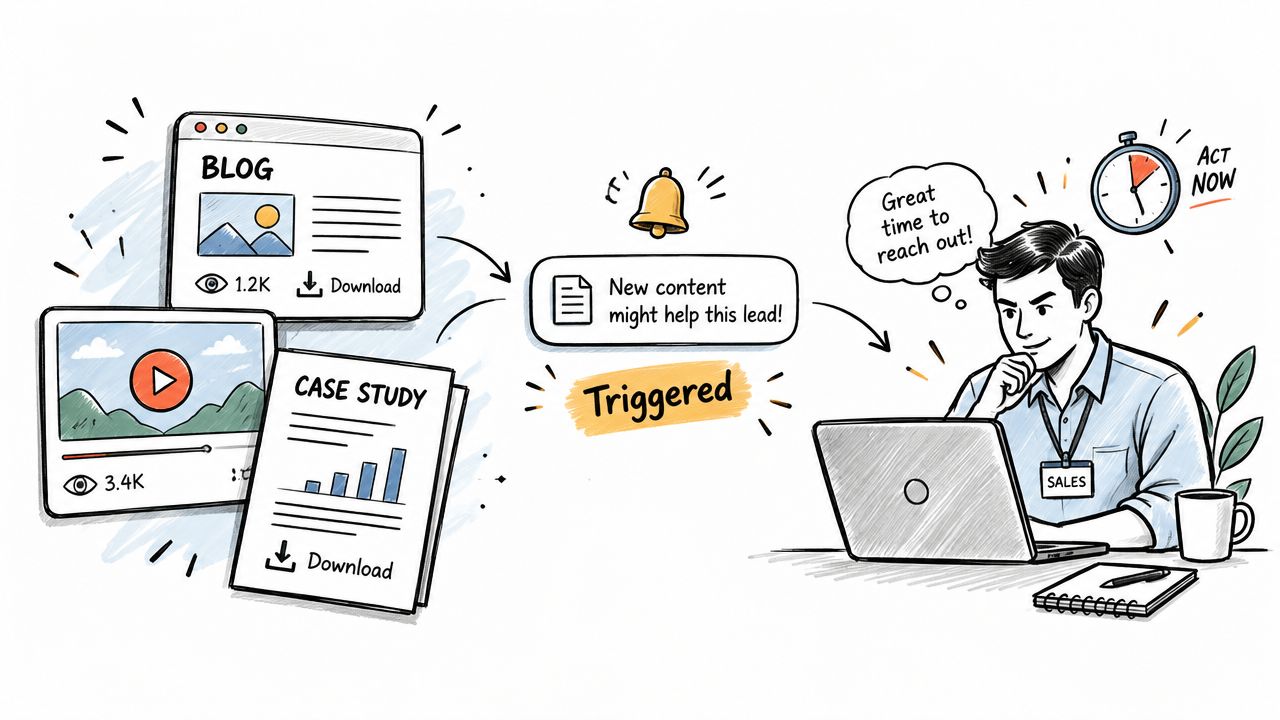
Content engagement should change the next conversation. A pricing calculator, product demo, or technical webinar carries more intent than a casual blog visit, but only if the workflow records what the prospect consumed and gives the owner a useful follow up path.
A B2B company can trigger an account executive alert when a prospect downloads an ROI calculator, including the submitted inputs and an offer to discuss the result. A startup can notify a sales representative when someone watches several product videos in one day, then send a message tied to the specific features watched. An enterprise SaaS team can use webinar attendance, questions, and engagement to prepare a personal video follow up.
The operating play
Trigger: A prospect downloads a high value asset, attends a webinar, watches several product videos, or reaches a defined engagement threshold.
Actions: Record the asset and event details, update the CRM, notify the owner through the preferred channel, send a relevant follow up, and exit any generic nurture that would create conflicting messages.
Integrations: Content platform, webinar system, video analytics, CRM, email, Slack or Teams, and calendar tool.
Decision points: Is the activity meaningful enough to indicate intent? Does the account fit the ICP? Has the contact already spoken with sales? Should the next step be human outreach, a useful resource, or continued nurture?
KPIs: Meetings, demo requests, opportunity creation, content assisted pipeline, response time, and conversion by content type.
Follow up quickly while the topic is fresh. The message should name the resource and offer a logical next step, not jump directly to a generic product pitch. Different content types need different paths, because someone downloading a technical guide may need a solution engineer while someone attending a commercial webinar may need an account executive.
A useful control is an engagement threshold that excludes casual visits and repeated events from the same session. Deploy this workflow when marketing produces substantial content but sales can't see which accounts are actively evaluating the problem.
5. Multichannel Prospecting Sequences
Multichannel prospecting works when each touch adds context. It fails when a team copies the same pitch into email, LinkedIn, and chat while ignoring replies, consent, or channel limits.
A technology sales team might use a sequence with email first, a LinkedIn message next, a thoughtful comment on a prospect's post, another email, a second LinkedIn touch, a message in a connected workspace, and a final email. The exact cadence should follow the team's compliance rules, audience expectations, and available signals, not a rigid template.
The operating play
Trigger: A reviewed, enriched prospect enters an approved campaign and has no conflicting active sequence.
Actions: Send a relevant first email, wait for the next permitted touch, vary the channel and message purpose, pause on engagement, route replies to triage, and stop on unsubscribe, objection, meeting booking, or opportunity creation.
Integrations: CRM, LinkedIn workflow, email platform, chat channel, sequencing tool, suppression list, and reply handler.
Decision points: Did the prospect engage? Is the account already in another motion? Is the next channel permitted? Does the message need human personalization before sending?
KPIs: Positive reply rate, meetings booked, opportunity creation, unsubscribe rate, bounce rate, and conversion by channel combination.
Use velocity limits such as a maximum of one touch per day when appropriate. Test subject lines, opening hooks, and calls to action, but don't optimize for opens alone. A high open rate with poor replies or unsubscribes indicates that the sequence creates curiosity without relevance.
Every sequence needs an exit condition that protects the relationship, not just a final step that exhausts the cadence.
A clean prospecting guide by CleanMyList can help frame list quality and outreach preparation. Deploy this play for defined ICP segments with enough account context to support useful personalization. Don't deploy it to unreviewed lists or use it to compensate for weak positioning.
6. Intelligent Reply Handling and Triage Workflows
Reply handling is where automation must become conservative. The system can classify routine responses and organize context, but interested prospects, objections, legal requests, and unusual situations need fast human attention.
An SDR team receiving many daily replies can automatically identify out of office messages, unsubscribe requests, and simple requests for information. The workflow can send approved resources for routine cases, while escalating positive intent and objections to the account executive. A customer success team can use similar triage in a Slack support channel, with urgent issues flagged and common resolution templates suggested.
The operating play
Trigger: A reply arrives in email, LinkedIn, chat, or a support channel.
Actions: Classify intent, check the account and opportunity record, apply suppression or preference updates, draft an approved response for routine cases, and escalate high priority replies with full conversation context.
Integrations: Email, LinkedIn, chat, CRM, help desk, calendar, knowledge base, and internal alerting.
Decision points: Is the classification high confidence? Does the reply contain buying intent, an objection, a complaint, a privacy request, or an escalation risk? Is human approval mandatory before sending?
KPIs: Response time for high intent leads, classification accuracy, reply to meeting conversion, escalation rate, and unresolved reply age.
Start with high confidence categories such as out of office and unsubscribe. Expand only after reviewing misclassifications. Keep the template library current, especially for pricing, security, timing, and competitor objections.
A hard response SLA for hot leads is useful, but it must be backed by ownership and coverage. If the workflow promises speed while alerts disappear into a shared channel, automation only conceals the operational failure. Deploy this play when reply volume causes missed opportunities or when sales representatives lose time sorting administrative responses.
7. Competitive Intelligence and Win Loss Workflows
Competitive intelligence becomes actionable when it changes a play, not when it fills a dashboard. The workflow should capture which competitor appeared, what capability mattered, how the deal ended, and what the sales team said.
An enterprise SaaS team might analyze deal records to learn that a competitor loses more often when buyers require real time data. That insight can inform discovery prompts, battle cards, and product positioning. A venture backed startup can monitor competitor funding announcements and alert sales when a newly funded competitor enters its geography. A growth team can extract competitor mentions from sales notes and build separate objection paths for three named competitors.
The operating play
Trigger: A competitor is entered in a CRM opportunity, appears in a call note, is mentioned in a sales conversation, or generates a market event relevant to a target account.
Actions: Normalize the competitor name, associate the mention with account, stage, capability, and outcome, notify the relevant team, update a battle card, and add the insight to the next messaging review.
Integrations: CRM, conversation intelligence, LinkedIn or market monitoring, knowledge base, product feedback system, and reporting layer.
Decision points: Is the mention confirmed or speculative? Does the account have an active opportunity? Is the insight specific enough to change positioning? Should product, marketing, or sales own the follow up?
KPIs: Win rate by competitor, opportunity progression, objection resolution, battle card usage, and product requests linked to competitive losses.
The data model matters more than the monitoring feed. Require standard CRM fields for competitor, capability, competitive outcome, and confidence. Review patterns quarterly and share validated insights with product and marketing.
Deploy this workflow when competitive mentions are frequent enough to affect deal strategy. Don't treat unverified social posts or isolated salesperson opinions as market truth.
8. Campaign Measurement and Feedback Loop Workflows
Measurement should decide what happens next, not merely describe what already happened. Each campaign needs a hypothesis, predefined success metrics, a confidence rule, and a path for promoting or retiring the play.
An outbound team can run subject line variations and compare opens, replies, meetings, and opportunities. A demand generation team can connect webinar registrations, attendance, demo requests, and later opportunity stages. An enterprise sales team can test two discovery approaches and judge them by booked meetings and closed deals rather than by activity volume.
The operating play
Trigger: A campaign reaches its reporting window, an experiment has enough observations, or a meaningful downstream outcome is recorded.
Actions: Join touchpoint, account, opportunity, and cost data, calculate conversion through the funnel, compare variants, flag weak data, create a confidence scored verdict, and recommend whether to keep, revise, or retire the play.
Integrations: Campaign platform, CRM, warehouse, advertising system, finance data, experimentation layer, and reporting dashboard.
Decision points: Are the records deduplicated? Is the sample sufficient for a decision? Did the campaign create pipeline or only engagement? Are sales acceptance and revenue data complete?
KPIs: Conversion from initial touch to opportunity, cost per acquisition, pipeline created, closed revenue, sales acceptance, and performance by segment and channel.
Don't declare a winner from early noise. Define the minimum evidence required before launch, and track results from first touch through closed deal where possible. Weekly reporting keeps teams close to the learning loop, while quarterly reviews can reset metrics as business priorities change.
The sales dashboard examples provide useful context for connecting activity to commercial reporting. Deploy this workflow from the first campaign, but keep the initial verdict advisory until data quality and attribution are reliable.
8 Marketing Automation Workflows Compared
| Workflow | Implementation Complexity 🔄 | Resource & Data Needs ⚡ | Expected Outcomes ⭐ 📊 | Ideal Use Cases 💡 | Key Advantages ⭐ |
|---|---|---|---|---|---|
| Lead Scoring and Qualification Workflows | Medium–High, scoring engine, routing & feedback loops 🔄 | High, firmographic, intent & enrichment feeds; CRM integration ⚡ | ⭐ Better lead prioritization; 📊 fewer unqualified leads, higher conversion | ICP-driven B2B sales, scalable qualification | Prioritizes high-probability accounts; learns from outcomes |
| Email Enrichment and List Building Workflows | Low–Medium, bulk processing, dedupe, verification 🔄 | Medium–High, paid data sources, verification services, storage ⚡ | ⭐ Lower bounce rates; 📊 cleaner CRM data and improved deliverability | Outbound prospecting, CRM cleanup, list preparation | Reduces wasted sends; enables stronger personalization |
| Visitor to Lead Pipeline Workflows | Medium, real‑time ID, IP mapping, fast routing 🔄 | Medium, visitor tracking, enrichment, privacy/compliance ⚡ | ⭐ Converts anonymous traffic to leads; 📊 real‑time account signals | Account‑based marketing, high-value visitor detection | Detects active accounts and triggers timely outreach |
| Content Triggered Engagement Workflows | Medium, content integrations, trigger rules, sequencing 🔄 | Medium, content analytics, engagement tracking tools ⚡ | ⭐ Higher response at peak intent; 📊 better conversion from engaged prospects | Nurture flows, inbound-to-sales acceleration | Reaches prospects when interest is highest with relevant hooks |
| Multichannel Prospecting Sequences | High, cross‑platform orchestration, adaptive logic, testing 🔄 | High, multiple platforms, personalization data, monitoring ⚡ | ⭐ Much higher response rates (3x–5x); 📊 increased meetings/bookings | Outbound SDR, complex B2B sales, demand gen campaigns | Breaks through noise via coordinated, adaptive touches |
| Intelligent Reply Handling and Triage Workflows | Medium–High, intent classification, AI replies, escalation rules 🔄 | Medium, conversation history, training data, SLA management ⚡ | ⭐ Faster response times; 📊 reduced manual triage time | High-volume inboxes (SDR/CS), webinar/reg system replies | Prioritizes hot leads and automates routine replies safely |
| Competitive Intelligence and Win Loss Workflows | Medium, monitoring pipelines, extraction & analysis 🔄 | Medium, CRM discipline, external feeds, conversation logging ⚡ | ⭐ Better positioning decisions; 📊 insights on win/loss patterns | Strategic enterprise sales, product positioning, ops | Reveals why deals win/lose and informs messaging/product moves |
| Campaign Measurement and Feedback Loop Workflows | Medium, tagging, metrics pipeline, auto‑promotion logic 🔄 | Medium–High, tracking through to closed deal, analytics tooling ⚡ | ⭐ Data‑driven ROI decisions; 📊 rapid iteration and scaling of winners | Demand gen, A/B testing, continuous improvement programs | Objectively measures campaigns and automates learning loops |
Build the Handoff Before Adding More Automation
The rollout sequence should follow operational dependency. Start with enrichment and list hygiene, then add scoring and qualification so sales receives records it can trust. Once those foundations are stable, add visitor and content triggers, because intent signals are only useful when account identity, ownership, and suppression data are dependable.
Layer multichannel prospecting after the team can manage entry rules, channel permissions, and exits. Add reply handling when the organization has approved response templates, escalation rules, and a clear owner for high intent conversations. Measurement should run across every stage, not appear at the end as a separate reporting project.
The market has moved well beyond isolated email sends. A 2026 industry summary reports that 95% of enterprise marketing teams and 78% of mid market B2B organizations run at least one marketing automation platform, while only 12% of teams with more than 50 marketing employees operate without a dedicated platform, down from 27% in 2023. The same summary reports that 93% of marketers automate administrative tasks, about 92% use automation for data analysis and reporting, and 40% of journeys are mostly or fully automated. These figures are reported in the 2026 marketing automation statistics summary. The implication is practical. Automation now sits inside execution and measurement, so disconnected recipes create more operational risk than advantage.
The historical shift explains why modern workflows need cross channel controls. The market reached $6.65 billion in 2024 and is projected to reach $15.58 billion by 2030, with a projected 15.3% compound annual growth rate, according to industry ROI and market data. Email remains the most automated channel at 58%, followed by social media management at 49%, content management at 33%, paid advertising at 32%, and SMS marketing at 30%. Around 79% of marketers automate customer journeys partially or fully, while only about 10% of journeys are fully automated in the cited data. The lesson isn't to remove people from complex decisions. It is to reserve human judgment for decisions that actually need it.
Start the first play with one trigger, one owner, one approval rule, and one pipeline KPI. Define the exit condition before adding another action. If a team needs to compose these plays through its MCP or run preconfigured playbooks from Slack and its UI, Yalc can provide that operating surface while keeping data, keys, permissions, logs, and learning loops under the team's control.
Yalc provides a unified GTM API, preconfigured playbooks, and composable workflows for enrichment, scoring, prospecting, reply handling, CRM updates, and campaign reporting. Teams can use its MCP through Claude Code or run plays from Slack and the Yalc UI, with approvals and audit logs for sensitive actions. Visit Yalc to connect these marketing automation workflow examples to a controlled B2B GTM system.