Sales Enablement Content, a 2026 Operator Playbook
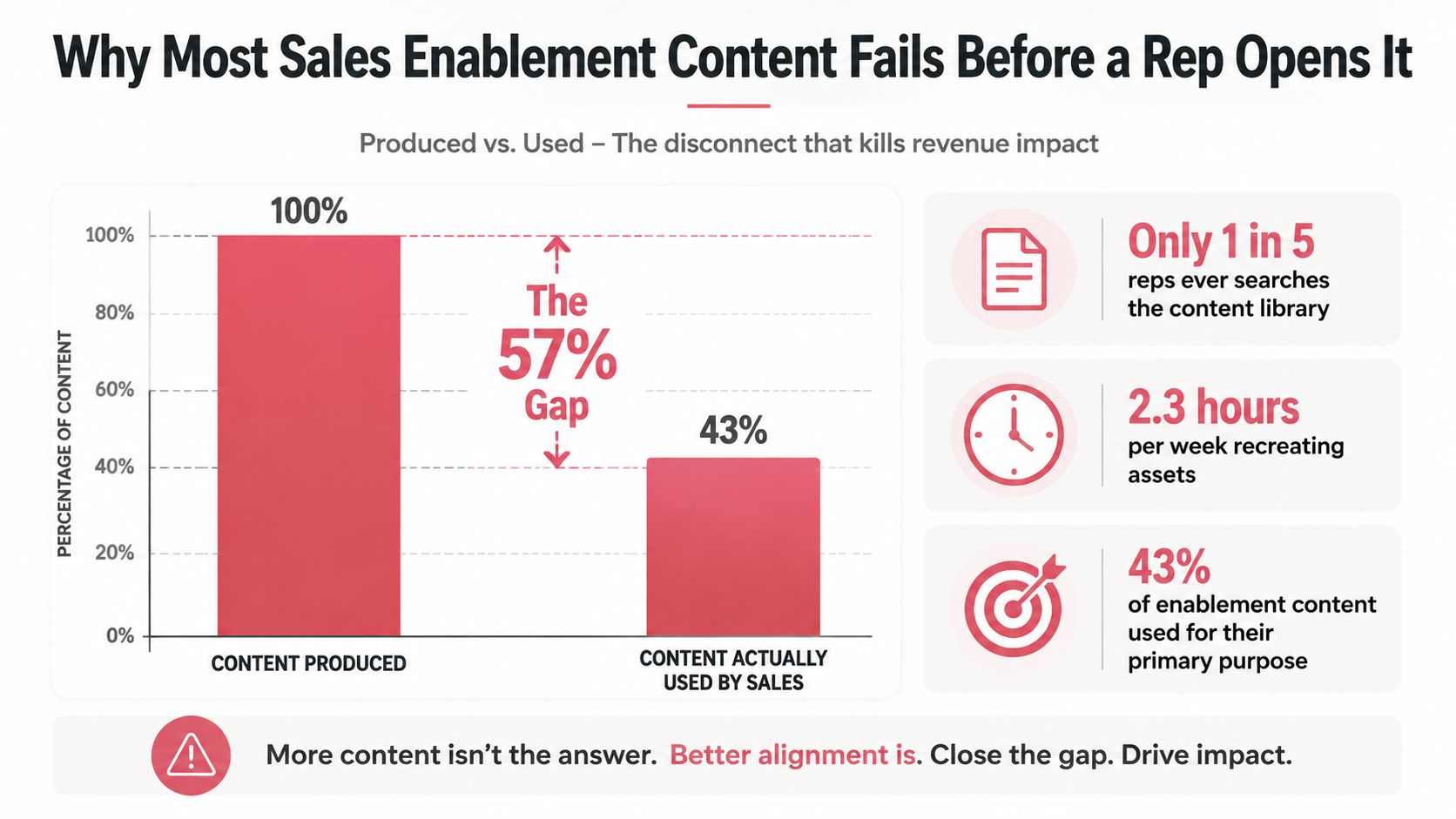
Only about 30% of marketing created sales content is used by sales teams, while roughly 40% is recreated because reps can't find the original (SiftHub's sales enablement benchmark). That isn't primarily a writing problem. It's a retrieval problem, a trust problem, and increasingly a timing problem.
A sales enablement content program succeeds when a rep can find the right asset, understand how to use it, adapt it safely, and connect it to the buyer's next step. A large library that fails those tests is operational clutter. The useful asset isn't the document sitting in a folder. It's the document that appears in the live deal when the buyer needs it.
Table of Contents
- Why Most Sales Enablement Content Fails Before a Rep Opens It
- What Sales Enablement Content Actually Is
- The Core Asset Types Mapped to Buyer Stages
- Playbook Examples and Templates You Can Ship This Quarter
- Operating the Program at Scale with Governance and AI Orchestration
- A Measurement Framework That Ties Content to Revenue
- Common Misconceptions and the 90 Day Implementation Checklist
Why Most Sales Enablement Content Fails Before a Rep Opens It
The conventional response to weak content usage is to produce more. That usually increases the problem. One industry summary reports that 78% of teams lack easy access to the content they need, and reps spend an average of 440 hours per year searching for the right content (SiftHub's sales enablement benchmark). A rep who can't find a trusted case study during deal preparation won't launch a research project. They'll recreate a version, forward an old attachment, or proceed without support.
The production and usage gap has several causes:
- Poor retrieval: Assets have vague names, weak metadata, or duplicate versions.
- Low trust: Reps don't know whether the pricing, positioning, or proof is current.
- Weak context: A file may be useful in general but irrelevant to a specific persona or stage.
- Late delivery: The asset appears after the buyer's question, not when the question is forming.
Remote and hybrid selling made this failure more visible. A survey of remote selling teams found that email templates were created by 53% of teams, followed by call scripts at 39%, pre call checklists at 37%, product demos and customer testimonials at 36% each, messaging templates at 34%, case studies at 32%, and informative blog posts at 19% (sales enablement statistics from Federico Presicci). These formats are practical, but standardization alone doesn't make them usable.
The same source reports that the top 10% of content generated 50% of engagement, while most of the remaining library produced far less interaction. That concentration changes the operating question. The team shouldn't ask, “How can it create more assets?” It should ask, “Which assets help reps progress live opportunities, and how quickly can reps reach them?”
Practical rule: Measure the time from a buyer need appearing in a live deal to a rep finding a trusted asset. Library size is not a performance metric.
What Sales Enablement Content Actually Is
Sales enablement content is a resource designed to help a seller or buyer move through a sales conversation. That definition is narrower than “anything marketing publishes” and broader than “a sales deck.”
A marketing article may attract demand. A product marketing brief may clarify positioning. A field enablement asset helps a rep handle a specific situation, such as opening discovery with a finance leader, answering a security objection, or preparing an evaluation committee. These groups often overlap, but they shouldn't be managed as if they have the same job.
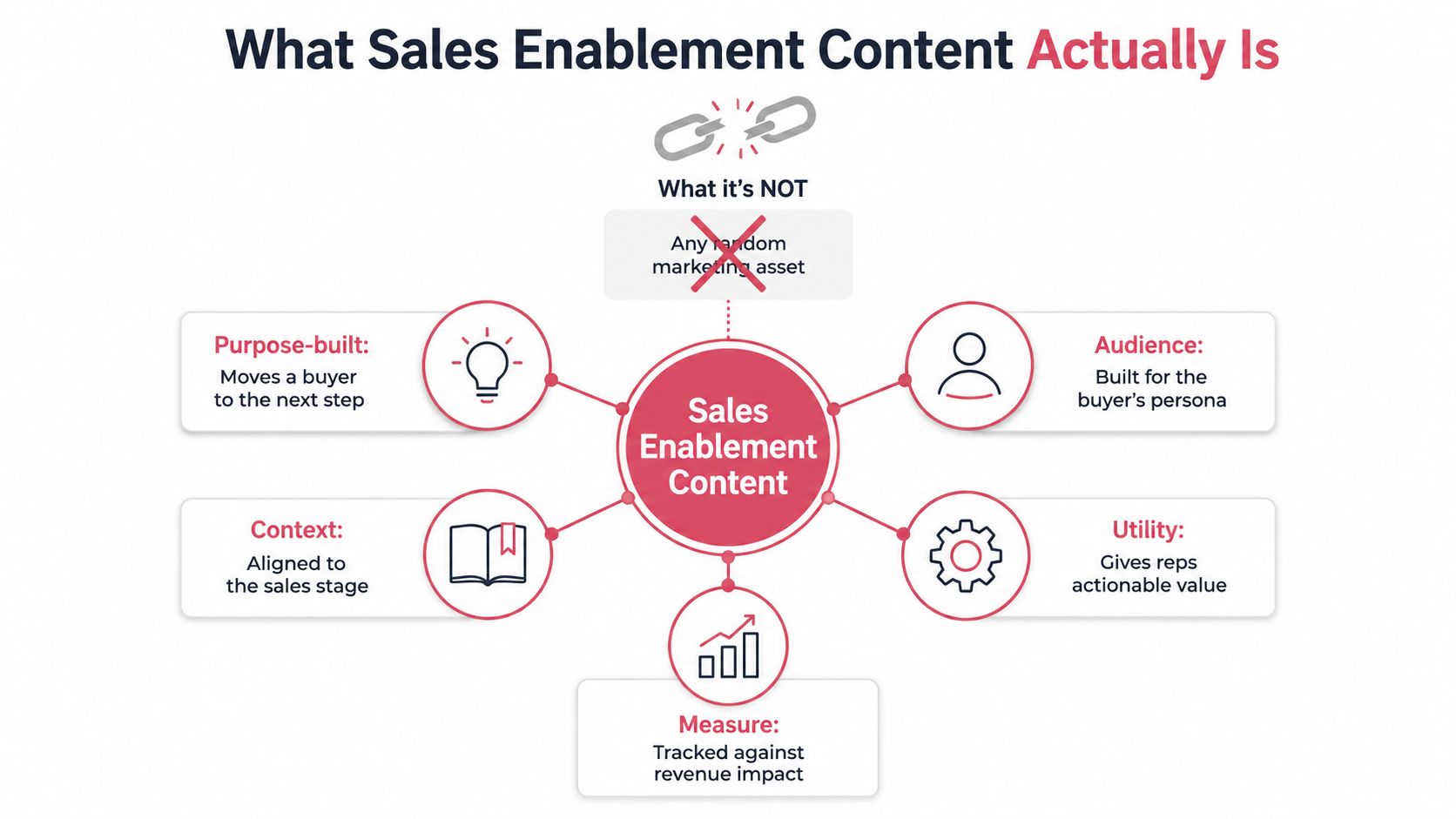
A useful operational definition is simple: an enablement asset is a versioned, governed, retrievable unit mapped to a stage, persona, and use case. The unit may be internal, such as a battle card, or external, such as a case study. What matters is whether the asset has enough context to be used correctly.
Separate the audience from the owner
Internal assets serve reps. They explain what to say, what to avoid, and how to respond. External assets support the buyer's evaluation, including demonstrations, proof points, comparison material, and implementation guidance.
Ownership should follow the asset's risk and purpose:
- Marketing owns demand assets that attract and educate a broad audience.
- Product marketing owns positioning and competitive narratives, with input from sales and product.
- Sales enablement owns field usability, including instructions, training, and distribution.
- Legal, security, and compliance reviewers approve controlled claims before publication.
- Sales operations or revenue operations maintains the system record, taxonomy, and reporting.
A central library needs more than folders. Each asset should carry an owner, status, last review date, approved audience, stage, use case, and permitted level of customization. Teams building detailed internal and external material can also use documentation for enterprise sales as a reference point for structuring complex sales knowledge.
The boundary is important because ownership confusion creates stale content. If nobody owns an asset after launch, reps stop trusting it. If every team creates its own version, the buyer receives inconsistent answers and operations loses attribution.
The Core Asset Types Mapped to Buyer Stages
A working library should cover the buyer's decisions, not merely mirror the marketing calendar. The five categories below give operators a practical way to audit whether the program supports the full motion.
| Category | Asset formats | Buyer stage | Sales play |
|---|---|---|---|
| Discovery aids | Question banks, persona briefs, pre call checklists | Problem recognition | Diagnose pain and qualify fit |
| Conversation aids | Call scripts, messaging templates, objection guides | Early evaluation | Create relevance and handle concerns |
| Evaluation aids | Product demos, solution briefs, comparison guides | Active evaluation | Help stakeholders assess the approach |
| Decision aids | Case studies, testimonials, ROI calculators, security material | Business case and approval | Reduce risk and support consensus |
| Expansion aids | Adoption guides, use case briefs, training content | Post sale and growth | Support value realization and expansion |
Discovery aids create better inputs
Discovery content helps the rep learn before the rep pitches. A question bank should be organized by business problem, persona, and signal. A pre call checklist should force preparation around the account's context, likely trigger, current process, and desired next step.
Without these aids, reps default to generic qualification. The failure isn't only an awkward call. Weak discovery produces weak personalization later, because the team never captured the buyer's language or operational constraints.
Conversation aids protect the live interaction
Scripts and messaging templates should provide structure without forcing every rep into identical wording. A useful call script contains an opening, a hypothesis, diagnostic questions, branching responses, and a clear transition. Objection guides should distinguish between a misunderstanding, a missing capability, a commercial concern, and a genuine qualification issue.
The trade off is control versus adaptability. Locking every sentence creates unnatural calls. Giving reps a blank page creates inconsistency. The strongest format offers approved building blocks and makes the reason for each block clear.
Evaluation aids answer “how does it work?”
Product demos and solution briefs belong where buyers test fit. The asset should connect capabilities to the buyer's workflow, not present a feature inventory. A comparison guide should state the evaluation criteria it addresses and identify where the product is a poor fit.
This category often exposes a product marketing gap. If the demo is impressive but doesn't map to the buyer's process, the rep still has to translate the product manually.
Decision aids reduce perceived risk
Case studies, testimonials, ROI calculator shells, implementation plans, and security documentation support the internal business case. They should be easy to share with people who weren't in the original conversation.
A decision aid fails when it makes claims without context. Proof needs a clear problem, approach, relevant outcome language, and boundaries around what can be inferred. Reps need to know which claims are approved and which require review.
Expansion aids continue after the signature
Enablement content shouldn't stop at closed won. Adoption guides, use case briefs, training resources, and account review templates help customer facing teams connect the purchase to ongoing value. These materials also give account teams a structured way to identify adjacent needs without restarting discovery from zero.
Playbook Examples and Templates You Can Ship This Quarter
The fastest way to improve sales enablement content is to ship small assets that solve recurring moments in the sales process. A team doesn't need a new portal before it can improve. It needs three useful artifacts, clear owners, and a release rhythm that creates feedback.
A discovery question bank
Organize questions by buyer problem, not by department. Each group should include:
- The business condition that signals relevance.
- The current process and its limitations.
- The cost of leaving the problem unchanged.
- The people affected by the problem.
- The next fact needed to confirm fit.
Add a short note under each question explaining what a strong answer reveals. This turns the bank from a list of prompts into a decision aid for the rep.
A branching call script
A practical script can follow this structure:
- Opening: State the reason for the conversation in the buyer's language.
- Hypothesis: Offer a tentative problem statement that the buyer can correct.
- Branch one: If the buyer confirms the problem, explore process, impact, and urgency.
- Branch two: If the buyer rejects it, test the adjacent problem rather than forcing the original pitch.
- Proof transition: Introduce only the evidence that matches what the buyer described.
- Close: Agree on a specific next step and the information required from both sides.
The script should include “do not say” guidance for claims that create legal or commercial risk.
A competitive battle card
Keep the front page operational. Include the competitor's likely strength, the buyer signal that indicates the competitor is in the deal, approved differentiation, questions that expose fit, and a response to the most common objection. Put source notes and review ownership on the back.
A battle card that tries to contain every feature becomes unusable. Reps need a fast decision tool, not a product encyclopedia.
A one page case study
Use a consistent shell:
- Customer context and relevant segment.
- Problem stated in the customer's terms.
- Previous process or constraint.
- Implemented approach.
- Evidence that can be approved for external use.
- Quote or narrative proof, if cleared.
- Situation where the example is relevant.
- Caveat explaining where the example shouldn't be generalized.
Teams creating gated educational material can also review the SupportGPT lead magnet guide for ideas on structuring useful resources without turning every asset into a product pitch.
A calculator shell and follow up sequence
A ROI calculator should separate buyer supplied assumptions from vendor supplied assumptions. Include fields for current process cost, affected volume, time involved, expected change, implementation effort, and a sensitivity view. Keep the model transparent enough for a finance stakeholder to challenge.
A follow up sequence should use the buyer's stated problem, one relevant proof point, one useful artifact, and a direct question about the next decision. The team can find additional practical structures in these sales playbook examples.
A sensible quarterly release plan is to assign one owner to each of three assets and ship one per week. The team should review usage after release, then revise or retire rather than automatically adding another document.
Operating the Program at Scale with Governance and AI Orchestration
A content program becomes difficult when nobody can answer four questions: who owns this asset, which version is approved, where should it be used, and what evidence supports it? Governance answers the first three. Measurement answers the fourth.
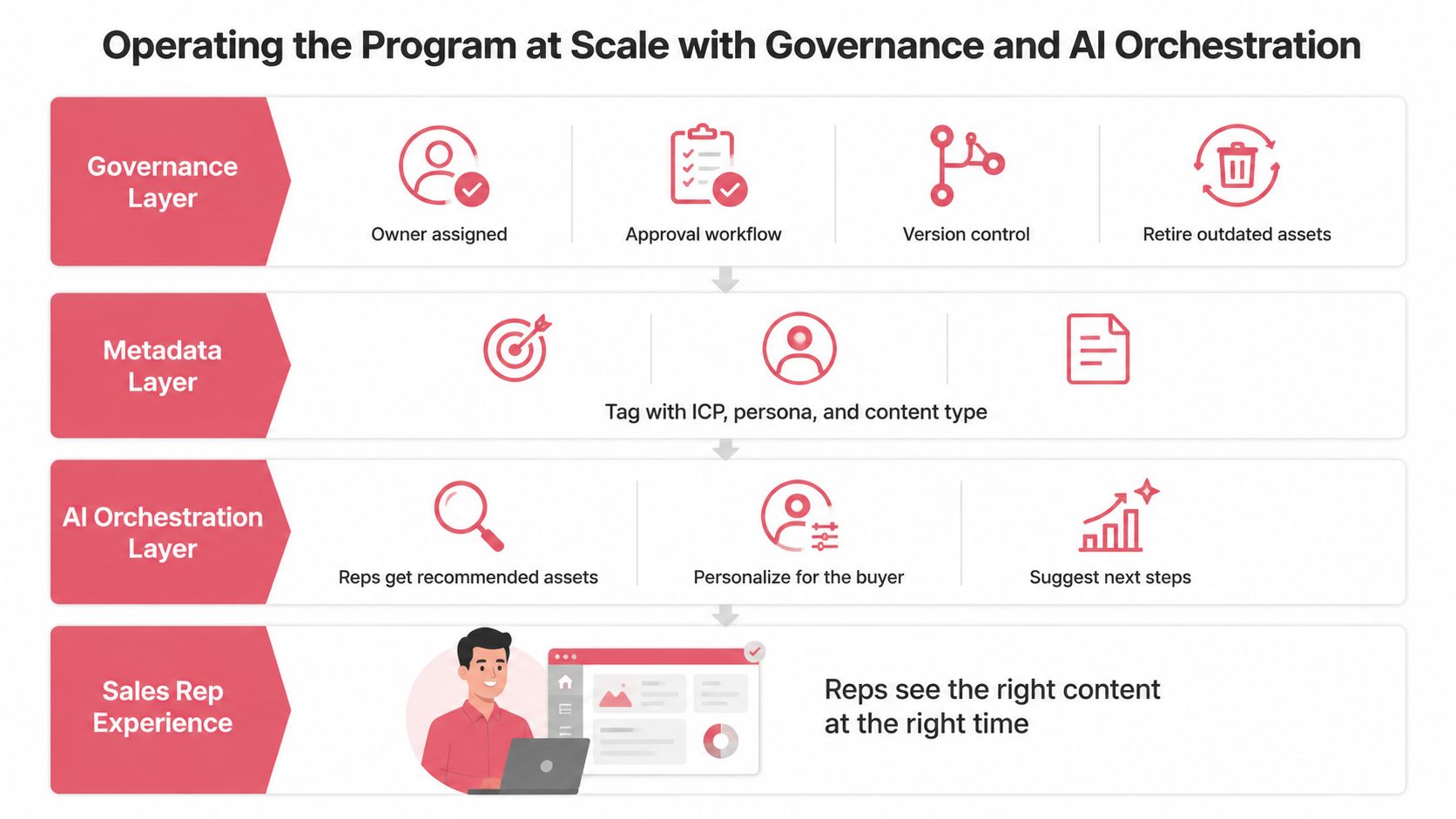
A central library should define owners, approval steps, version control, and audit trails before publication. Highspot's guidance on content governance provides a useful reference for structuring those controls. Retirement rules matter just as much as publishing rules, because outdated material remains discoverable unless someone removes it.
Build the metadata layer first
Every asset should be tagged for ICP, persona, stage, use case, content type, freshness, owner, and confidence. Tags should be controlled values, not free text that creates several spellings for the same concept.
A useful lifecycle has four states:
- Hypothesis: Newly created or materially changed, with an intended use but limited proof.
- Validated: Used by the field and reviewed for accuracy.
- Proven: Repeatedly associated with useful deal activity or progression.
- Retired: No longer approved, relevant, or trusted.
This model gives content a clear path from experiment to default. It also supports automatic retirement when an asset expires, loses approval, or consistently fails to earn usage.
Surface content inside the work
Search is necessary but insufficient. Orchestration should use deal stage, persona, account context, conversation signals, and prior asset performance to recommend the next useful resource. The rep should see a short explanation of why the asset is relevant, along with usage guidance and approval status.
AI can help retrieve and personalize content, but it shouldn't invent claims or bypass approval. Sensitive actions need human review, scoped permissions, and an audit trail. Teams producing visual assets at scale may also evaluate automated product video generation tools, provided every generated asset enters the same review and lifecycle system.
Yalc can fit this operating model as a GTM knowledge orchestration layer. Its workflows can read structured ICP, voice, positioning, and prior play outcomes, then run through a unified GTM API while recording results and confidence states. The relevant design principles are described in what AI orchestration means for GTM systems.
A Measurement Framework That Ties Content to Revenue
A serious dashboard connects four layers. Each layer answers a different question, and none can replace the others.
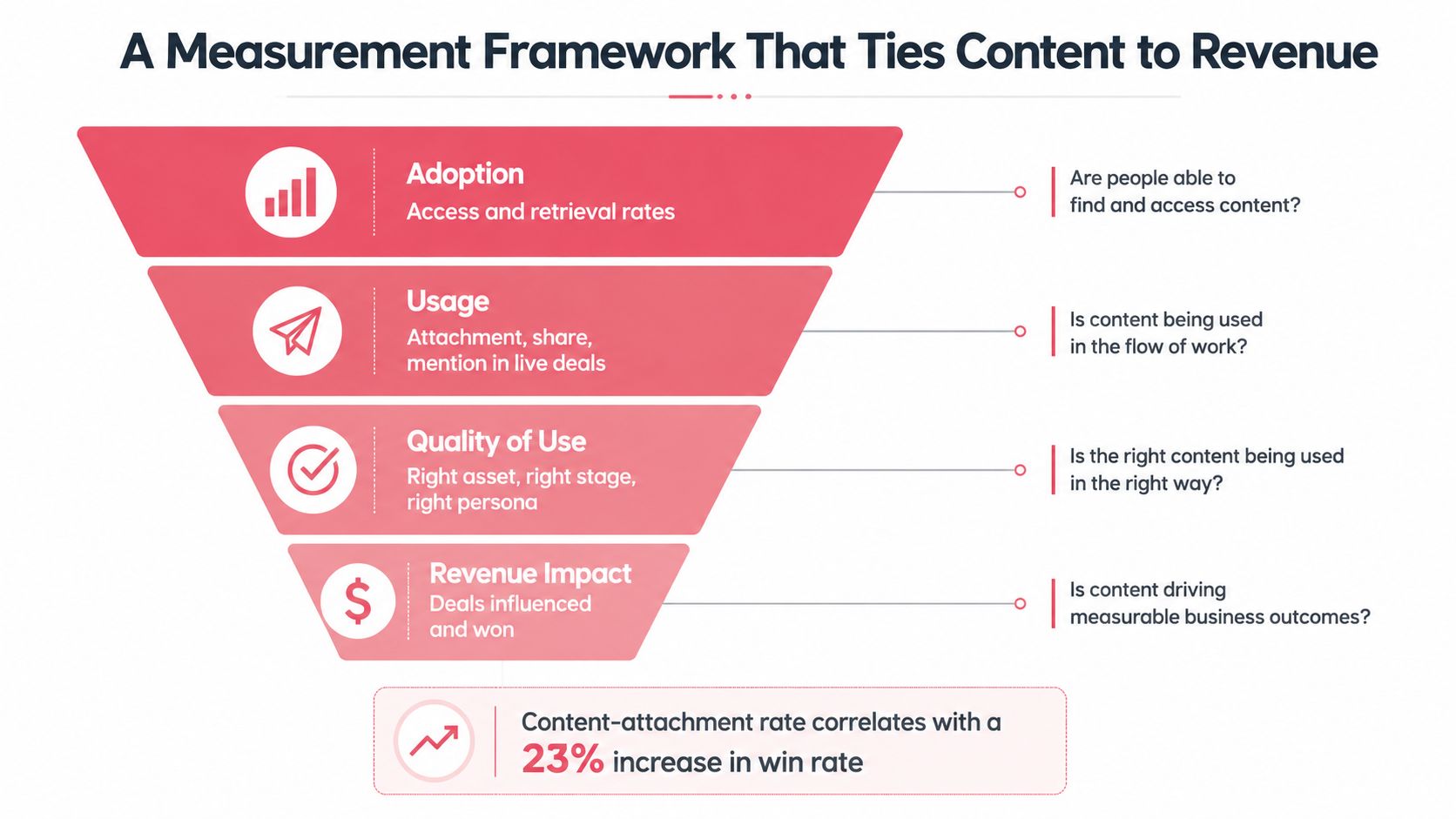
Adoption shows whether the system works
Track access, search success, retrieval time, and repeat use. If reps don't reach an asset, the problem may be taxonomy, permissions, placement, or trust. Views and downloads alone don't prove that anyone used the material correctly.
Live deal usage shows whether content entered the motion
Track attachment, sharing, buyer views where available, mentions in call notes, and inclusion in opportunity activity. The key distinction is between passive library activity and content used in a real deal.
A content asset that gets downloaded repeatedly but never appears in an opportunity may have a packaging problem. An asset attached to active deals but rarely opened by buyers may have a timing or format problem.
Quality of use tests relevance
Measure whether the rep used the right asset for the buyer's stage, persona, and use case. Managers can review a sample of opportunities and check whether the asset supported the stated next step, matched approved messaging, and answered the buyer's actual concern.
Business outcomes close the loop
Connect content activity to deal progression, conversion, cycle time, win rate, and ACV. The measurement guidance from Pedowitz Group on sales content adoption supports tracking access, live deal usage, quality, and business outcomes together.
One benchmark in the provided research reports that 82% of content may be used in individual deals, sent to buyers, or attributed to deal progress or revenue (SiftHub's sales enablement benchmark). That kind of attribution is more useful than production volume, but it still needs a consistent definition of influence.
Review one metric from each layer monthly. Weekly reviews encourage teams to chase noise and make premature changes.
Operators can use sales dashboard examples to structure reporting views, then adapt the dashboard to the fields their CRM and content systems can reliably populate.
Common Misconceptions and the 90 Day Implementation Checklist
More content doesn't automatically create more pipeline. A smaller library with clear ownership and strong retrieval usually beats an archive that asks reps to judge every file themselves.
Marketing doesn't own the entire program. Marketing creates valuable material, but sales, product marketing, revenue operations, legal, and customer teams all contribute to accuracy and field usability. Downloads don't equal impact, and enablement isn't a folder. It's an operating process that routes approved knowledge into buyer conversations.
Days 1 to 30
- Audit: Export the library and classify every asset by owner, stage, persona, use case, and status.
- Prune: Retire duplicates, expired claims, orphaned files, and assets no rep can explain.
- Interview: Ask reps which assets they use, recreate, distrust, or fail to find during live opportunities.
- Baseline: Record retrieval time and current deal usage for the surviving library.
Days 31 to 60
- Fill gaps: Create the highest impact discovery, evaluation, and decision aids first.
- Tag: Apply controlled metadata and write a one sentence usage instruction for every new asset.
- Test: Put each release into a real sales play and collect structured feedback.
- Promote: Move validated assets into default recommendations and revise weak drafts.
Days 61 to 90
- Govern: Assign approval paths, review dates, version rules, and retirement triggers.
- Measure: Choose one metric for adoption, live deal usage, quality, and business outcome.
- Orchestrate: Surface stage specific assets inside the CRM, sales workspace, or GTM system.
- Review: Run a monthly operating meeting that retires underperformers and promotes proven material.
Yalc helps GTM teams organize buyer knowledge, approved messaging, content workflows, and play outcomes in one orchestrated system. Visit Yalc to see how teams can run structured GTM plays through Claude Code, Slack, or the Yalc UI while keeping their data and operational controls under their own management.