What Is No Code Automation: A 2026 Guide
No code automation is software that lets operators build and run workflows through visual interfaces and prebuilt connectors, without writing or maintaining the underlying code. By 2025, 64% of large organizations with 5,000 or more employees had at least one formally sanctioned no code platform, up from 31% in 2022, and 41% had replaced at least one custom application with no code (Kissflow).
A revenue operations lead can connect a new lead source to enrichment, qualification, CRM routing, and Slack alerts without opening an engineering ticket. The workflow looks simple on a canvas, but its real value depends on the orchestration underneath: API calls, credentials, field mapping, schedules, retries, approvals, and exception handling.
That distinction matters to every GTM team evaluating what is no code automation. The builder experience is only the visible layer. The orchestration layer determines whether a workflow keeps working after the first launch, whether sales trusts the data, and whether operations can reuse the same logic across campaigns and channels.
Table of Contents
- What No Code Automation Means for a GTM Team
- No Code vs Low Code vs Code First Builds
- How GTM Teams Use No Code Automation
- Benefits and Limitations Operators Run Into
- Adoption Checklist and Best Practices
- Choosing Tools and Vendors Without Losing Control
- Where No Code Automation Pays Off and Where It Breaks
What No Code Automation Means for a GTM Team
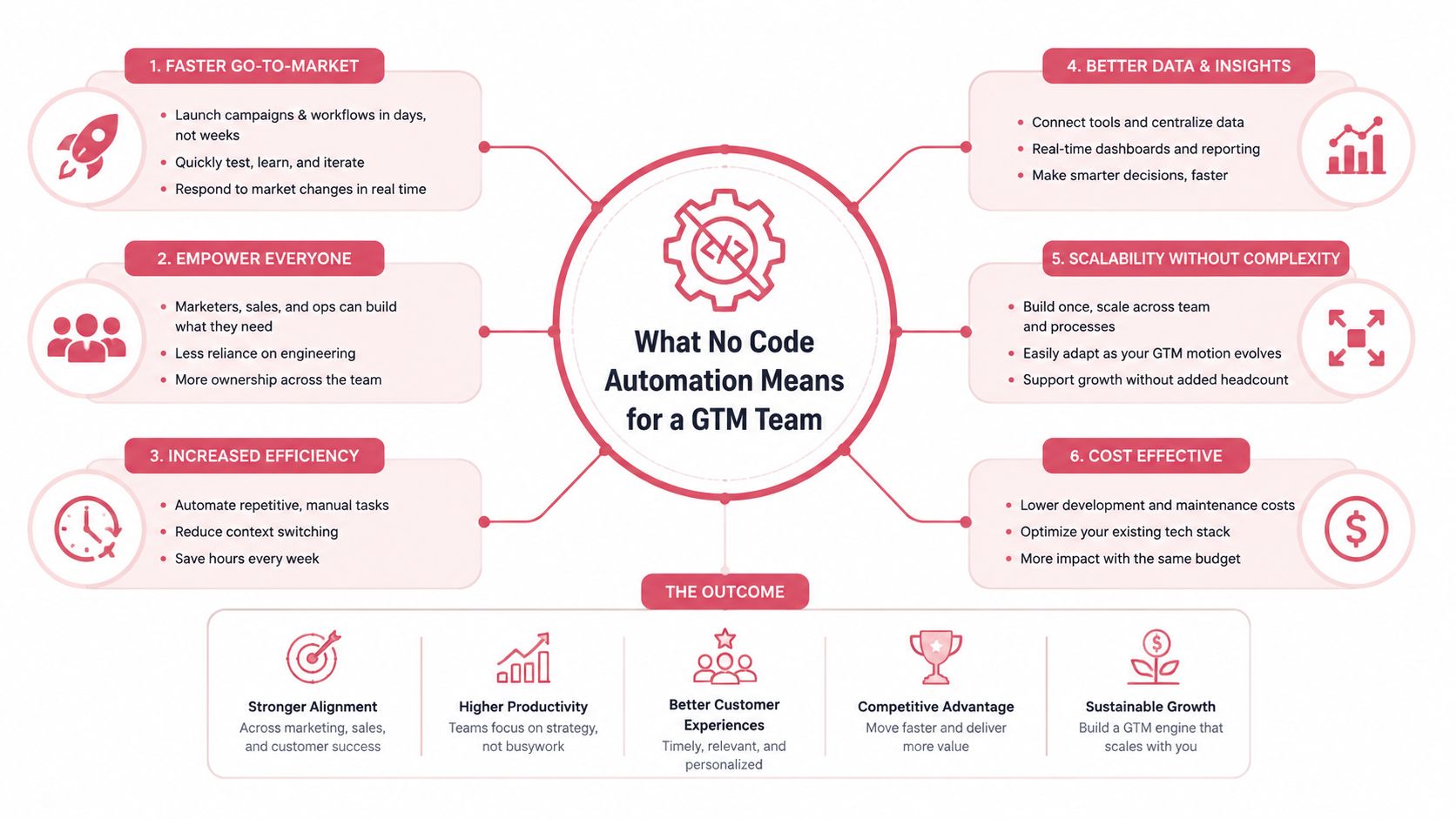
No code automation moves workflow construction from a specialist engineering queue to the people who understand the business process. A RevOps lead can create a trigger for a new form submission, send the record to an enrichment provider, compare the result with the ICP, assign an owner in the CRM, and alert a sales channel in Slack. The operator selects actions and rules in a visual editor instead of writing the integration from scratch.
The canvas, connectors, and trigger menu form the user facing surface. Behind them, the platform still has to authenticate with each service, send structured API requests, map fields between different schemas, manage schedules, handle webhooks, and respond when a service returns an error. No code means the operator doesn't maintain that underlying implementation directly. It doesn't mean the implementation has disappeared.
The builder changes ownership
The important organizational change is ownership. Engineering may still define security boundaries and approve sensitive integrations, but RevOps, sales operations, and sometimes SDR leadership can build and adjust workflows themselves.
That can shorten campaign iteration from a long backlog cycle to a much faster operating rhythm. The benefit only lasts when the team understands the workflow's inputs, outputs, permissions, and failure modes. A visual workflow that nobody can explain is still technical debt, even if it contains no handwritten code.
A useful sales automation overview from Yalc helps place no code workflows in the broader GTM system. The focus shouldn't be on connecting the largest possible number of apps. It should be on creating a repeatable path from a business signal to a measurable revenue action.
Practical rule: Treat every visual workflow as production software. Give it an owner, a test path, a change record, and a clear failure response.
Teams that need a broader conceptual explanation can also review PostPulse no code automation, particularly when introducing the category to nontechnical stakeholders. The operator's job remains more specific: decide which process deserves automation, define the acceptable result, and make sure someone owns the workflow after launch.
No Code vs Low Code vs Code First Builds
No code, low code, and code first development sit on one spectrum. The right choice depends on who needs to change the workflow, how unusual the logic is, and how costly a failure would be.
| Dimension | No Code | Low Code | Code First |
|---|---|---|---|
| Builder | RevOps, sales operations, marketers, and business users | Technical operators and developers | Software engineers or developer focused operations teams |
| Maintainer | The platform plus a business owner | Shared between the platform and the technical team | The engineering team owns the implementation |
| Best GTM workload | Stable routing, enrichment, alerts, and straightforward campaign actions | Complex transformations, custom functions, and unusual data shapes | Core data systems, proprietary logic, and high consequence infrastructure |
| Change speed | Fast for supported actions | Fast until custom logic grows | Slower, but changes can be controlled through engineering practices |
| Logic ceiling | Limited by connectors and visual controls | Higher because scripts and custom functions are available | Highest flexibility |
| Failure exposure | Connector changes and opaque platform behavior | Connector issues plus custom code maintenance | Infrastructure, deployment, dependency, and application risks |
No code works well when a workflow has predictable inputs and outputs. A sales operations manager can adjust territory rules or add an approval step without waiting for a developer. The tradeoff is that the team operates within the vendor's connectors, data model, execution limits, and error handling.
Low code keeps the visual builder but opens selected escape hatches. A technical operator might add a JSON path, custom function, or script to normalize a data shape that the connector doesn't understand. That raises the ceiling, but it also creates maintenance responsibility. The workflow now needs someone who can read and test the inserted logic.
Code first builds take the opposite position. Engineering owns the repository, deployment process, infrastructure, and integrations. This makes sense for a core attribution pipeline or a proprietary scoring service, where consistency and control matter more than rapid editing by a business user.
Teams comparing platforms can use this guide to sales automation tools to evaluate the broader stack. The key question isn't whether a tool advertises no code capability. It is whether the tool leaves a clean path to low code or code first work when the GTM process becomes more demanding.
How GTM Teams Use No Code Automation
Prospecting, enrichment, sequences, and reporting each follow a different operational rhythm when no code automations run at scale. Start with the record, event, or decision that should trigger action, then define who owns the result when the workflow stalls.
Prospecting and account routing
A prospecting workflow can pull intent and firmographic signals from Crustdata or another account data source. It filters companies against the ICP, checks whether the account exists in the CRM, enriches missing fields, assigns an owner using territory rules, and posts a concise Slack alert.
The builder only shows the steps. The orchestration layer determines whether the play survives production. Define which source wins when fields conflict, whether an existing account can be overwritten, and what happens when enrichment returns incomplete information. Add an owner for failed runs, not just successful ones.
Enrichment and segmentation
A scheduled workflow can find contacts with missing role, company, or location fields. It sends those records to FullEnrich or a similar enrichment service, normalizes job titles, applies segment labels, and places contacts in the correct SDR queue.
Do not treat every blank field as permission to replace existing data. Preserve the original value, record the enrichment source, and send uncertain matches for review. Keep enrichment separate from downstream outreach. A data correction should not enroll a contact in a campaign by accident.
Sequences and event based outreach
A signup, product usage event, or meeting outcome can start a multistep sequence through lemlist or Unipile. The workflow branches when a prospect replies, books a meeting, or becomes ineligible. A positive reply can create a rep task, while a held meeting can remove the contact from prospecting.
Enrollment status, suppression rules, and human approvals need one source of truth. Without that control, separate automations can enroll the same contact twice or continue outreach after a buyer responds. The email action is only one step. The state management decides whether the motion is safe.
Reporting and revenue visibility
A reporting flow can sync pipeline, reply, and meeting data into a warehouse, then refresh a no code dashboard on a recurring schedule. Revenue leadership gets a consistent view without asking an analyst to combine CRM exports, sequencer activity, and meeting records manually.
Reporting exposes data quality problems quickly. If field definitions differ across systems, the dashboard can refresh correctly and still mislead leadership. Set ownership for definitions, monitor failed syncs, and document the source for each metric. Teams exploring adjacent workflows can explore SEO automation for marketers to see how recurring data and content processes can run without turning every task into a separate point solution.
Benefits and Limitations Operators Run Into
When a RevOps lead cuts lead-routing time from two days to two hours, the business case is visible immediately. The team can test a routing rule, inspect the result, and correct the workflow before delayed assignment affects active pipeline.
No code automation shortens the distance between a GTM problem and a working correction. RevOps can build a routing change without competing with product work for engineering capacity. Sales leaders can inspect the visible process more easily than a code repository, while operators can test rules against live pipeline conditions and adjust them as campaign requirements change.
The category has moved beyond isolated prototypes. Gartner's widely cited projection said 70% of new applications would use low code or no code by 2025. A separate 2026 benchmark says 70% of new applications built by organizations use low code or no code, compared with less than 25% in 2020 (Caspio). Adoption is broad, but ownership still determines whether a workflow keeps producing revenue value.
Where the tradeoffs appear
The main limitations emerge at the integration boundary.
- Connector fragility: An upstream API can change a field, permission, response format, or rate limit. The visual workflow may look unchanged while execution fails.
- Cost opacity: Per-task, per-record, or usage-based pricing can make a successful workflow more expensive as volume grows.
- Governance gaps: Shared credentials, broad permissions, and untracked changes expose customer and prospect data.
- Logic ceilings: Deep branching, custom parsing, transactional requirements, and tight latency needs can exceed what a visual builder handles cleanly.
Technical analysis of no code systems identifies abstraction layers, runtime overhead, and proprietary backends as potential bottlenecks for high concurrency, high data volume, and integrated systems (Browserless). Integration chains add failure surfaces, so observability and exception handling matter once automation becomes infrastructure (Opscaling).
No code removes routine implementation work. It doesn't remove system design.
The builder experience is only the first layer. Operators must also evaluate the orchestration layer that coordinates ownership, retries, approvals, data state, and failure alerts across teams. Ask whether the workflow can be reused, who repairs it, how failures reach that owner, and whether a central control layer prevents departments from creating disconnected versions of the same process.
For a practical perspective on AI-enabled workflows, Prompt Builder's automation insights can help teams assess where generated steps still need human review.
Adoption Checklist and Best Practices
A GTM ops lead should use the first 30 days to establish one dependable workflow, not a collection of impressive demos. Choose a process tied to a revenue outcome, such as qualified lead routing, meeting follow up, or suppression after a reply.
Start with a controlled workflow
Document the source, owner, required fields, destination, and acceptable result before opening the builder. Identify the sales manager who approves exceptions and the person who receives an alert when the process fails.
Use a narrow first release. A workflow that updates one CRM object and sends one internal notification is easier to test than a broad automation that changes records, launches outreach, and updates reporting simultaneously.
Build governance into the canvas
No code business process automation needs policies defining who can build, review, and publish workflows, alongside version control and audit logs that record configuration changes (Moxo).
A practical checklist includes:
- Name triggers consistently: Use a shared convention that tells the next operator what starts the workflow.
- Record data ownership: Document the system of record and the team responsible for each important field.
- Separate approval paths: Make sensitive actions pause for a named human reviewer.
- Capture exceptions: Route missing data, duplicate records, and failed API calls to a visible queue.
- Review permissions: Recheck credentials, access scopes, and inactive users during scheduled reviews.
- Version definitions: Export or document workflow configurations so the process isn't trapped in one visual editor.
Auditability requires more than a success indicator. The system should answer who initiated the task, what identity executed it, what inputs were used, and what exact output was produced. Stronger practice separates business approval logs from execution logs and records the requestor, approver, executor, timestamp, and workflow identifier (NHIMG).
Instrument the workflow with execution logs and alerts tied to the agreed service level. Reuse should be the default. Standard trigger names, tags, field mappings, and exception patterns let new campaigns plug into proven logic instead of creating another isolated automation.
Choosing Tools and Vendors Without Losing Control
The right vendor pattern depends on where the GTM team needs control. A CRM embedded automation tool can solve a narrow update quickly, while a horizontal integration platform can coordinate records across a wider SaaS stack. AI first builders can accelerate workflow creation, but generated steps need review before they touch customer data or send messages.
| Vendor Pattern | Data Control | Orchestration Depth | Best Fit |
|---|---|---|---|
| CRM embedded point solution | Usually concentrated in the CRM and its connected features | Narrow, focused on native objects and actions | Simple routing, field updates, and task creation |
| Horizontal integration platform | Depends on the provider's storage, retention, and export controls | Broad connections across SaaS systems | Cross application workflows and recurring operations |
| AI first workflow builder | Must be assessed for prompt, input, output, and model data handling | Can create or alter multi step workflows, but needs review | Rapid drafting and decision support |
| GTM orchestrator | Central control varies by architecture and deployment model | Coordinates data, channels, approvals, and reusable plays | Multi channel revenue motions that need shared context |
The evaluation should start with five questions.
- Where does the data live during execution? Check whether records, prompts, logs, and credentials are stored by the vendor or remain in infrastructure controlled by the customer.
- Can the team export the workflow? Portable definitions reduce switching costs and make review easier.
- How are credentials scoped? Each workflow should have only the access it needs.
- What does the audit trail show? A green status icon isn't enough for sensitive sales activity.
- What happens when the workflow outgrows the canvas? A good platform offers custom connectors, code handoff, or an interoperable export path.
Market composition also signals why teams shouldn't confuse pure no code simplicity with the full automation category. One 2026 roundup attributes about 60% of the market, or $39 billion, to low code platforms, with 40%, or $26 billion, attributed to pure no code platforms (Searchlab). The figures reinforce an operator reality: complex workflows still need technical escape routes.
Teams evaluating an orchestration layer can use this explanation of AI orchestration to assess how shared context, tools, and decisions fit together. Yalc offers one example of a GTM focused operating layer. It provides a unified GTM API, reusable plays, scoped permissions, human approvals, and step by step telemetry, with options to compose plays through Claude Code using its MCP or run preconfigured playbooks from Slack and its interface.
Where No Code Automation Pays Off and Where It Breaks
No code automation pays when the workflow is repeatable, the trigger is stable, the inputs are defined, and the team that builds it also owns the outcome. Lead routing, enrichment, internal alerts, suppression rules, and recurring reporting usually meet those conditions.
The category becomes a poor fit when the team uses a visual canvas to hide an unstable process. If a sequence has been rebuilt repeatedly in one quarter because the message logic, data source, or approval path keeps changing, the problem isn't a missing connector. The team needs a maintained operating model with explicit versions, decisions, and owners.
Signals that the workflow has outgrown no code
Watch for these conditions:
- Branching exceeds comprehension: Reps and operators can't explain the possible paths from one screen.
- Upstream limits control the outcome: Rate limits, latency, or unreliable API responses make the process unpredictable.
- Audit needs exceed platform logs: The system can't prove who approved an action, which identity executed it, or what data produced the result.
- Transactional behavior matters: An enrichment or CRM update must succeed as one controlled operation, but the platform can only perform loosely connected steps.
- Engineering review becomes routine: Every change needs code review, deployment controls, or repository based versioning.
Independent market research estimates the no code development platforms market at $35.61 billion in 2025 and forecasts $45.24 billion in 2026, representing projected year over year growth of 27.1% (The Business Research Company). A separate report estimates the no code AI platforms market at $4.28 billion in 2024 and projects $44.15 billion by 2033, with a projected 30.2% compound annual growth rate from 2025 to 2033 (Robonito). Those projections describe expansion, not a reason to automate every edge case.
The practical judgment is straightforward. Keep no code as the default for stable GTM operations, then move the difficult edges into low code or code first systems when control, performance, or auditability demands it. The builder gets a workflow started. The orchestration layer decides whether that workflow becomes durable operating infrastructure.
Yalc helps GTM teams compose and run reusable plays across prospecting, enrichment, scoring, outreach, CRM updates, reply handling, and reporting through a unified GTM API. Visit Yalc to see how its MCP, Slack, and interface based workflows can combine operator control, human approvals, scoped access, and step by step execution records.